Home builder estimating software

A home-building estimate has to explain both what the customer is buying and what the work will cost your business. Home Builder Software keeps quantities, unit costs, selling prices and optional items in an estimate that can be printed for the customer and transferred into a project budget.

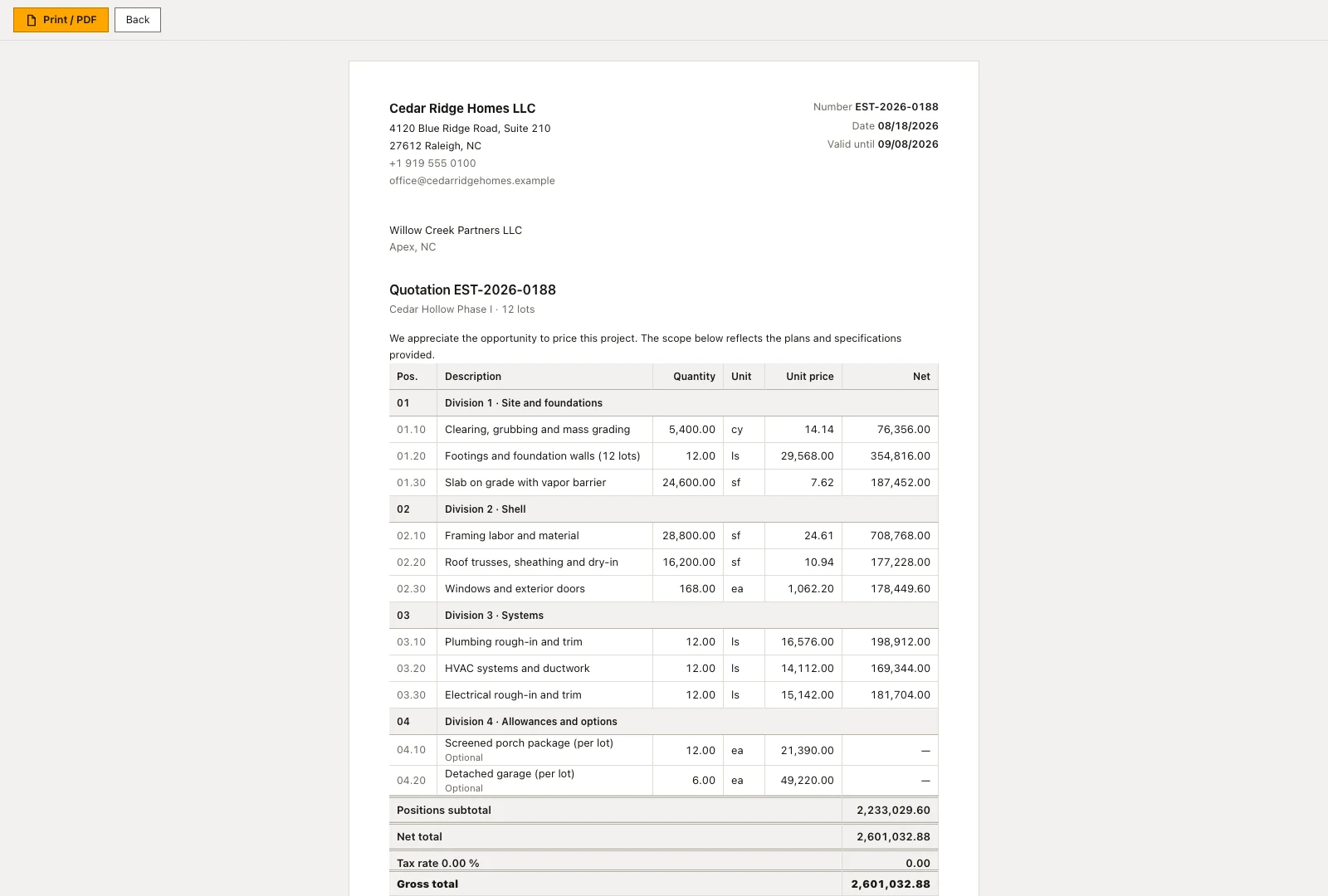
Printable residential estimate with sections, quantities, unit prices and optional work
The customer estimate separates priced construction items from optional additions.

Build the residential estimate from quantities and unit costs

Use it when the price has outgrown a single spreadsheet total: a foundation package needs its own quantities, a supplier changes a rate, or the customer asks for an optional garage. The estimate keeps those decisions in priced lines, while the budget transfer gives the delivery team a reviewed starting point.

Organize the estimate into sections, then enter each item’s quantity, unit, unit cost and markup. Home Builder Software calculates the line’s cost and net selling amount. If you enter a selling price directly, the markup is recalculated against the unit cost so the two do not quietly disagree. Optional items remain identifiable in the customer document.

Keep the estimate’s project, customer, validity date and status with its commercial terms. Before moving the priced work into a budget, choose the target project and inspect the transfer preview. Lines are grouped by cost group; the preview shows the proposed values before you confirm. Sending or accepting a quote is a separate decision from writing the delivery budget.

  • Separate cost from selling price

    The amount you expect to pay and the amount you quote are different figures. Review both before applying markup or overriding a price.

  • Keep optional work visible

    Present the base scope and alternatives clearly so an unselected item is not mistaken for work already included in the contract.

  • Preview the target budget

    Check the project and cost groups before confirming a transfer, particularly when that project already has budget lines.

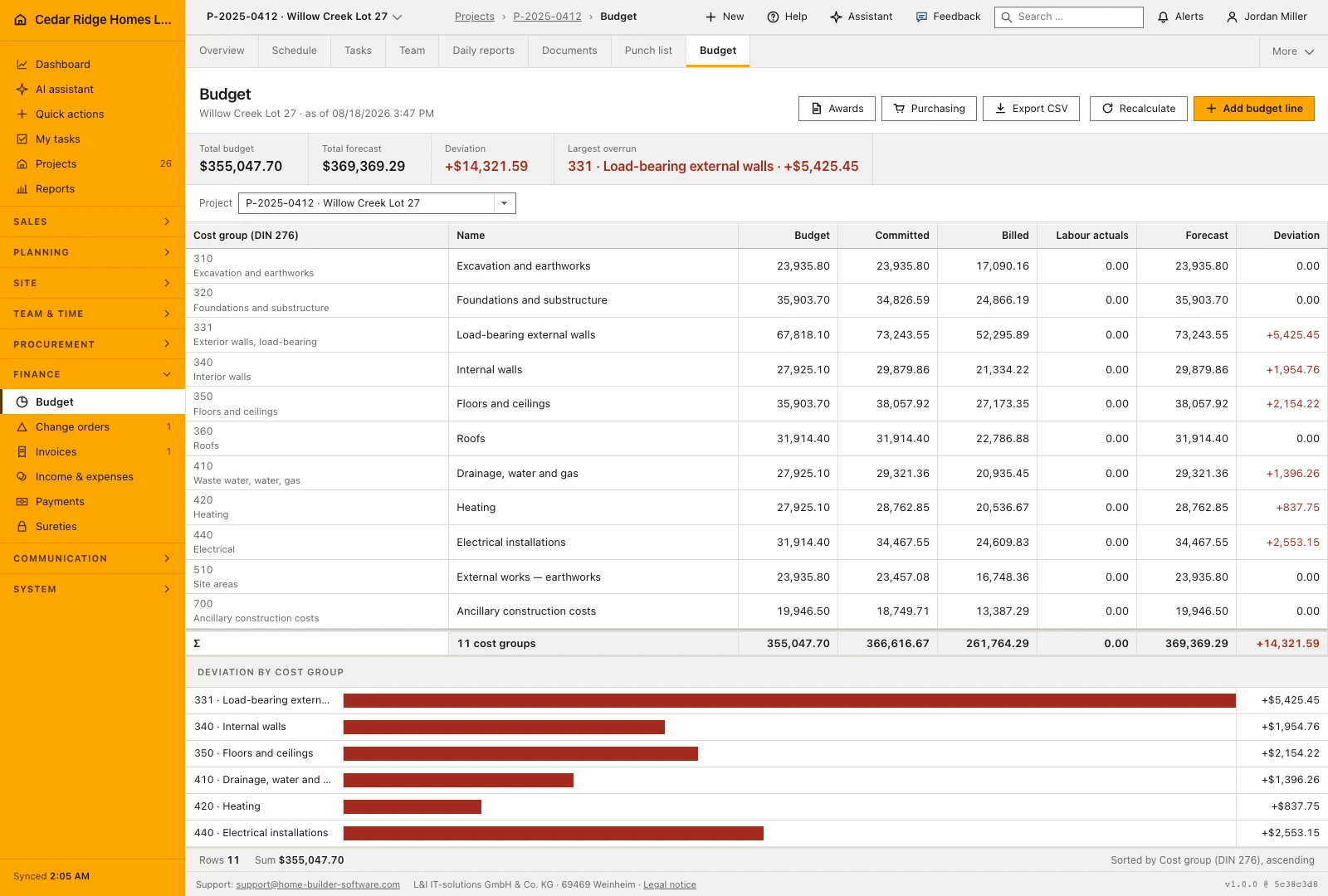
Project budget with planned amounts, commitments and billed costs
The project budget compares planned amounts with commitments, invoiced costs and forecasts by cost group.

Follow the estimate into the construction budget

The budget view places planned amounts beside commitments, billed costs and forecasts. It is where an estimator’s assumptions meet purchasing and delivery. Open the budget workflow to inspect which records feed each column and how the team can investigate an overrun by cost group.

Inspect the budget handover

A markup example that changes the quote

Suppose an item costs 100 per unit and you apply a 20% markup. The selling price is 120, leaving 20 before other costs; the margin on revenue is about 16.7%, not 20%. This arithmetic example works in any currency. The markup calculator below lets you check the distinction before using a rate in an estimate.

Labor needs the same care. An hourly wage alone may omit employer costs, paid nonproductive time and overhead. Use the labor-rate calculator to examine your assumptions, then enter the agreed cost in the estimate. Its result is a planning input, not a supplier price or a jurisdiction-specific payroll determination.

Check takeoff and cost-code requirements before choosing estimating software

This workflow starts with quantities and prices you enter. A priced estimate is not evidence of automatic measurement from drawings, a live merchant price feed or BIM quantity extraction. If those are essential, bring a representative drawing and supplier list to a demonstration and specify the required handover.

The project budget uses the product’s configured cost-group structure. International builders should compare that structure with their own estimating and accounting codes before committing. An agreed mapping is more useful than discovering during the first live job that two reports group the same work differently.

Calculators and instructions for this construction workflow

Read the workflow instructions

Home Builder Software pricing and trial access

Managed cloud starts at $70 per month before tax, with all modules and unlimited projects. Your written quote specifies users and storage. A self-hosted license is quoted separately.

The free 14-day trial opens all product modules, with up to 100 MB of uploads and a limited monthly AI allowance. A secure registration link arrives by email; no payment details or automatic subscription are required.

Home builder estimating software questions

Can I override the calculated selling price?

Yes. An estimate line can use a manually entered unit price. Its markup is then recalculated from the unit cost, keeping the displayed cost and price relationship consistent.

Does accepting an estimate automatically replace the budget?

No. Budget transfer has its own project selection and preview. Confirm that transfer after reviewing the cost groups and the effect on existing budget lines.

Can an estimate include optional construction work?

Yes. Estimate lines can be marked optional and remain recognizable in the printable customer document. Review which options belong in the agreed scope before budgeting the job.

Does the software measure quantities from house plans?

The estimating workflow shown here prices entered quantities. Automatic drawing takeoff and live supplier pricing are not promised by this page. Discuss those requirements with a sample file before purchase.

Bring one house estimate to a product demonstration

Choose an estimate with a supplier quote, an optional item and a labor allowance. We can examine the line pricing, customer document and budget transfer together.