
Construction costs and invoicing
Finance keeps budget, change orders, invoices, income and expenses, payments and sureties in the same file as the work behind them.
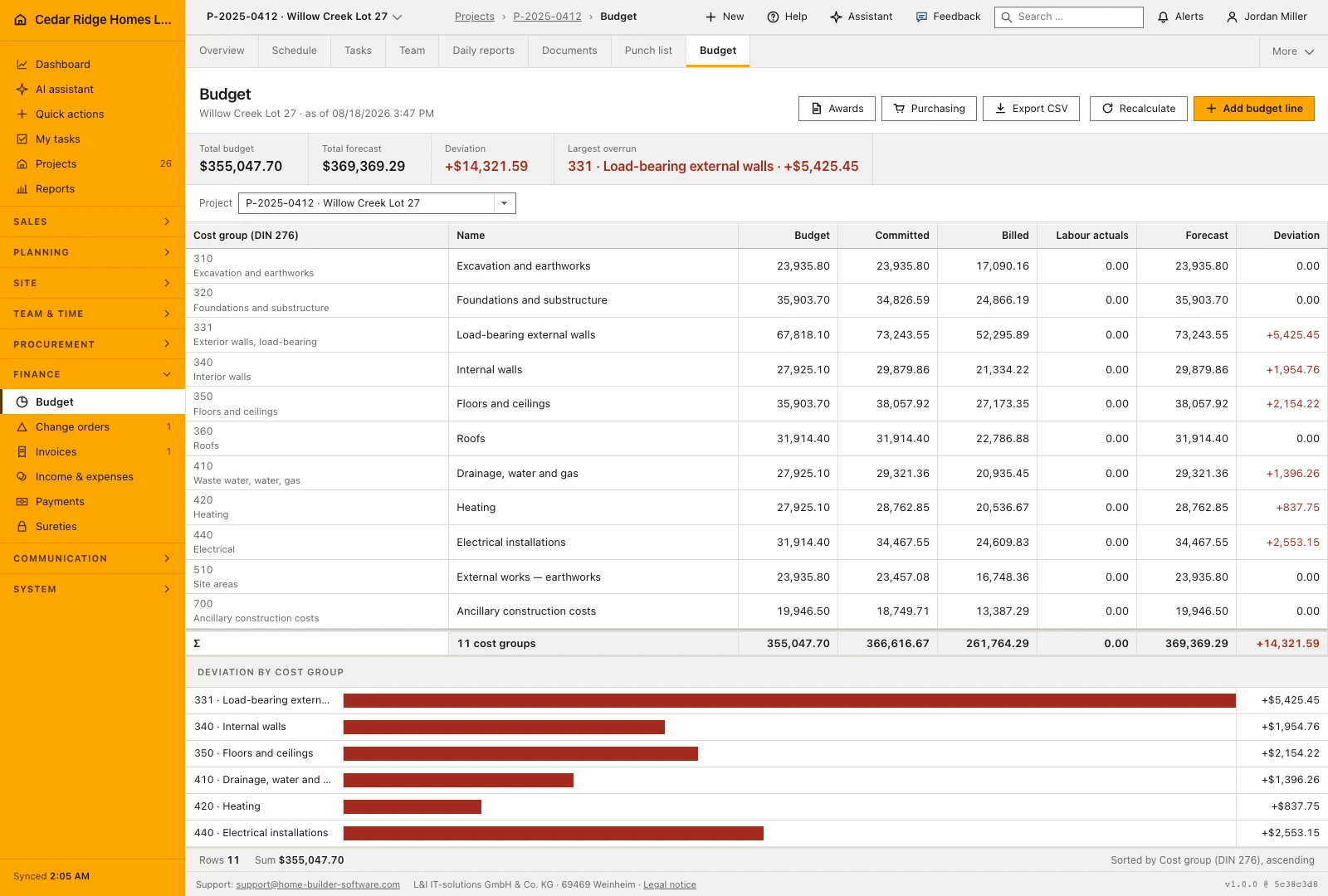
Accounting sees a cost group structure along DIN 276, invoices that reference the progress they bill, payments that clear them, and the securities that are still held. A change order raises the contract value where the extra work was ordered, so the figure on the report and the figure in the project agree.
Finance modules in Home Builder Software
Construction budget control
Compare planned, committed, invoiced and forecast cost by project and DIN 276 cost group to identify overruns before reviewing the underlying records.
Change order software for builders and remodelers
Track residential construction and remodeling additions or credits with origin, amount, schedule extension, customer approval and controlled posting.
Construction invoicing software
Create progress, final and standard invoices or credits with tax, due date, payments, reminders, printable output, accounting export and XRechnung XML.
Construction income and expense records
Record income, expenses, employee costs and purchases with project, supplier, net amount, tax, status, note and a protected receipt.
Construction payment tracking and bank matching
Maintain a payment log linked to outgoing invoices and review imported bank transactions before confirming or ignoring each match.
Construction surety tracking
Track sureties received from subcontractors and issued by the company’s bank with type, project, guarantor, amount, validity and release status.