
Construction bid comparison and awards
Collect subcontractor bids by trade package, compare submitted amounts and exclusions, and document the selected award in one procurement workflow.
Construction bid comparison and awards: how it works in Home Builder Software
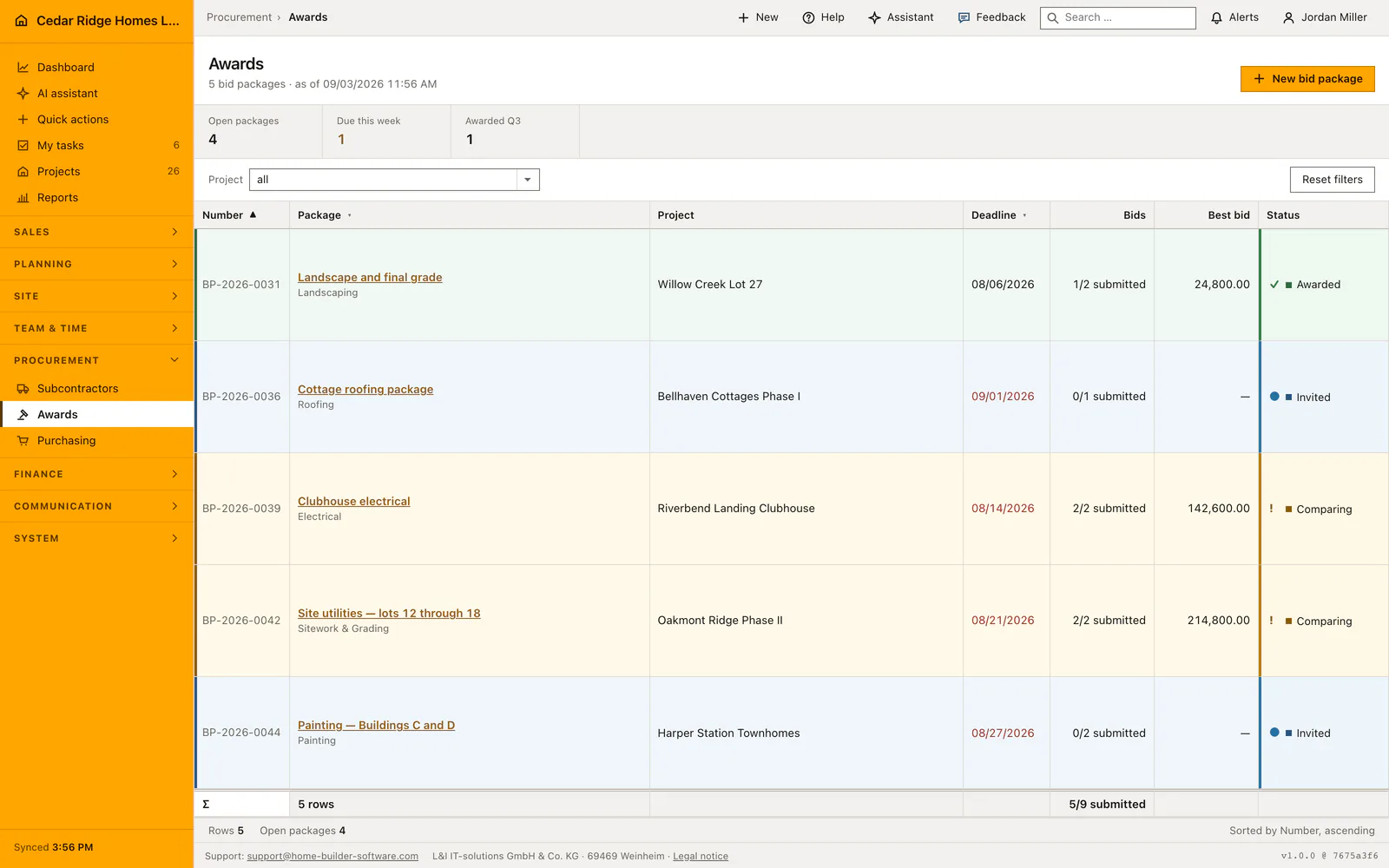
One bid package per trade carries the whole tender: which firms were invited, who has answered, and what the work will cost. The list shows package number, trade, project, deadline, a bid count read as submitted over invited, the best bid and the package status of draft, invited, comparing or awarded. A deadline that has passed without an award turns red, so a package cannot quietly age out of view.
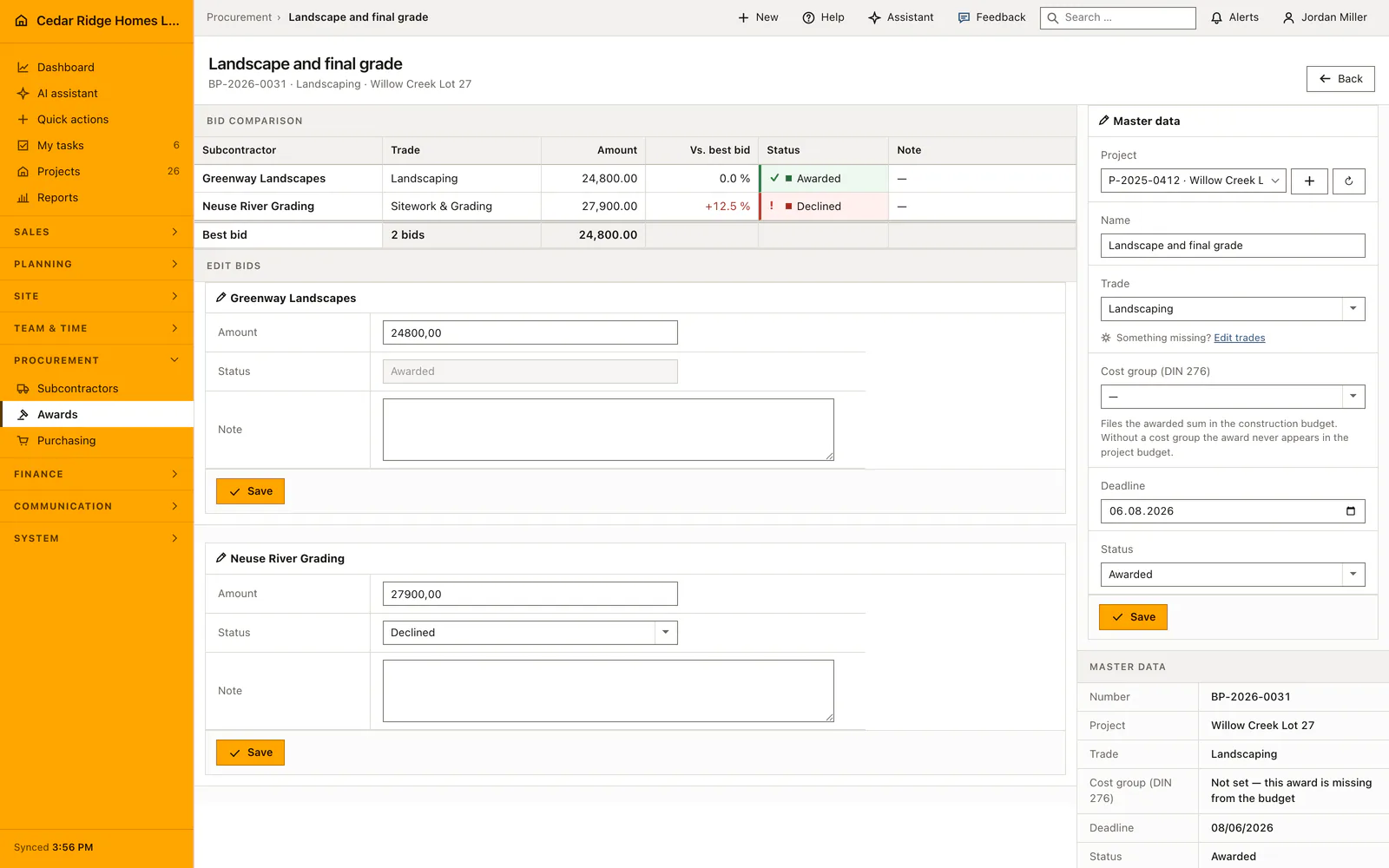
Opening a package title shows the bid comparison. Every bidder stands with trade, amount and the percentage distance from the best bid, with dearer offers marked in red and a dash where nothing has arrived. Bidder notes carry the exclusions that decide a comparison as often as the price does. Amount, status and note stay editable in place. Awarding sets the chosen bid to awarded, the rest to declined and the package to awarded.
An award is a money decision, so it has to reach the budget. A package attached to a project needs a cost group before it can be awarded; without one the amount would never appear as committed cost in the project budget, and the page says so instead of offering the button. Once the award is saved, the next step turns the winning bid into a purchase order with project, supplier, cost group and award sum already filled in.
Creating a bid package and taking bidders onto it
New bid package asks for a title of up to 180 characters, an optional project, the trade, the deadline and the cost group. The number follows the year, counted per company from VP-2026-0001 upward. A new package starts as a draft. The master-data block on the detail page keeps all of it editable afterwards, including the status, which runs from draft through invited and comparing to awarded.
Bidders join one at a time through a select that already leaves out the firms on the package; a second attempt with the same company returns a message rather than a duplicate row. A new bid starts at invited, with an amount only where one is already on paper. Amount, status and note stay editable in a block of their own per bidder, and a bid can be removed as long as neither it nor the package has been awarded.
 Open full-size screenshot
Reading the bid comparison, the deviation column and the bidder notes
The comparison lists every bidder with trade, amount, the percentage distance from the best offer, status and note. The baseline is the cheapest amount that actually arrived, counting submitted and awarded bids, which is why an awarded package still shows the price it went out at. Dearer offers carry a plus sign in red, and a dash means nothing has been entered yet, which says something different from zero.
The note is where the exclusions live, and they settle a comparison at least as often as the price does. On the list page the bid count reads as submitted over invited, and the deadline column turns red once the date has passed while the package is still open. The figures above the table count open packages, deadlines falling in the current week and packages awarded in the running quarter, that last count taken from the bid deadline rather than from a date of award, which the package does not carry.
From an awarded package to the purchase order and the project budget
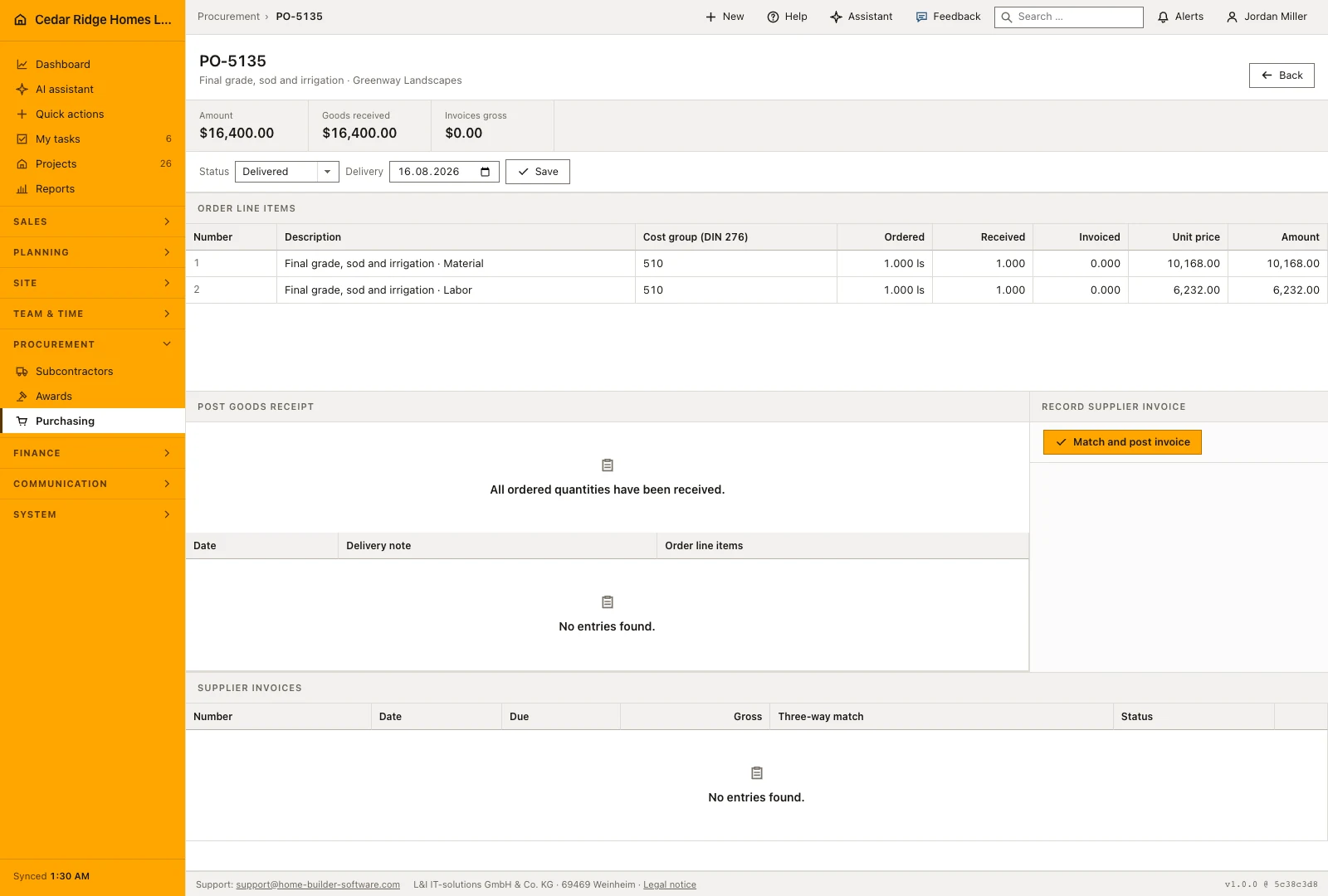
After the award the column on the right offers the step that follows: create a purchase order from the award, with project, supplier, cost group and awarded sum already filled in. Beside it stands the way into the project budget, where the amount now appears as committed cost against its cost group. The project filter above the list narrows awarding to one site, and the reset returns to all packages.
Where nothing has been awarded yet and no project hangs on the package, that same column says so plainly instead of offering steps that lead nowhere. A missing cost group is called out beside the master data with the line saying the award is missing from the budget, so the hole is visible while the decision is still open rather than after it. The protocol block at the foot of the detail page keeps the history of the package itself, and on the list the column headers sort by number, package and deadline. Trade and firm both come from master data, so nothing on this page is retyped.
 Open full-size screenshot
Construction bid comparison and awards in the daily routine
Procurement creates the package against a project, trade and cost group, then invites firms from the subcontractor register. Bidders answer by email or through their signed portal link, which sets the bid to submitted and moves a draft package into comparing. Buyers then read the comparison: the cheapest complete offer, the exclusions in the notes, the deadline. Management confirms the award, declines are sent, the subcontractor contract follows, and the purchase order carries the sum into the budget.
Read the documentationConstruction bid comparison and awards: what it covers
Track bid deadlines, submissions and package status
Compare each amount with the best bid and review bidder notes
Award one bid while marking the remaining bids declined
Construction bid comparison and awards: questions and answers
Does the comparison show more than the lowest amount?
Yes. It shows bid status, notes and each amount’s percentage difference from the best submitted bid.
What changes when a bid is awarded?
The chosen bid becomes awarded, other bids become declined and the package becomes awarded.
Use Construction bid comparison and awards on your own projects
Request a trial period for the workflow around this module. We agree the roles, permissions and useful scope with you before preparing access.