
Construction invoicing software
Create progress, final and standard invoices or credits with tax, due date, payments, reminders, printable output, accounting export and XRechnung XML.
Construction invoicing software: how it works in Home Builder Software
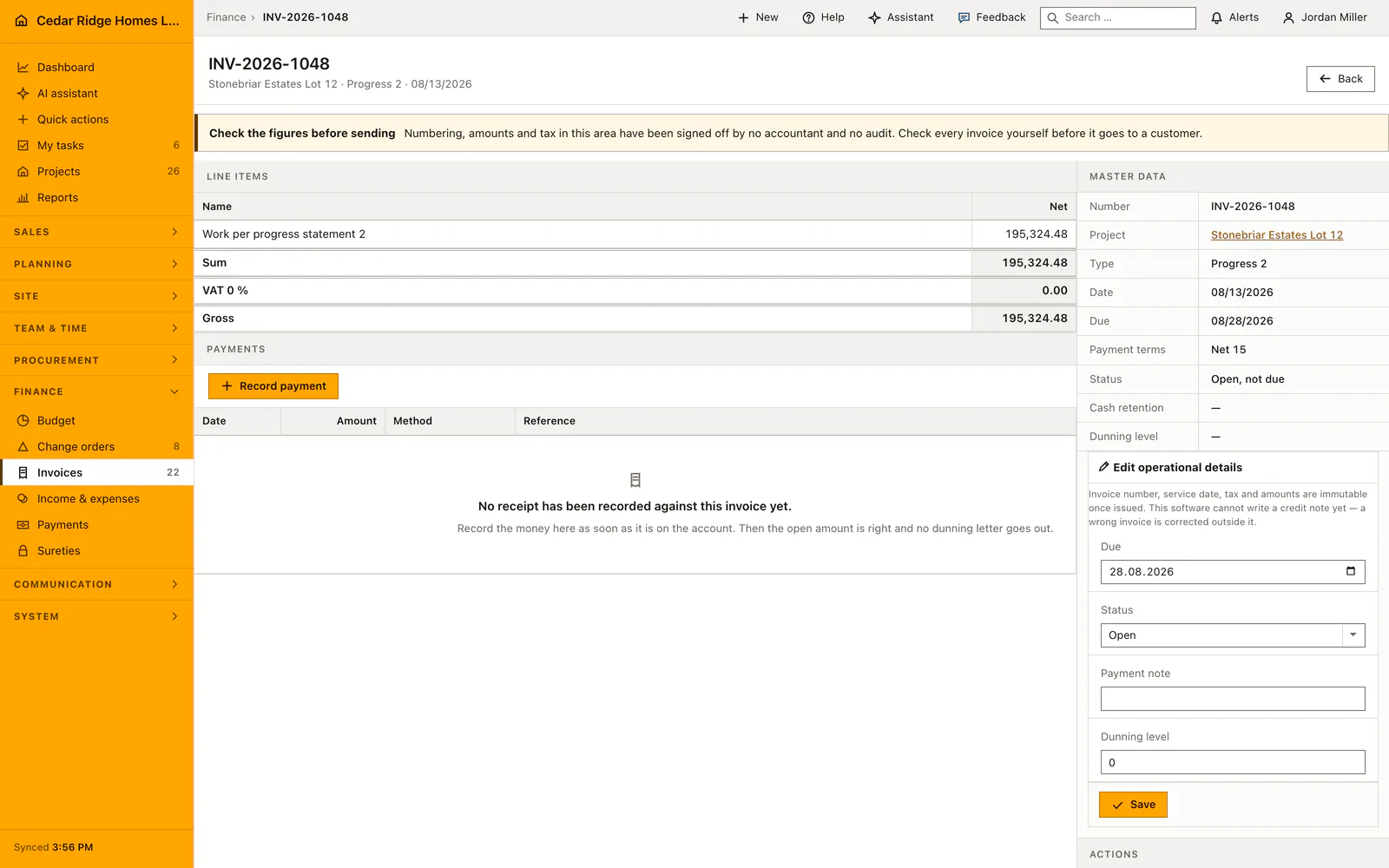
Progress billing goes wrong when nobody can say what is left of the contract. The invoice list holds every outgoing document — progress invoices, final invoices, ordinary invoices and credits — with net, tax rate, gross and the amount still open, and the payment column spells the situation out in words: eight days overdue at reminder level two, paid on a date with discount, or open and not yet due.
Raising one starts from the billing basis: contract sum including posted change orders, what has already been billed, and what remains. A document carries up to one hundred line items with description, DIN 276 cost group, quantity, unit, unit price and degree of completion, and the server calculates each net position as quantity times price times completion. Line items may point at a measurement of the same project. The reverse charge option forces zero percent and the required notice.
Issuing the document reserves the next number, numbers progress invoices per project and writes the project billed sum in the same transaction; number, date, tax and amounts then stay fixed and a financial correction becomes a credit. The retention percentage kept in the project is deducted from the payable amount without touching the gross figure. Overdue documents advance one reminder level at a time up to the third, individually or through a single dunning run.
Issuing a progress, final or standard invoice
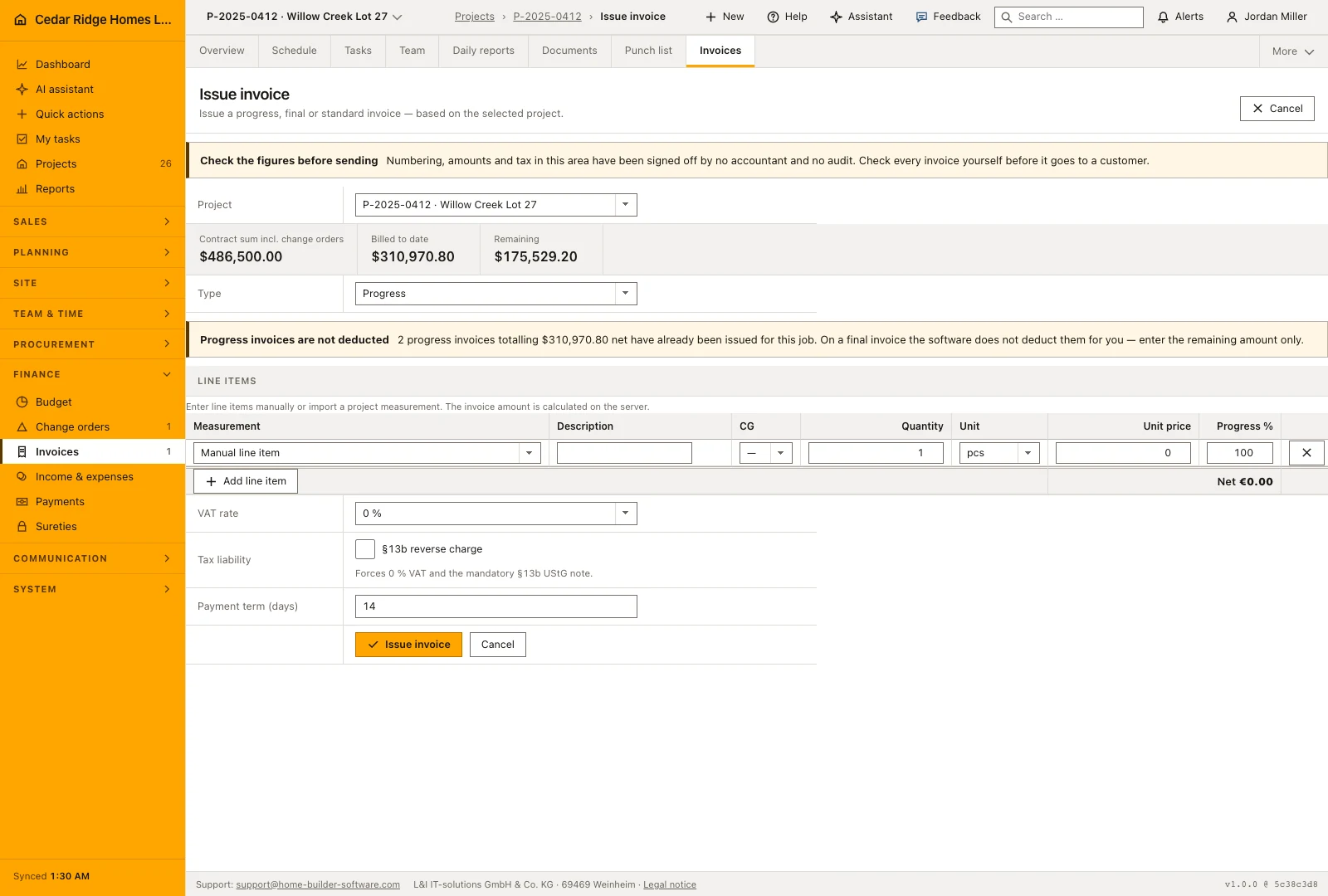
The screen opens with the job selector, and under it the billing basis: contract sum including posted change orders, billed to date, and what remains. Switching the job reloads the page and the basis with it. Below come the document type and up to a hundred line items with description, cost group, quantity, unit, unit price and a degree of completion, or a project measurement taken over into a line.
The invoice calculates its positions from the entered quantities, unit prices and completion percentages. Review the tax treatment, payment term and any retention before issuing it. Issuing gives the document its invoice number and updates the amount billed on the project. Check the preview and the billing basis together, especially when approved change orders have altered the original contract amount.
A final invoice does not deduct the progress invoices already issued. The screen says so as soon as any exist, because the word suggests a closing statement, and describing the whole scope again bills it a second time. Enter the remaining claim only; the cumulative presentation with its deduction lines belongs to the print sheet.
 Open full-size screenshot
Filtering open items, matching receipts and sending reminders
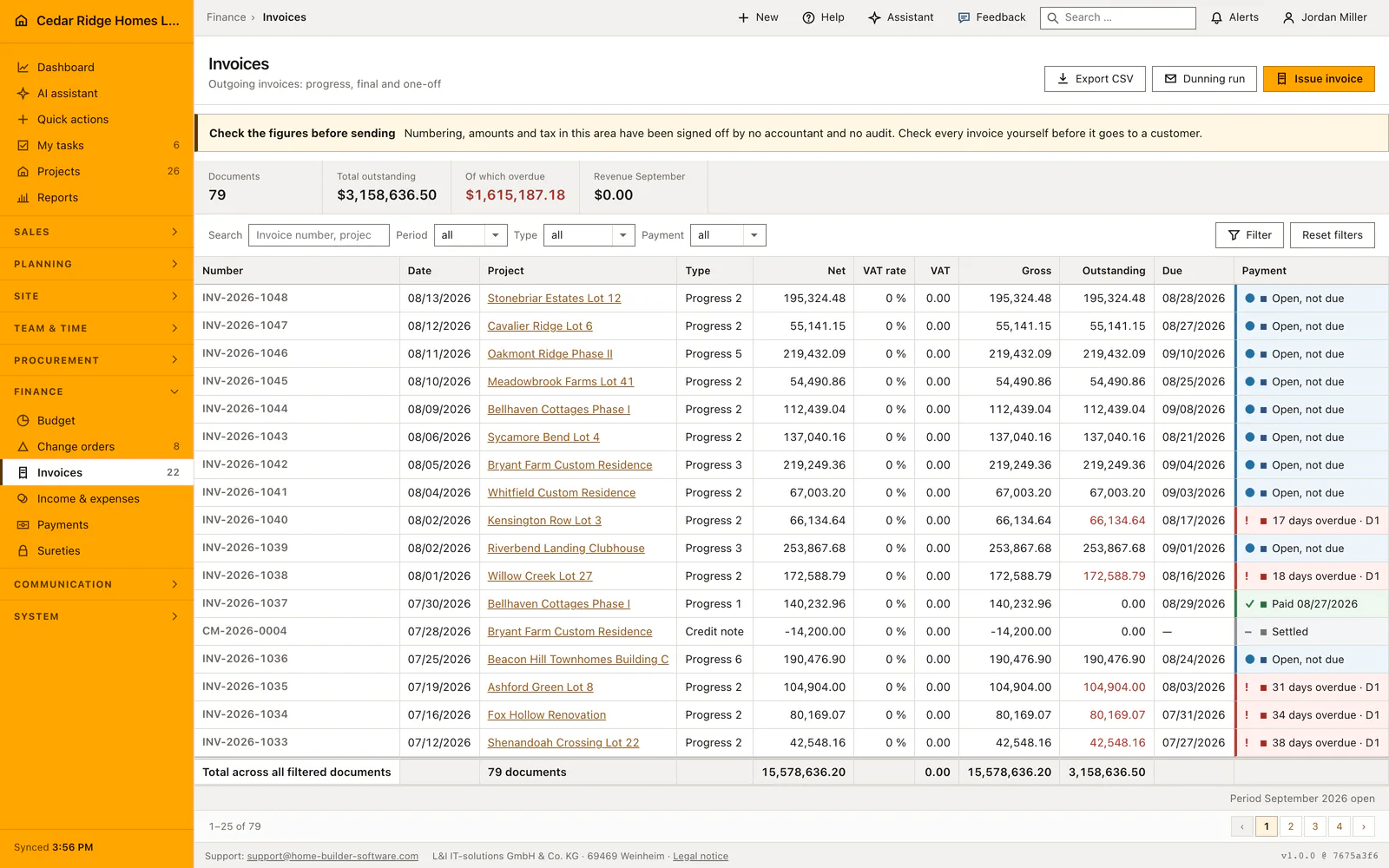
Four filters narrow the ledger: period as month, quarter or year, document type, payment state, and a search field over invoice number, job and customer. The metric band and the total row both cover the filtered set, so the figures on screen belong together. The payment column writes the state out, from eight days overdue with its reminder level through paid with discount to settled, or open and not yet due.
A document turns overdue through the daily deadline run, not the moment the date passes on screen. The single action then records the next reminder level on an overdue document, and the dunning run raises every overdue invoice below the third level by one step while skipping anything already reminded the same day. Receipts are entered in the payments module, each one lowering the open amount of the invoice it names.
 Open full-size screenshot
Print sheet, XRechnung and the accounting export
Generating the PDF opens a standalone letter with the company head, the recipient from the job, the itemized works and the total block. On a final invoice it shows the cumulative works and below them every earlier progress invoice of the job as a deduction line. The reverse charge note appears where it applies, and the payment sentence pairs the due date of the document with the terms text stored on the job. The PDF comes out of the browser print dialog.
The invoice offers an XRechnung export as well as a CSV export of the register. Check the recipient and required invoice details before using an electronic file in a receiving system. The accounting CSV includes an example account mapping; it is not a certified DATEV interface. Agree the mapping with the accounting workflow that will receive the file instead of assuming every installation uses the same accounts.
Construction invoicing software in the daily routine
Billing usually starts in the project file, so the project arrives preselected and the remaining contract volume is already on screen. The office picks the type, enters or selects the positions, sets the tax rate or the reverse charge flag, checks the payment term and issues. The finished document produces a print sheet where a final invoice deducts every earlier progress invoice, and an XRechnung file per line item for customers who need it. Later the overdue filter drives the reminders.
Read the documentationConstruction invoicing software: what it covers
Calculate net, tax, gross and remaining contract billing basis
Track partial payments, discount, overdue days and reminder level
Export filtered accounting data and individual XRechnung documents
Construction invoicing software: questions and answers
Can issued invoice amounts be changed?
No. Number, issue date and amounts remain immutable; corrections are issued as credits.
Does invoicing support reverse charge?
Yes. Eligible construction services can use the §13b option with zero VAT and the required invoice notice.
Use Construction invoicing software on your own projects
Request a trial period for the workflow around this module. We agree the roles, permissions and useful scope with you before preparing access.