
Project resource and cost planning
Plan labor, subcontractors, equipment, tools and material by quantity, unit, unit rate and deployment period in the project file before those resources are committed.
Project resource and cost planning: how it works in Home Builder Software
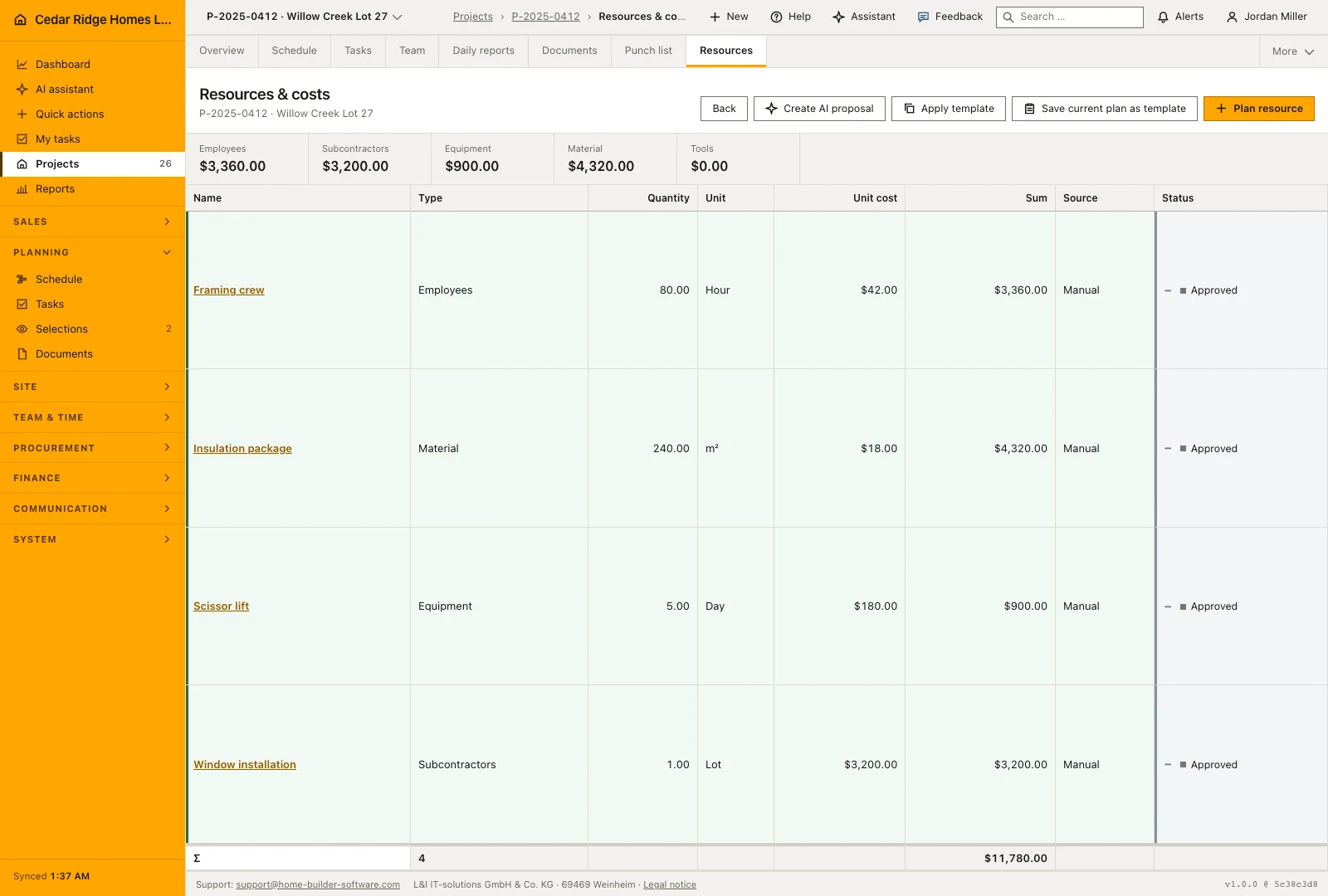
Inside every project file, Resources answers a question the schedule cannot: what this build will consume. Staff, subcontractors, equipment, tools and material are planned as lines, and quantity, unit, unit rate and deployment period produce the planned cost per line and per resource type. The demand picture exists before anyone orders, hires or awards, which is while changing it still costs nothing.
New lines are created on their own page and refined afterwards in the detail view. Every line carries an approval status of pending, approved or rejected, and anything applied from a template or generated automatically starts as pending, so a suggestion never slips into a confirmed plan unnoticed. Smart Planning builds such a proposal from the scheduled effort, the project period and the stored employee costs, and shows how it got there. Approvals and rejections write audit events.
Approved lines can be kept as a company-wide resource template and applied to the next project of the same kind, where they arrive as pending again rather than as settled fact. Planned cost per resource type is what the office holds against the budget before purchasing and awards commit real money. Resource planning needs project management rights, and every view stays inside the company and project scope of the person looking at it.
Adding a resource line with quantity, unit and unit cost
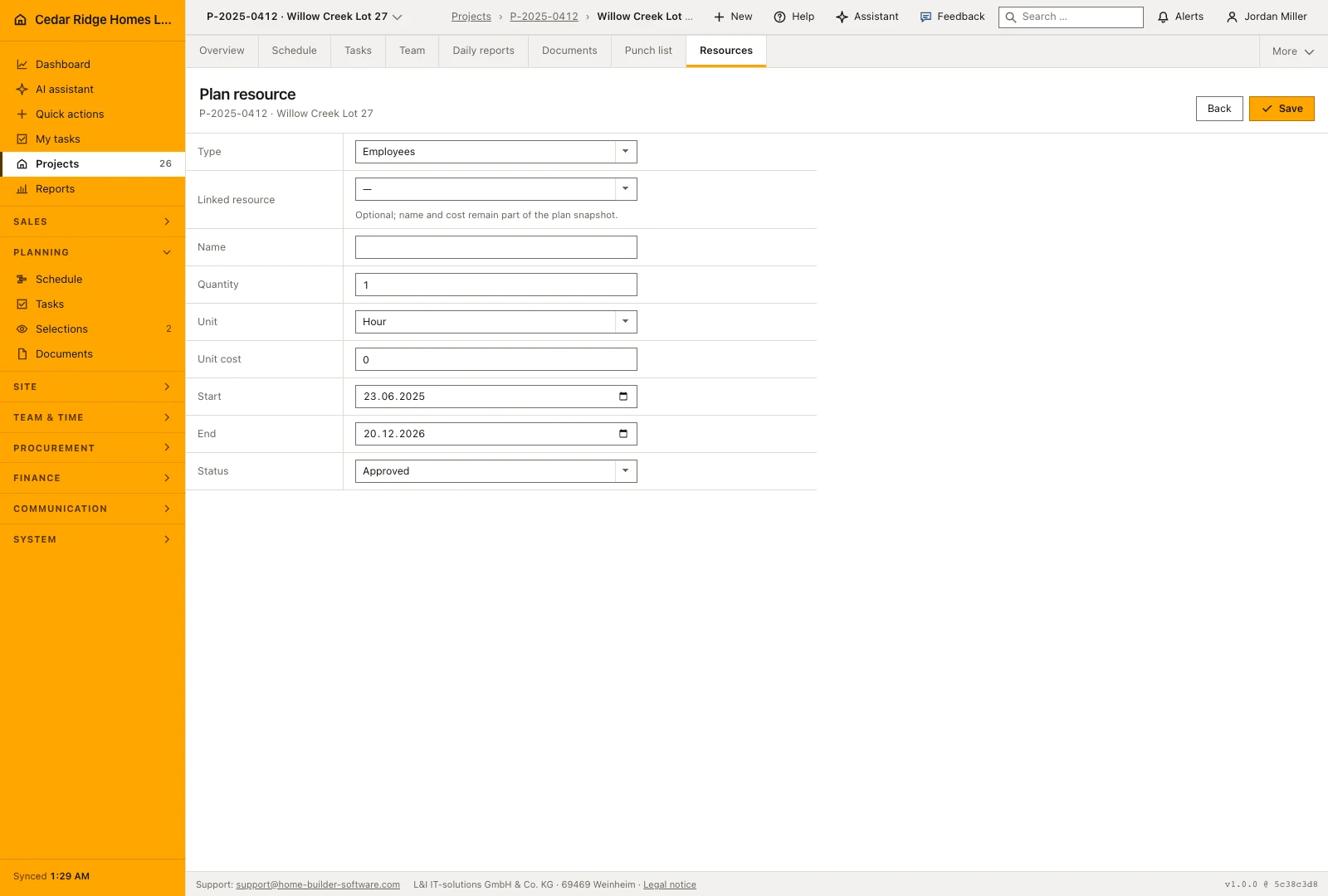
Plan resource opens a page of its own rather than a row you fill in place. Pick the resource type, then a name, a quantity, a unit of hour, day, piece, lot, square meter or cubic meter, a unit cost and, when they are known, a start and end date. The end may not fall before the start. The linked resource field is optional and points at an employee, a supplier or an equipment record.
Saving takes you to the detail view, which is where a line is sharpened. The table shows quantity, unit, unit cost and the line sum, plus the source of manual, template or AI proposal, and the approval status that colors the row. Beneath the table a total is drawn, and above it the figure band gives the planned cost for each resource type separately, which is the shape a cost group comparison wants.
 Open full-size screenshot
Approving, rejecting and re-reading pending lines
The daily work here is judgment rather than typing. A pending line is a proposal: somebody applied a template, ran the automatic planner, or wrote the line by hand and left it open. You read it against the real site situation, asking whether the quantity suits this house, whether the unit cost is still current and whether the deployment window matches the slot that trade has in the plan, and then approve or reject.
Approve and Reject are one press each and write the status straight away, with a message naming what happened. A rejected line is not deleted: it stays visible with its status, so the decision not to plan something reads as clearly as the decision to plan it. Corrections belong before the approval, because editing a line and approving it are separate actions and the second one is what everybody later relies on.
Resource templates, Smart Planning and the budget comparison
Save current plan as template carries over only the approved lines of this job and stores them company-wide together with the project’s country profile and currency. Applying a template writes its lines onto another project as open proposals, without their original links, so the next house of the same type starts from experience rather than from an empty table. The template list names the extent of each one.
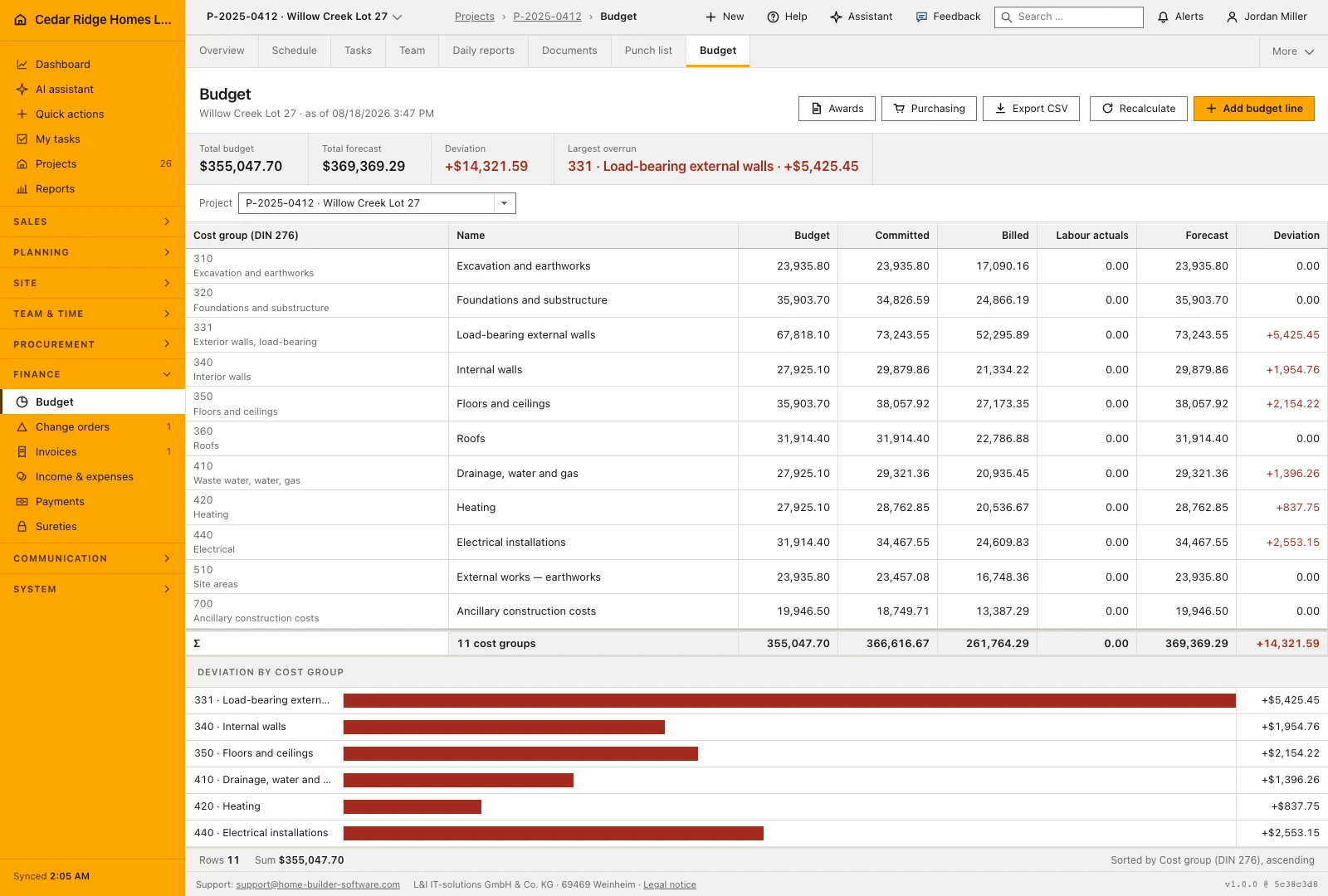
Create AI proposal builds one pending line from the summed estimated hours of the schedule, the project period and the hourly cost of the person running the job, and the message says outright that it waits for human approval. What the approved set is for shows in the budget of the project file by DIN 276 cost group: planned resource cost is the figure the office holds against the budget before money is committed.
 Open full-size screenshot
Project resource and cost planning in the daily routine
Once a project has its schedule, project management opens Resources, applies a company template or runs Smart Planning, and receives a set of pending lines. Each one is measured against the real site situation, quantity, unit rate and deployment window, then approved or rejected with the decision written to the audit trail. The approved set feeds the comparison against the budget and can be saved as the template that the next house of the same type starts from.
Read the documentationProject resource and cost planning: what it covers
Calculate planned cost by line and resource type
Review proposed items as pending, approved or rejected
Reuse approved items as a company template for another project
Project resource and cost planning: questions and answers
Do proposed resources immediately become approved plans?
No. Template and Smart Planning suggestions start as pending until a person approves or rejects them.
Which resource types can be planned?
The project file supports labor, subcontractors, equipment, tools and material.
Use Project resource and cost planning on your own projects
Request a trial period for the workflow around this module. We agree the roles, permissions and useful scope with you before preparing access.