Run every home-building project from one place

Home Builder Software connects estimating, scheduling, field documentation, defect management and project controlling. An affordable, intuitive system that keeps deadlines, costs and responsibilities visible from the first lead through warranty.

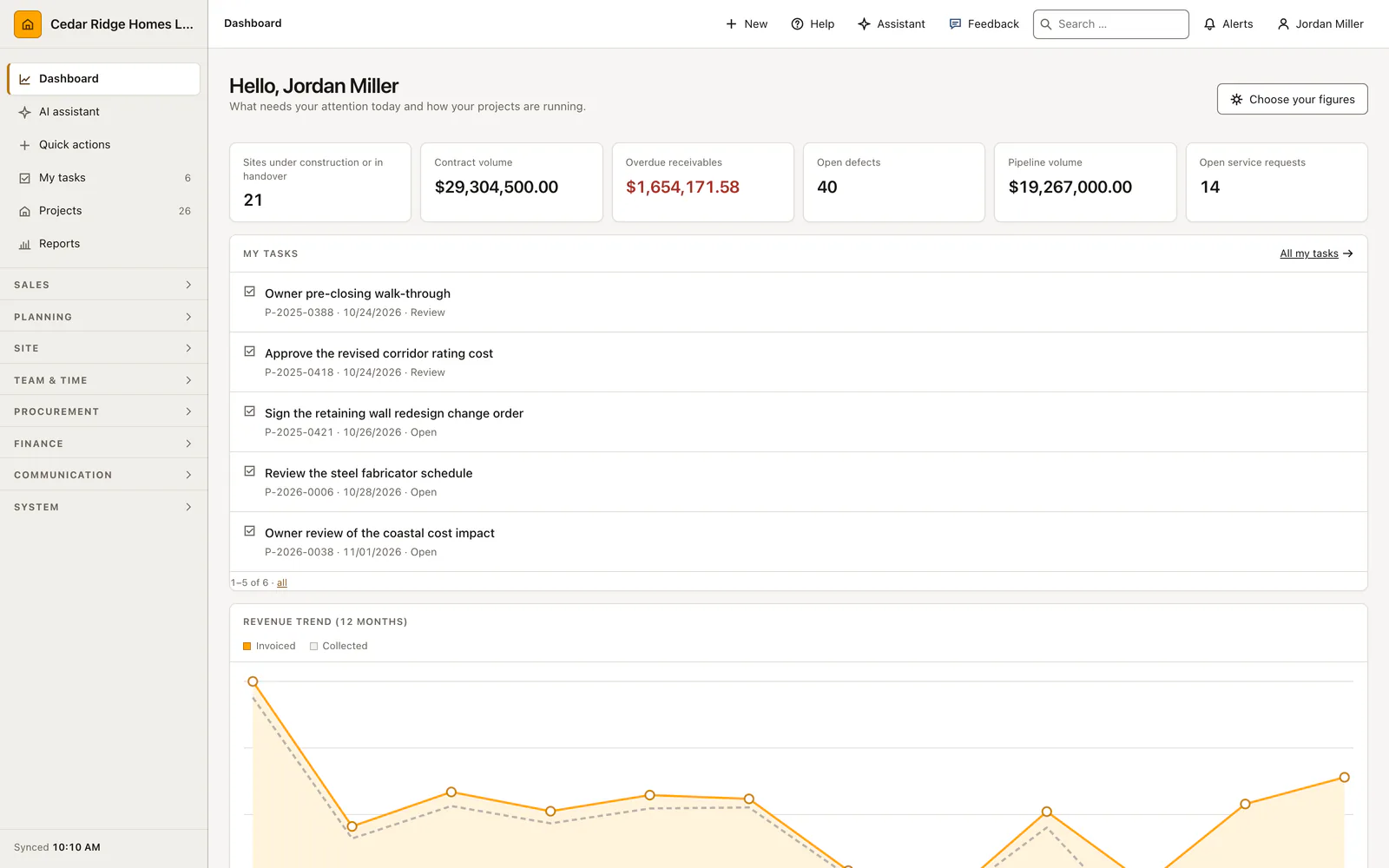
Home Builder Software dashboard with project, revenue and receivable information
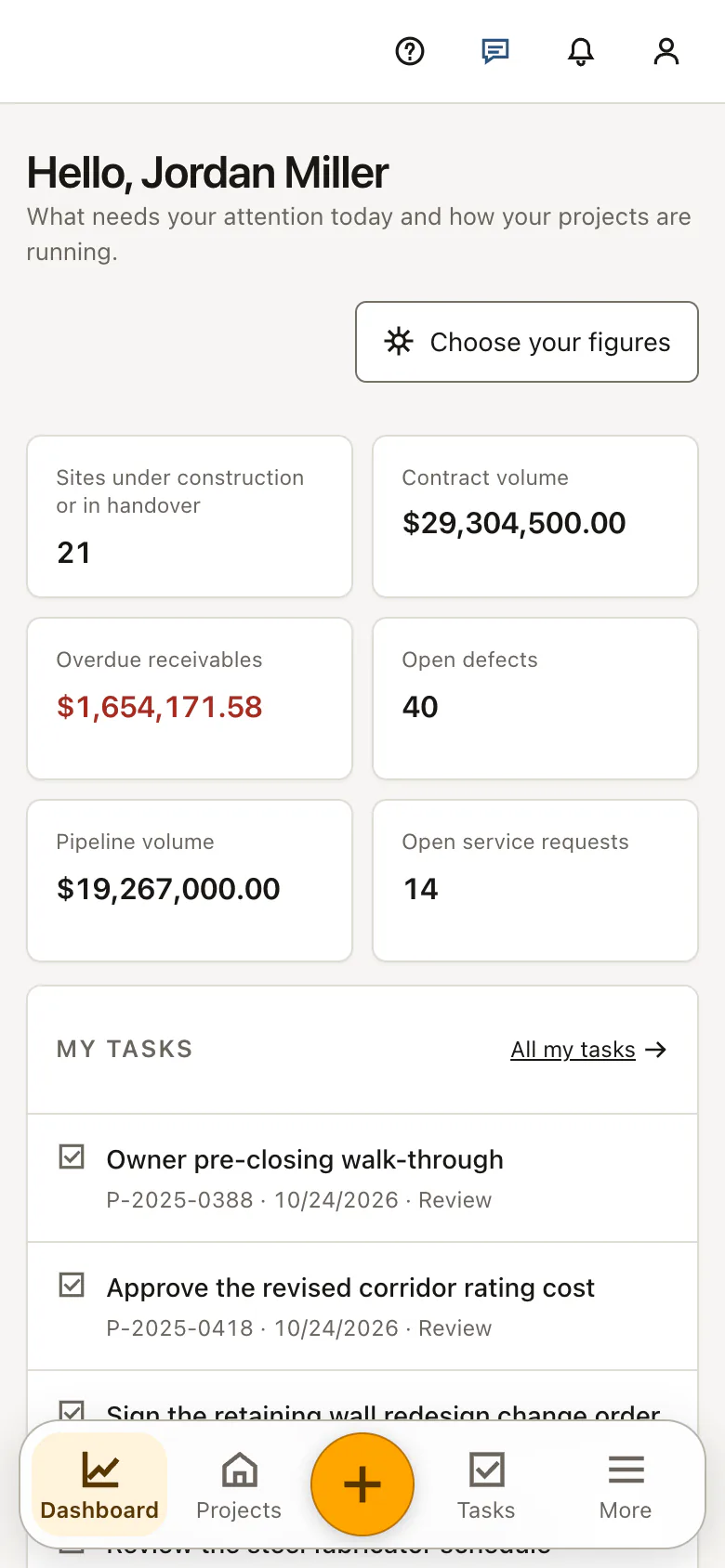
The dashboard on a phone: metric tiles, revenue curve and the bottom tab bar for dashboard, projects and tasks
AI-generated construction site manager in safety workwear

Devices and the person are AI-generated, the screens are the running product

From the first lead through warranty

One system your office and your crews both work in

One application covers sales, planning, field work, finance and service. All of them read and write the same project file, whether it is opened on an office monitor or on a phone at the site.

  • Sales, planning, field, finance and service in one system. Estimating, scheduling, purchasing, invoicing and warranty service share one project file instead of five separate tools.

  • Office and site. The same workflows are laid out for a wide monitor and for a phone held in one hand, with touch targets that survive work gloves.

  • Built in Tübingen, Germany. BleyIT writes and operates the software, so there is no reseller layer between you and the people who maintain the code.

  • English, German and French. Each user picks a language for their own profile while the project data stays identical for everyone.

What happens in the field is ready for the office

Sales, preconstruction, field, finance and service share the same project file. Each update is entered once and is available to the next person responsible.

  • Win the right work

    Move each lead through estimating and proposal without retyping customer or project data.

    When the customer signs, the quantities and assumptions behind the estimate become the opening budget.

    Open the sales pipeline
  • Plan the build

    Turn the contract into activities, resources, deadlines and named responsibilities.

    Move one activity and the plan shows which trades and delivery dates move with it.

    See scheduling
  • Run the field

    Record daily work, decisions, documents, RFIs and defects against the current project.

    A photo taken at eleven in the morning is in the project file before the site meeting starts.

    See daily reports
  • Control costs

    Compare the budget with commitments, change orders, invoices and payments.

    Every variance links back to the purchase order or invoice that caused it.

    Open budget control

One change to the estimate reaches the budget, the schedule and the invoice

A day recorded on site is in the project file before the site meeting starts. A signed change order moves the contract sum and the dates that hang off it. Nobody retypes a figure, and nobody hunts for the version that counts.

Construction estimating software

Build itemized home-building estimates with quantities, unit costs, markups, margin, optional items and cost types that can become the project budget.

  • Calculate selling prices, markups and margin while editing line items
  • Print customer-facing proposals without exposing internal cost or margin
  • Transfer accepted estimate lines into grouped project budget items
More about construction estimating software
Real Home Builder Software interface for Construction estimating software
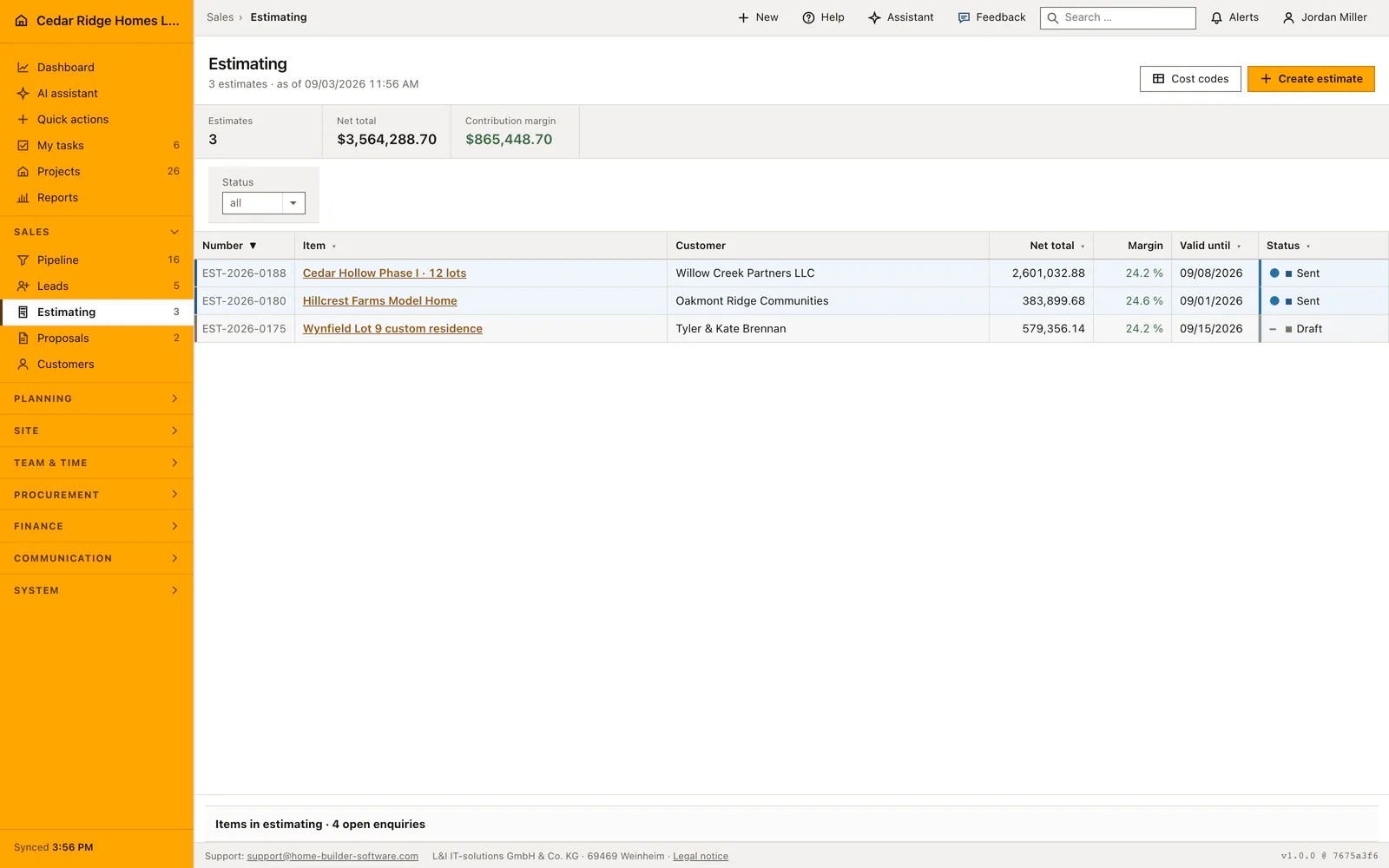
The estimating list of Cedar Ridge Homes: three documents, $3,564,288.70 net total and $865,448.70 contribution margin in the metric band, EST-2026-0188 for Cedar Hollow Phase I sent at $2,601,032.88 with 24.2 percent margin, and Wynfield Lot 9 still a draft, valid until 09/15/2026.

Home building project management

Manage every home-building project with contract value, billing, schedule status, progress, customer record, cost groups and current decisions in one project file.

  • Filter and export the project portfolio by phase, manager and status
  • Connect budget, invoices, change orders, RFIs and field updates in the project file
  • Keep customer, dates, progress and responsibility as editable structured data
More about home building project management
Real Home Builder Software interface for Home building project management
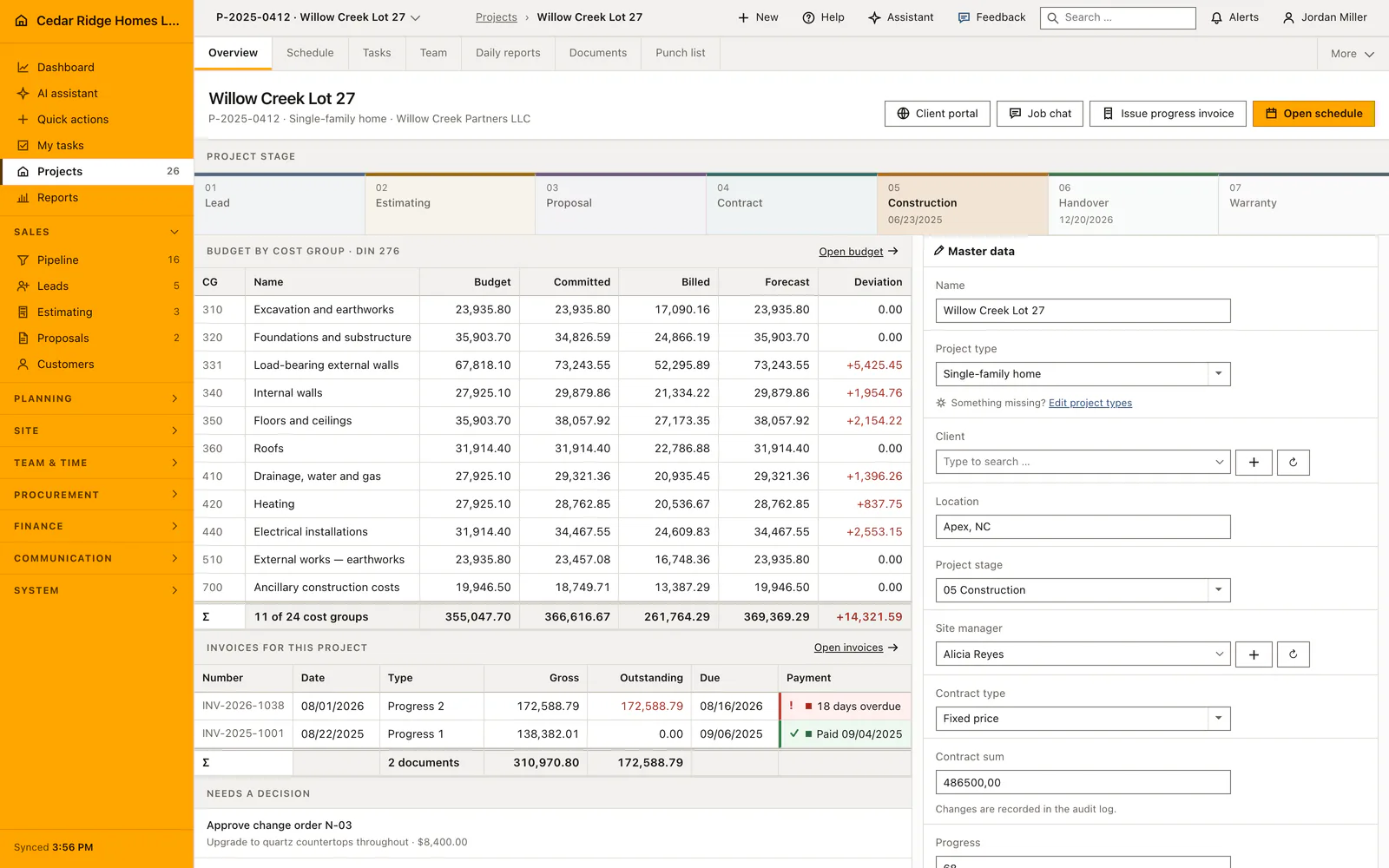
The project file of Willow Creek Lot 27, P-2025-0412, a single-family home for Willow Creek Partners LLC in Apex, NC: tabs for Overview, Schedule, Tasks, Team, Daily reports, Documents and Punch list, the stage rail with 05 Construction active since 06/23/2025 and handover set for 12/20/2026, the budget by cost group with a deviation of +14,321.59, the two invoices of the project and the buttons Client portal, Job chat, Issue progress invoice and Open schedule.

Construction punch list and defect management

Manage defects across projects from capture and trade assignment through correction and verified acceptance in a list or Kanban board.

  • Prioritize defects by due date, severity, location and responsible trade
  • Move operational statuses on a Kanban board with save-failure rollback
  • Reserve final acceptance for an explicit superintendent review action
More about construction punch list and defect management
Real Home Builder Software interface for Construction punch list and defect management
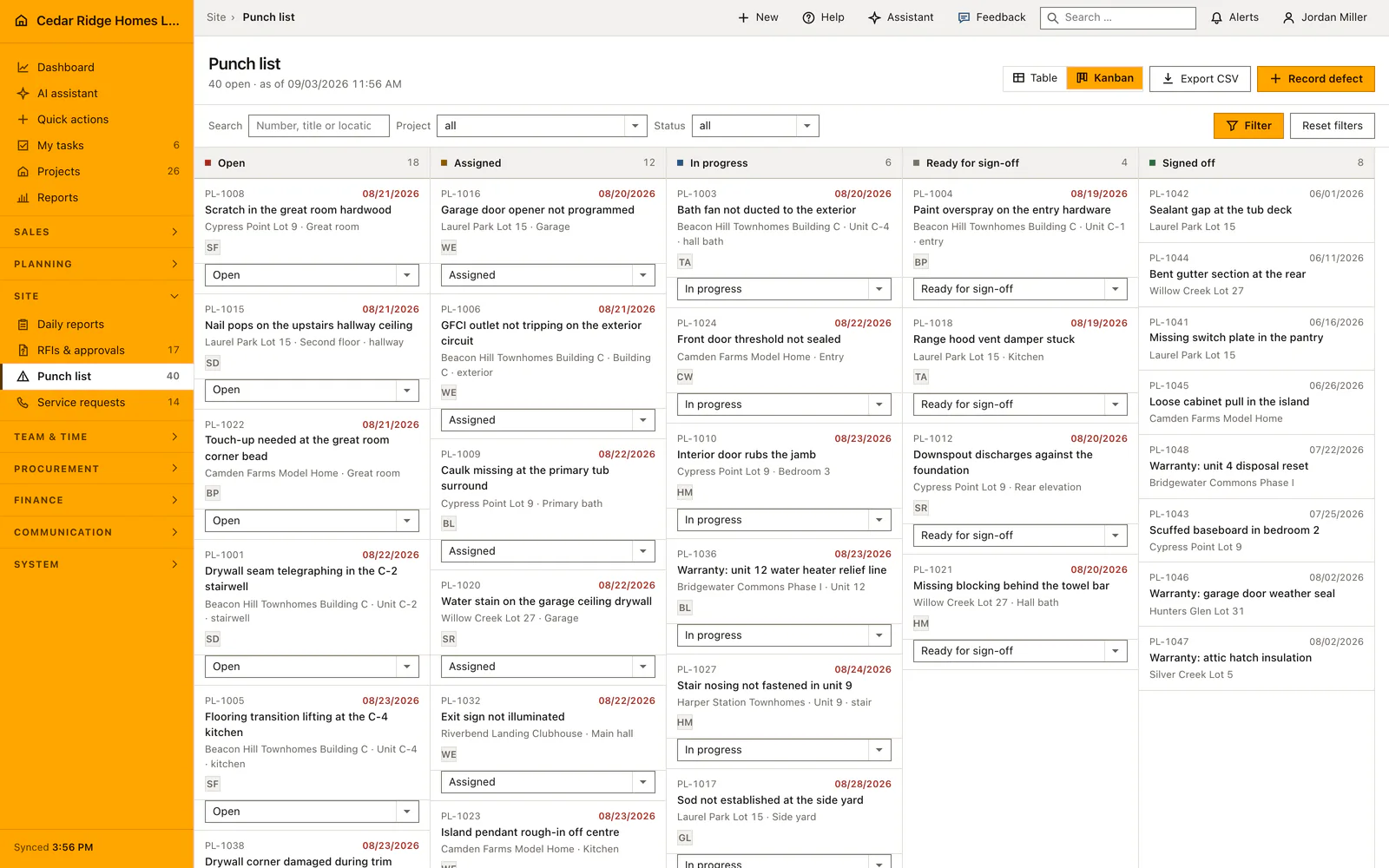
The punch list as a Kanban board with 40 open defects as of 08/22/2026: 18 open, 12 assigned, 6 in progress, 4 ready for sign-off and 8 signed off, each card carrying number, due date, project and unit, from PL-1008, the scratch in the great room hardwood on Cypress Point Lot 9 due 08/21/2026, to PL-1042, the sealant gap at the tub deck on Laurel Park Lot 15 in the signed-off column dated 06/01/2026.

Construction invoicing software

Create progress, final and standard invoices or credits with tax, due date, payments, reminders, printable output, accounting export and XRechnung XML.

  • Calculate net, tax, gross and remaining contract billing basis
  • Track partial payments, discount, overdue days and reminder level
  • Export filtered accounting data and individual XRechnung documents
More about construction invoicing software
Real Home Builder Software interface for Construction invoicing software
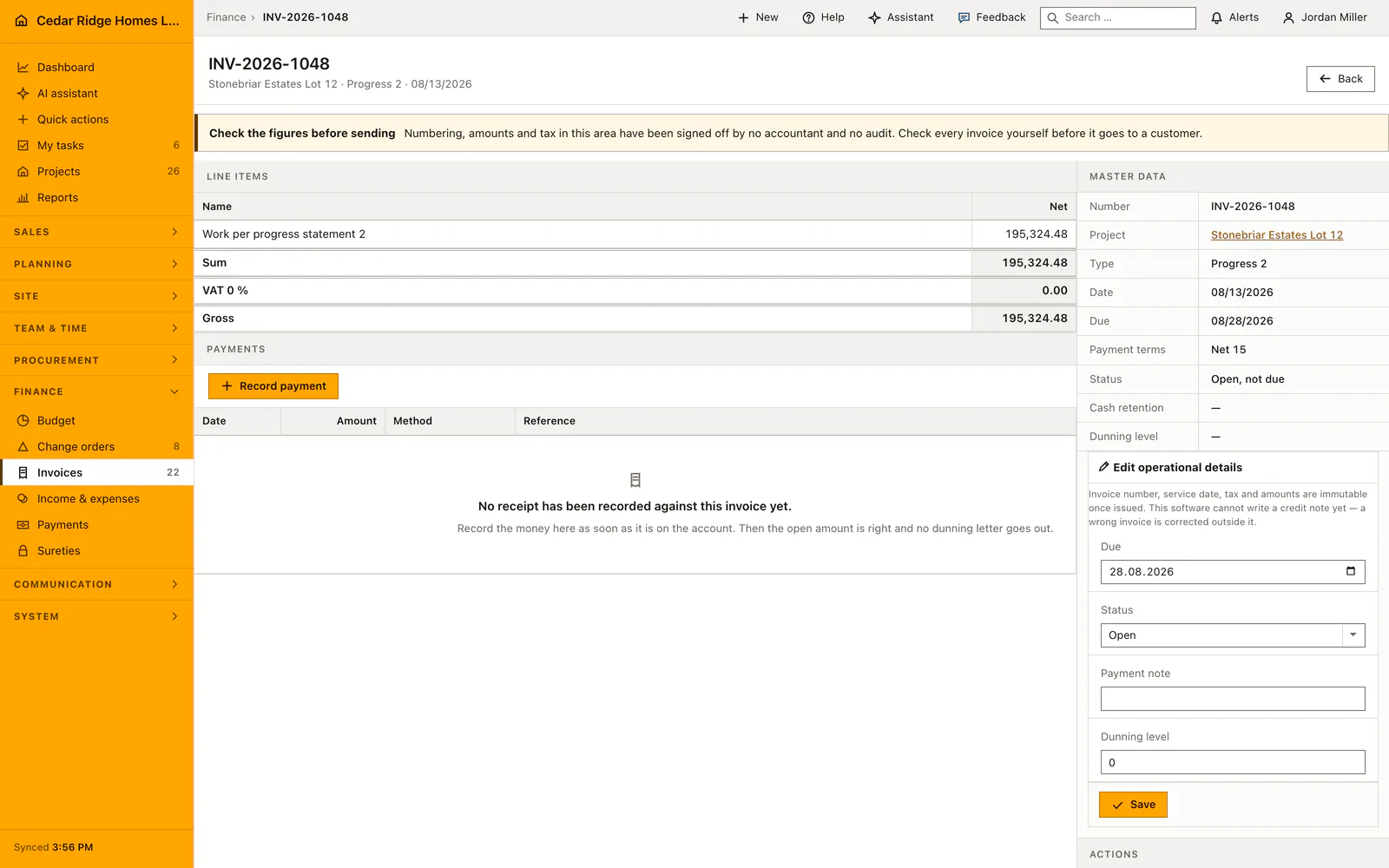
Invoice INV-2026-1048 for Stonebriar Estates Lot 12, progress invoice 2 dated 08/13/2026: one line item of 195,324.48 net, VAT 0 %, gross 195,324.48, due 08/28/2026 on Net 15 terms, status open and not yet due, no receipt recorded, and the operational details with dunning level 0 that stay editable after issue.
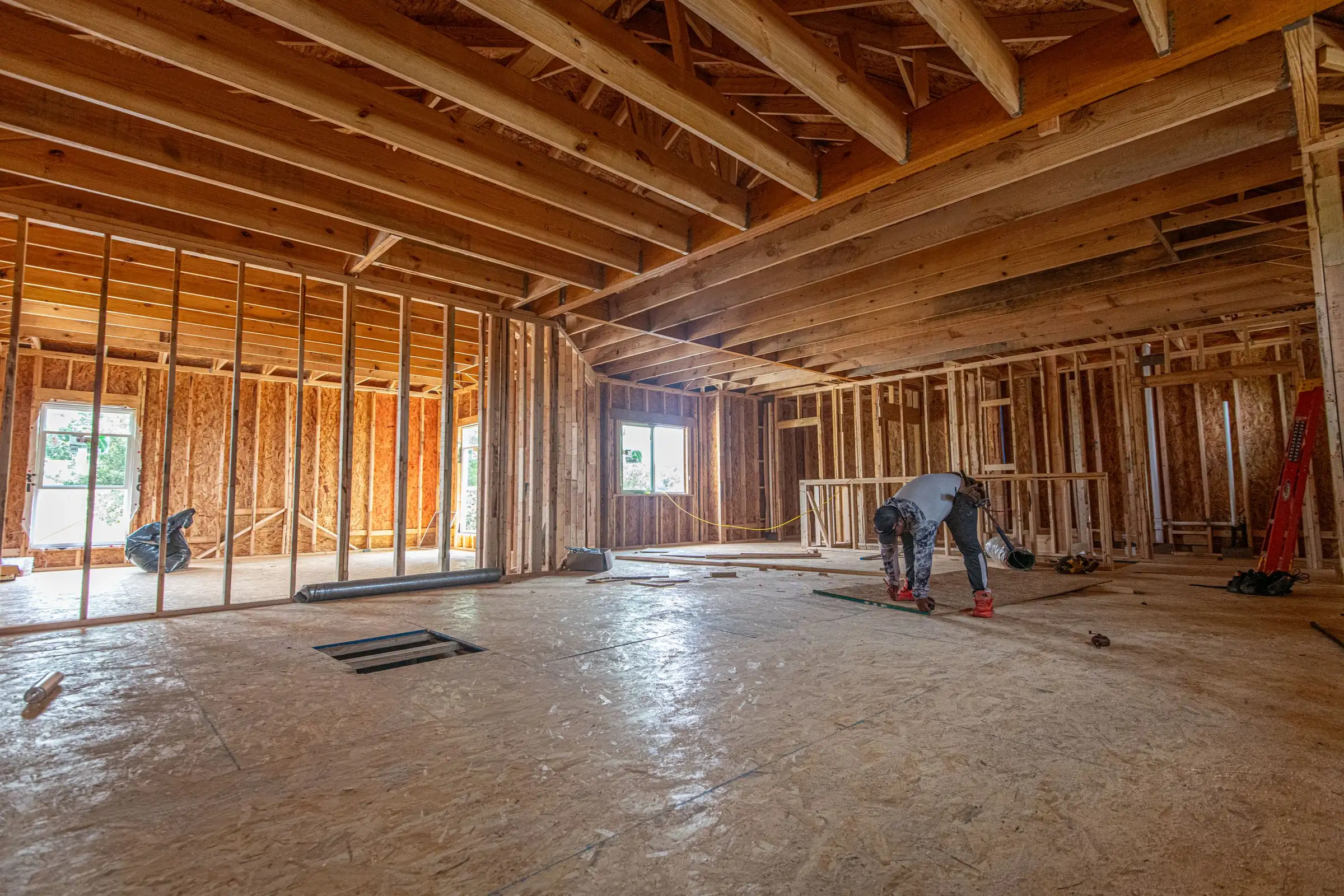
The inside of a house shell: stud walls, ceiling joists, open window holes and a plywood subfloor, with one worker crouched at the far end.
Inside a house under construction in The Colony, Texas, with the stud walls standing.Photo: Ryan Stephens / Pexels

The assistant answers from your own project data

A fixed rail on the right of every internal page takes the visible page content, the matching documentation and, inside a project file, up to three site photos. It answers with the records you are already allowed to open and links to every source it used.

  • Its tools inherit the signed-in user’s permissions, so it can never read a record that person could not open.

  • Write actions arrive as proposals that a person accepts; only an administrator can switch on the audited bypass.

  • The monthly figure in the header is a cost guide for platform AI, shown to the company rather than enforced as a cap.

Read how the assistant works
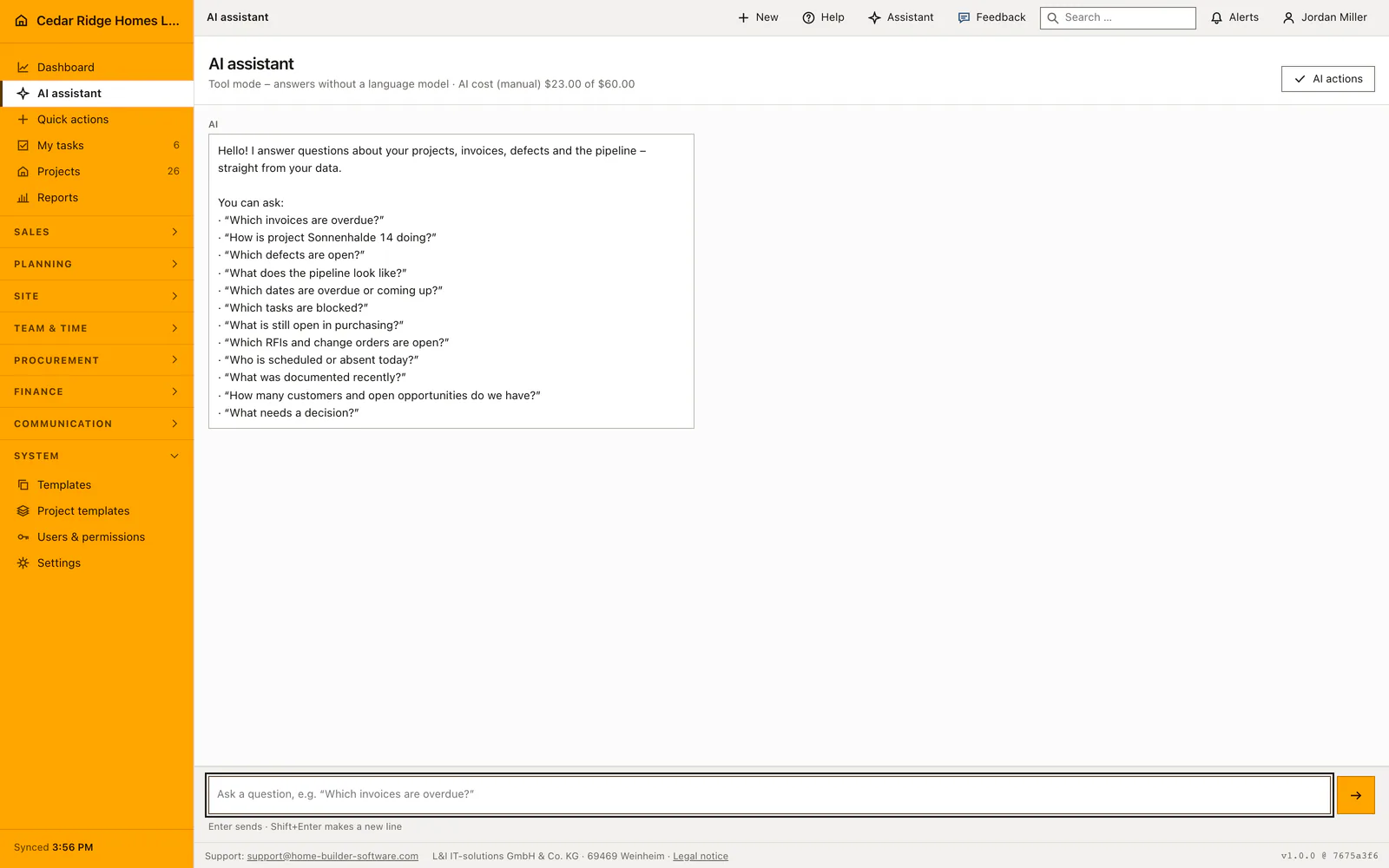
The Home Builder Software assistant answering a question with linked sources
The assistant as a full page at Cedar Ridge Homes: the head names tool mode without a language model and the manually kept figure of $23.00 of $60.00, the greeting offers example questions from overdue invoices to pending decisions, and the composer at the bottom sends on Enter.
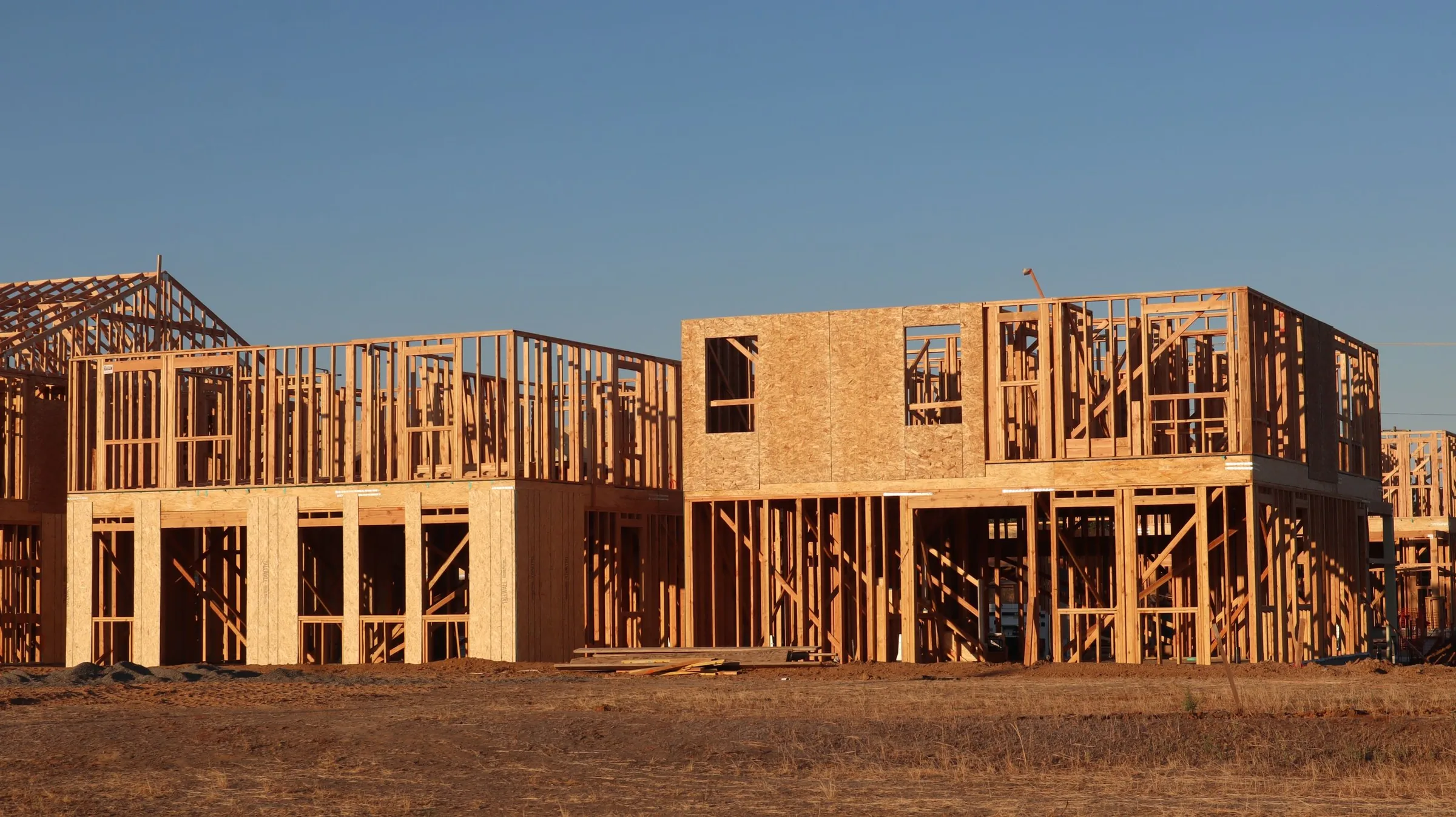
A row of two-story houses at the framing stage, part of the walls already closed with OSB sheathing, under a cloudless sky.
New houses at the framing stage in Elk Grove, California.Photo: D Goug / Pexels

Everyone works from the plan that is current right now

Site managers describe the same day over and over: the drawing downloaded at ten to four was already superseded by the time it came off the plotter. Documents carry their revision, the project file shows which one is in force, and a superseded sheet is marked rather than quietly replaced.

The record works the other way too. Daily reports, photos, weather, crew hours and signatures stay attached to the day they describe, so a question in the second warranty year is answered from the project file instead of from somebody’s memory.

Read the use cases

Built for the whole home-building team

Owners, estimators, project managers, superintendents, accounting and subcontractors work from the same current project file without giving everyone access to everything.

  • Owner

    Opens the dashboard with contract volume, overdue receivables, open defects and the My tasks block of decisions waiting for a signature.

    Open the dashboard
  • Estimator

    Prices the estimate line by line, prints the proposal without internal cost or margin, and watches its binding deadline until the customer decides.

    See proposal tracking
  • Site manager

    Writes the daily report with photos and crew hours on the phone and raises an RFI with due date and responder when a drawing leaves a question open.

    See RFIs and approvals
  • Accountant

    Issues progress invoices from the contract sum, books each receipt against the invoice it settles, and clears imported bank transactions one by one.

    Open payment tracking
Several people in hard hats and work gloves hold a timber wall frame down on the ground while one of them drives a nail with a hammer.
Volunteers nailing a wall frame together in Raleigh, North Carolina.Photo: Brad Weaver / Pexels

Run it on your own servers if that is what your company needs

Two operating models are on offer: a managed cloud that we host and keep updated, or a one-time license installed on infrastructure your own administrators control. The self-hosted version can also be adapted to your processes, specified and quoted apart from the license itself.

Where the project data lives therefore stays a decision you make, not one that arrives with a hosting contract. The same product runs in both models, in English, German and French.

Read about both operating models

Home Builder Software pricing for cloud or self-hosted

Managed cloud from $70 per month; the final amount follows the number of users and the storage you need and comes as a written quote. A one-time license covers self-hosting on your own infrastructure; customizing is quoted separately.

Managed cloud

From $70 per month

Every module, unlimited projects, hosting in the European Union, updates and backups included; the quote names users and storage, and nothing else is charged.

See what the cloud includes

Self-hosted & customized

One-time license

Pay once for the software license. You control the infrastructure; customizing is scoped and quoted separately.

Ask for a tailored quote

Frequently asked questions

What is Home Builder Software?

Home Builder Software is an integrated construction management system for home builders. One project file carries sales, estimating, scheduling, field documentation, purchasing, invoicing, workforce and warranty service, so a figure entered on site reaches the office without a second entry and without a parallel spreadsheet.

Is Home Builder Software suitable for small home builders?

Yes. The managed cloud starts at $70 per month with every module included, and the quote grows only with the number of users and the storage you need. A two-person office gets the same product as a company with thirty people on staff.

Can we run and customize the software on our own infrastructure?

Yes. A self-hosted license is paid once. Your administrators keep the servers, the database and the backups under their own control. Customizing beyond the standard scope is specified together with you and quoted as a separate piece of work.

Which languages are supported?

English, German and French are available in the product and on this website. Each user picks a language in the top right corner and the choice stays with their profile, so an English-speaking site manager and a German back office can read the same project file in their own language.

Bring the decision your team argues about every week

Name the point where information breaks today. We open Home Builder Software on that point and you judge whether the connected version is better.