Home builder scheduling software

The handover date depends on the work that comes before it. Home Builder Software gives residential builders a schedule with dated activities, dependencies, milestones and a saved baseline, alongside the tasks and site records used to report progress.

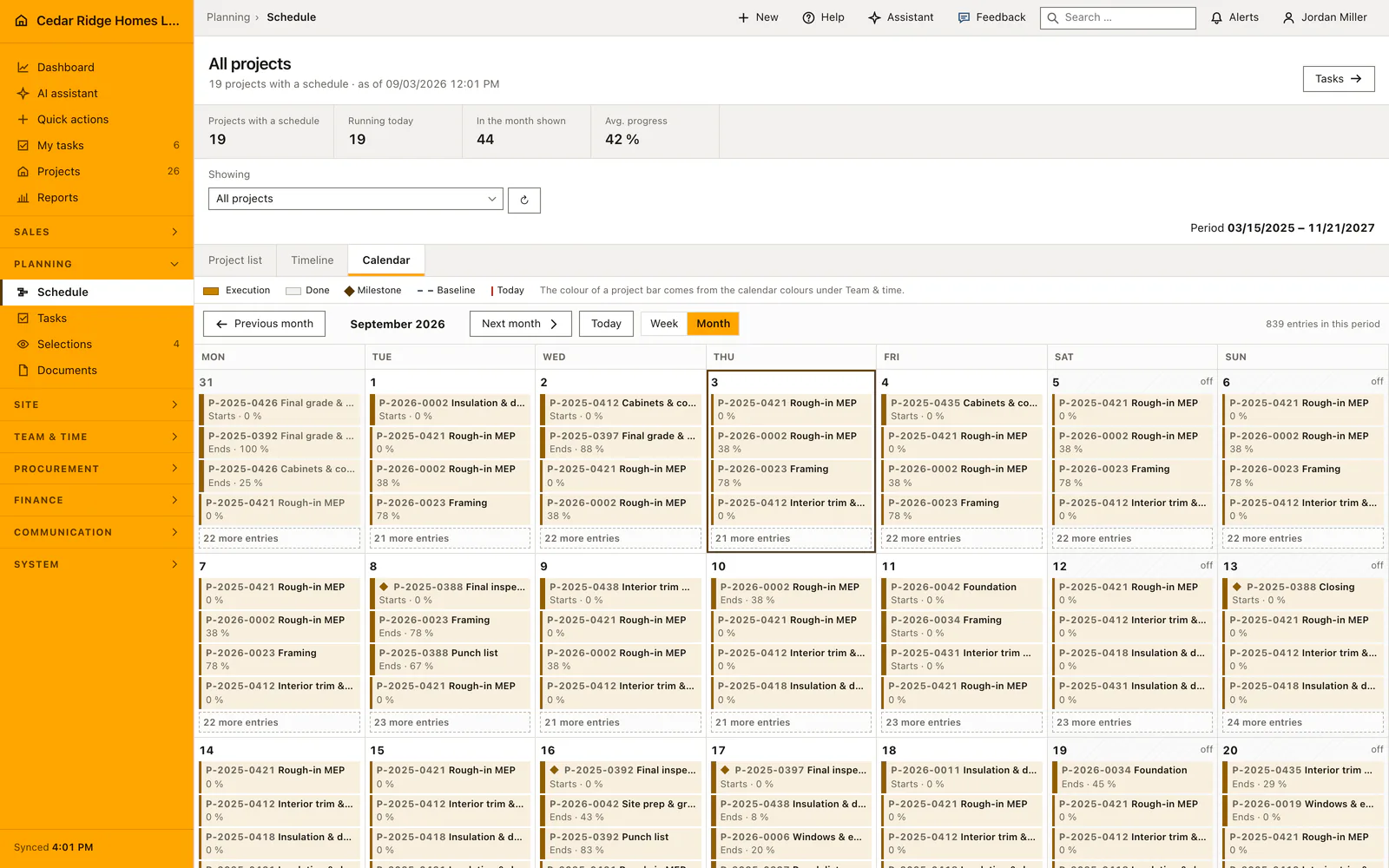
Portfolio construction calendar showing activities from several house projects
The calendar brings dated construction activities from multiple projects into one view.

Plan the dependencies behind the construction timeline

Use the project schedule to organize a single house, then open the portfolio view when several jobs compete for attention. The calendar makes dates visible; the activity record explains its status and responsibility. A useful plan needs both, especially when a delay changes the sequence of trades.

Create the activities and milestones for the job, then connect work that depends on another activity. The scheduler supports finish-to-start, start-to-start, finish-to-finish and start-to-finish relationships with lag. Those relationships describe the build sequence more precisely than a list of independent due dates.

Save a baseline before tracking changes. When the sequence moves, recalculate the dependent dates and compare the current plan with that saved reference. Project templates provide repeatable starting activities, while each project retains its own dates and progress. Keep the working calendar and the planning assumptions under review as conditions change.

  • Name the real predecessor

    Connect the activity that actually releases the next trade. A decorative line between tasks will not explain the delay you need to manage.

  • Keep the original baseline

    Compare changed dates with a saved plan so the team can distinguish a revised forecast from the date originally agreed.

  • Read progress with its site context

    Use assigned tasks and daily reports to understand what happened behind a percentage or a blocked activity.

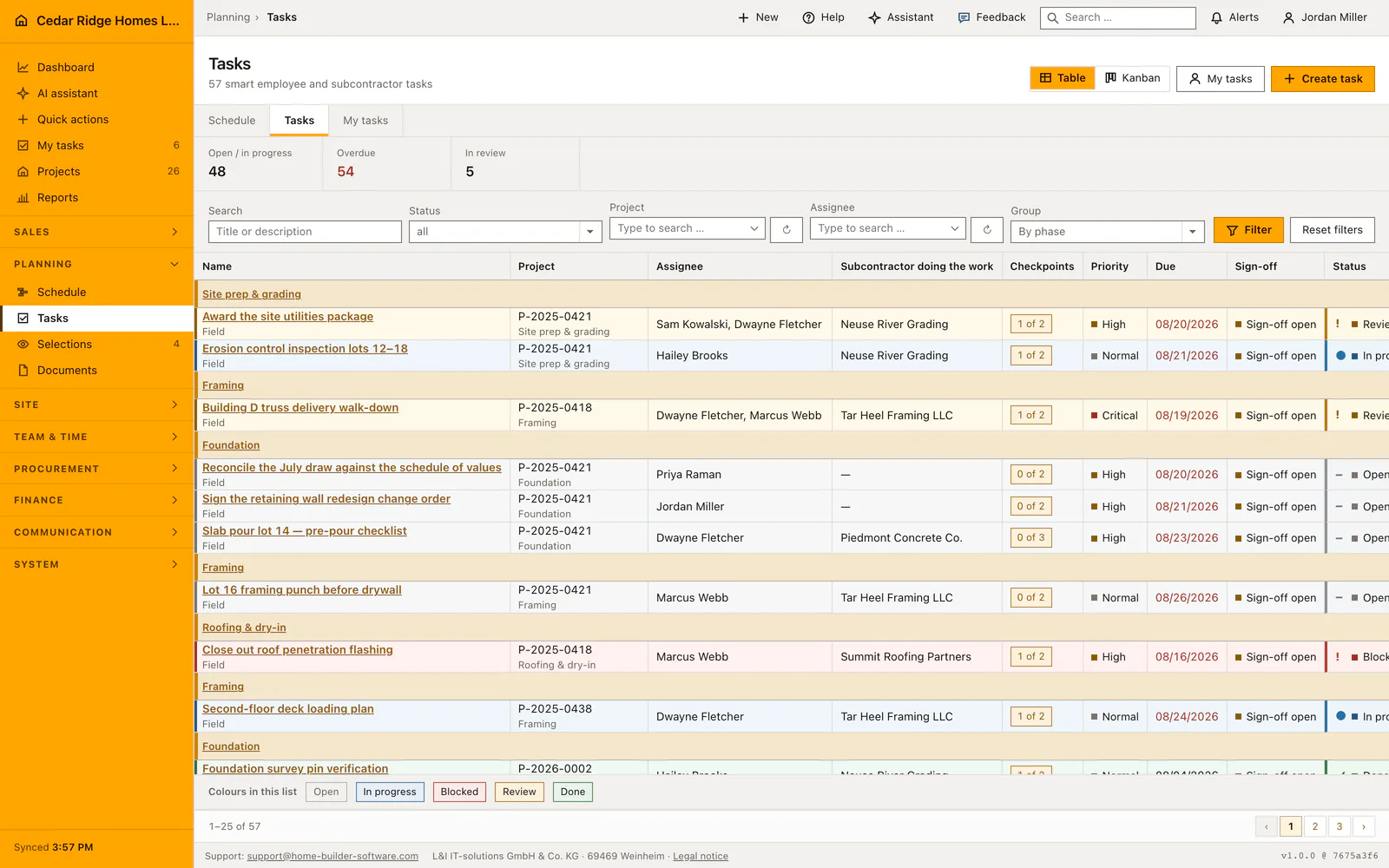
Construction task board with assigned work grouped by status
The task register shows project work with assignees, priorities, due dates and current status.

Turn scheduled work into tasks people can follow

The task board organizes work by status and keeps assignments with the project. It complements the schedule’s dates and dependencies: a manager can review when the trade is due, while the responsible colleague follows the work still open. Inspect the task workflow before deciding how your office and field team will share updates.

Explore construction tasks

A delayed trade should change a plan you can explain

Consider a window delivery that arrives after the planned installation date. Identify the affected activity, inspect its successors and revise the schedule deliberately. Compare the result with the baseline and check which commitments to the homeowner or other trades need a conversation. A recalculated date is not the same as a supplier confirming availability.

The schedule does not replace workforce allocation. Its working calendar and the separate workforce planner have different responsibilities. Do not assume that moving an activity automatically reserves a crew, changes an absence or resolves a subcontractor clash.

Evaluate scheduling software with one real sequence

Bring a short sequence from a current house: foundations, framing, weather-tightness and interior work. Include one dependency, one waiting period and one milestone. Review the sequence in the timeline and calendar, save a baseline, then change an activity and inspect the downstream dates.

The free schedule calculator can help estimate a duration from labor hours and available capacity. It is a planning aid. Weather, inspections, deliveries and your project’s dependency network still need to be represented in the working plan.

Calculators and instructions for this construction workflow

Read the workflow instructions

Home Builder Software pricing and trial access

Managed cloud starts at $70 per month before tax, with all modules and unlimited projects. Your written quote specifies users and storage. A self-hosted license is quoted separately.

The free 14-day trial opens all product modules, with up to 100 MB of uploads and a limited monthly AI allowance. A secure registration link arrives by email; no payment details or automatic subscription are required.

Questions about residential construction scheduling

Does the schedule support task dependencies?

Yes. Activities support four dependency types and lag. Test the relationships used in your own build sequence and inspect recalculated dates before relying on the plan.

Can I compare the current schedule with a baseline?

Yes. Saving a baseline preserves the activities’ start and end dates as a reference for later comparison. Choose that reference deliberately before changing the live plan.

Can I see several house projects together?

Yes. The schedule provides project and portfolio views, including timeline and calendar presentation. Each project keeps its own activity records.

Will rescheduling automatically allocate my crews?

No. Construction scheduling and workforce planning are separate workflows. Review assignments and availability alongside changed project dates.

Test a schedule with a delay that matters

Use a current sequence and a realistic delivery delay to examine dependencies, baseline comparison and the information your field team needs.