Home builder job costing software

The bank balance cannot tell you whether a particular house is still on budget. Home Builder Software compares the project’s planned costs with commitments, billed costs, labor actuals and a current forecast, organized by cost group.

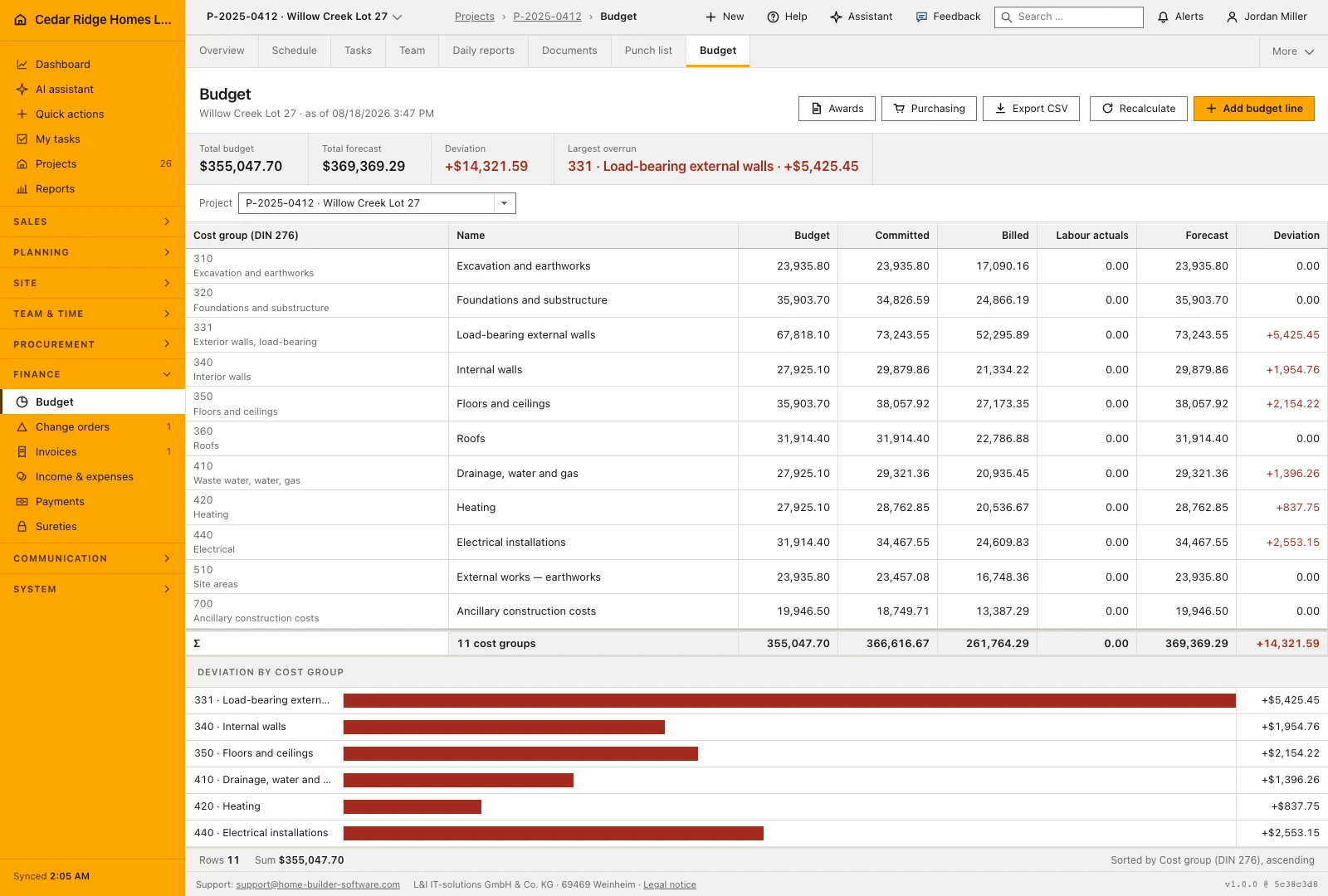
House project budget comparing planned, committed, billed and forecast costs
The budget separates the planned amount from commitments, billed costs and labor actuals.

Read budget, committed and billed costs as different figures

This is useful before all the invoices arrive. A purchase commitment already affects the work you can afford, while an invoice without a purchase order still needs a place in the job’s costs. The budget brings these records together so the team can investigate a variance instead of rebuilding the picture from separate spreadsheets.

Start with a reviewed estimate transfer or a project budget. As purchasing and finance records change, the budget rollup updates their cost groups. Sent, confirmed, partially delivered and delivered purchase orders contribute commitments. Booked or settled cost records contribute billed amounts; approved time entries provide labor actuals.

Use the forecast to identify where the recorded costs have moved, then inspect the source documents. A missing cost-group assignment can prevent a record from reaching the intended budget line. The CSV export includes the project and cost columns so your accountant or project manager can reconcile the figures outside the application.

  • See commitments before payment

    A sent order matters even when the supplier has not invoiced it. Review committed costs alongside amounts already billed.

  • Investigate the source of a variance

    Open purchasing and finance records for the affected group. Check amounts, status and coding before changing the budget.

  • Approve and assign labor time

    Labor actuals depend on approved entries and their cost group. An unapproved or unassigned timesheet cannot provide the same cost evidence.

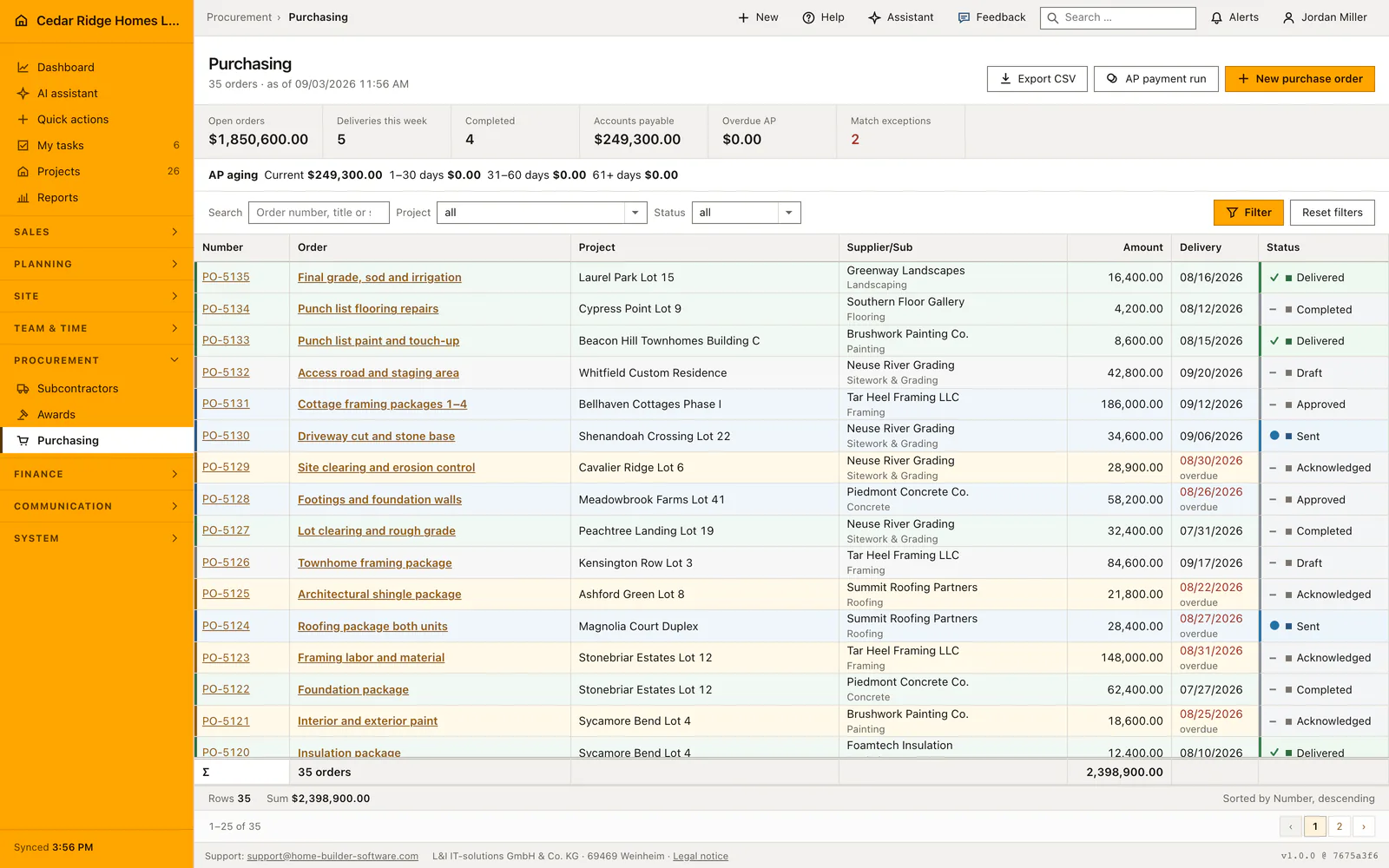
Construction purchase orders with suppliers, values and delivery status
The purchasing register lists orders with supplier, delivery date, amount and fulfillment status.

Purchase orders explain a construction commitment

The purchasing register keeps supplier, project, amount, delivery date and order status together. Those details explain why a cost has been committed and what still needs to arrive. Inspect the purchasing workflow to follow order lines through partial receipt and supplier invoicing.

Follow purchase commitments

Use the cost review to find work that is still missing

Review one trade at a time: the original allowance, the order placed, the invoices booked and any labor already approved. Ask what remains unpriced or uncommitted. The current forecast derives from recorded commitments and billed costs, falling back to the budget when neither exists; it does not automatically estimate every piece of work still to be bought.

A practical weekly review also checks whether an awarded package and a later purchase order describe the same scope, whether an invoice uses the correct group and whether a customer change has been commercially approved. A useful number needs an agreed recording process behind it.

Job costing alongside your accounting system

The project view supports operational cost control. It is not a promise of local statutory accounts, payroll or a direct QuickBooks or Xero connection. Home Builder Software provides exports and permissioned integration interfaces; a specific accounting connection needs an agreed mapping and a tested data exchange.

The budget uses a DIN 276 cost-group structure. If your business works with another coding system, examine a representative estimate and supplier invoice before purchase. Decide how project codes, tax treatment and reporting categories will be handled in your country.

Calculators and instructions for this construction workflow

Read the workflow instructions

Home Builder Software pricing and trial access

Managed cloud starts at $70 per month before tax, with all modules and unlimited projects. Your written quote specifies users and storage. A self-hosted license is quoted separately.

The free 14-day trial opens all product modules, with up to 100 MB of uploads and a limited monthly AI allowance. A secure registration link arrives by email; no payment details or automatic subscription are required.

Construction job costing questions

What is the difference between committed and billed cost?

Committed cost records purchasing obligations, including relevant purchase-order states and awarded packages. Billed cost follows recorded cost entries in the applicable booked or settled states. They answer different questions and should not simply be added together.

Does the forecast estimate all remaining work automatically?

No. It is based on recorded commitments and billed costs, with a budget fallback when both are absent. Review remaining scope and unplaced orders as part of your cost forecast.

Can I export the project budget?

Yes. The budget CSV includes project, cost group, planned amount, commitment, billed cost, labor actuals, forecast and deviation.

Is there a built-in QuickBooks or Xero connector?

A direct connector to either system is not included in the current published product. Discuss the records, mapping and reconciliation you need before agreeing any integration work.

Review the cost history of one house

Bring a budget, an order and a supplier invoice for the same trade. We can check the cost-group mapping and show how the records appear in the project view.