
Construction purchase order software
Track construction purchase orders, supplier line items, partial deliveries and committed job costs. See the purchasing workflow and real product screens.
Construction purchase order software: how it works in Home Builder Software
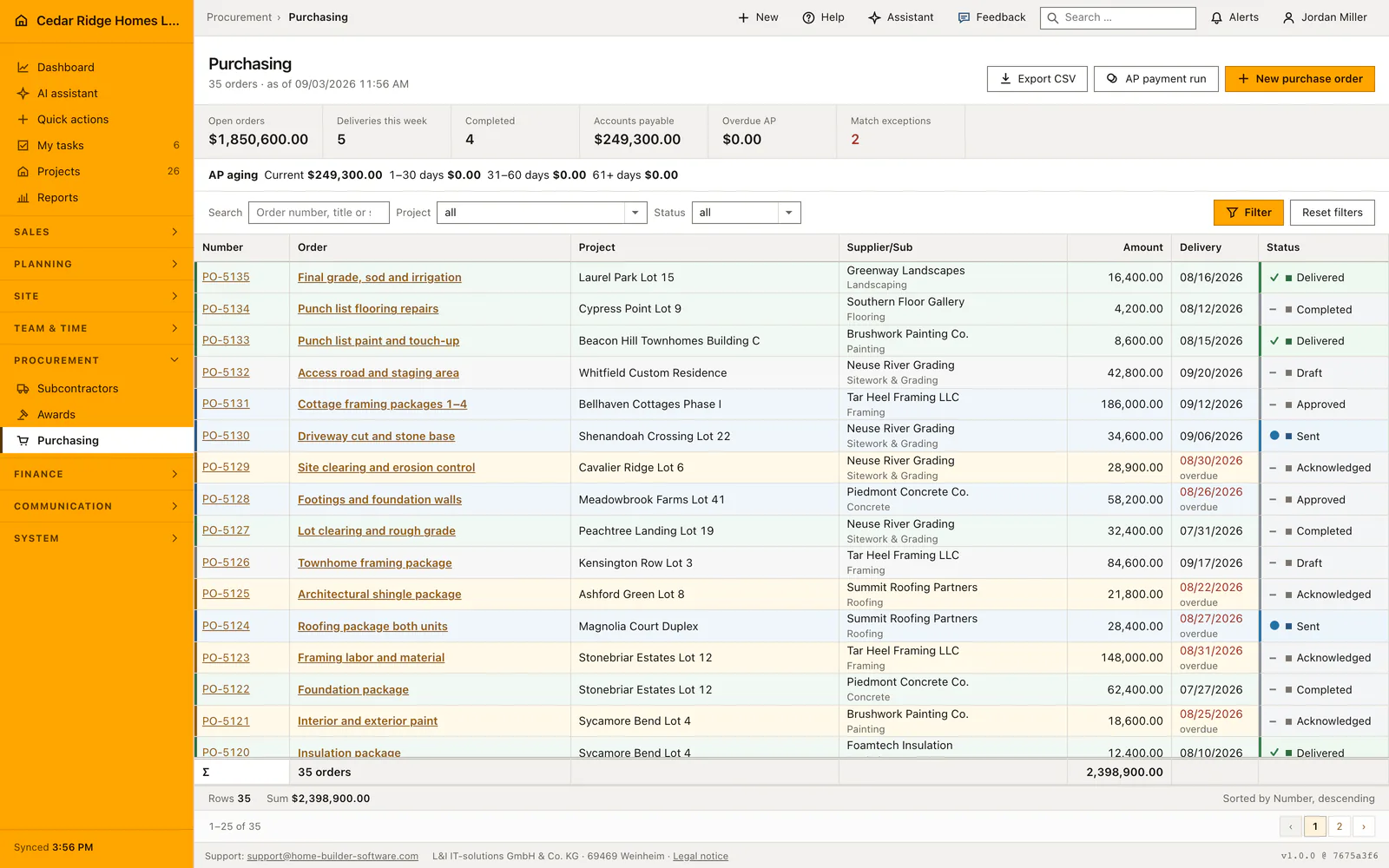
Purchasing lists every order placed with a supplier or a subcontractor, across all sites, in one filterable table: number, title, project, supplier with trade, amount, delivery date and status. Free-text search reaches order number, title and supplier name; project and status filters narrow the set further. The metric strip recalculates over whatever is filtered, showing open order value, deliveries falling in the current calendar week and the count already completed.
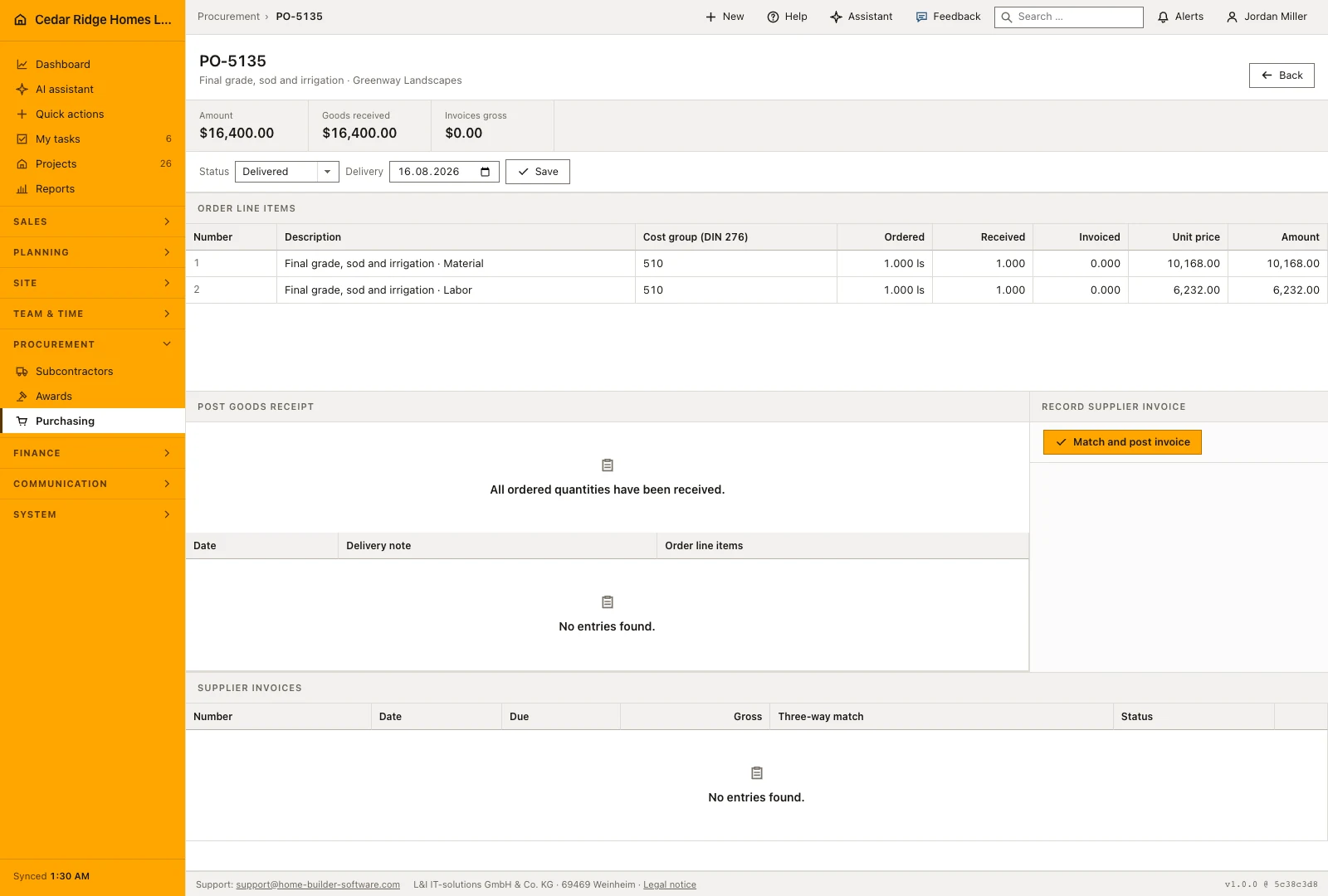
An order runs from draft to approved, sent, acknowledged, delivered and completed, and a delivery date in the past keeps the red mark plus the word overdue until goods arrive. Priced line items with quantity, unit and unit price replace the header amount and carry the cost group that binds the value against the project budget. Goods receipts book partial or full quantities against a line; an over-delivery is refused inside the transaction.
The supplier invoice closes the chain. It is matched three ways against the ordered price and the received but not yet invoiced quantity; a quantity or price deviation lands as an exception and cannot be released. Release is refused again when the tax-exemption certificate or the lien-waiver value on the subcontractor is not in order. Each posted invoice writes a finance entry tied to order, due date and document, so the budget keeps its actual cost.
Writing a purchase order with line items and a cost group
The create form asks for project, supplier, a title, a cost group, an opening status and a delivery date, then a line item table with description, cost group, quantity, unit and unit price. The number comes from the company sequence in the form B-2026-0142. Once lines exist their total replaces the header amount, and a cost group that is the same across every line moves up into the head by itself.
An order that came out of an awarded trade is better started there: opened with the winning bid attached, the form arrives with project, supplier, cost group and price already filled in, and the order stops drifting onto a different cost group than the package it pays for. Older orders reduced to a header amount are not lost either, because adding positions afterwards recalculates the amount from those lines.
 Open full-size screenshot
Chasing delivery dates and booking goods receipts
The metric strip counts over the filtered set: open order value, deliveries falling in the running calendar week and the number of orders already completed. A passed date on an order that is neither delivered, completed nor canceled turns red and carries the word overdue beside it, so the signal does not rest on color alone. Free-text search reaches order number, title and supplier name, the table pages at twenty-five rows, and the CSV export writes the filtered set.
When the lorry arrives, the goods receipt takes the receipt date, the delivery note number and a quantity per line. More than the quantity still outstanding is refused when the receipt is saved. The status then follows by itself: part of the quantity gives part delivered, the last outstanding unit gives delivered. Recording the supplier invoice afterwards asks for the supplier document number, invoice and due date, tax rate, then a quantity and price per line.
What purchasing passes on to budget, awards and finance entries
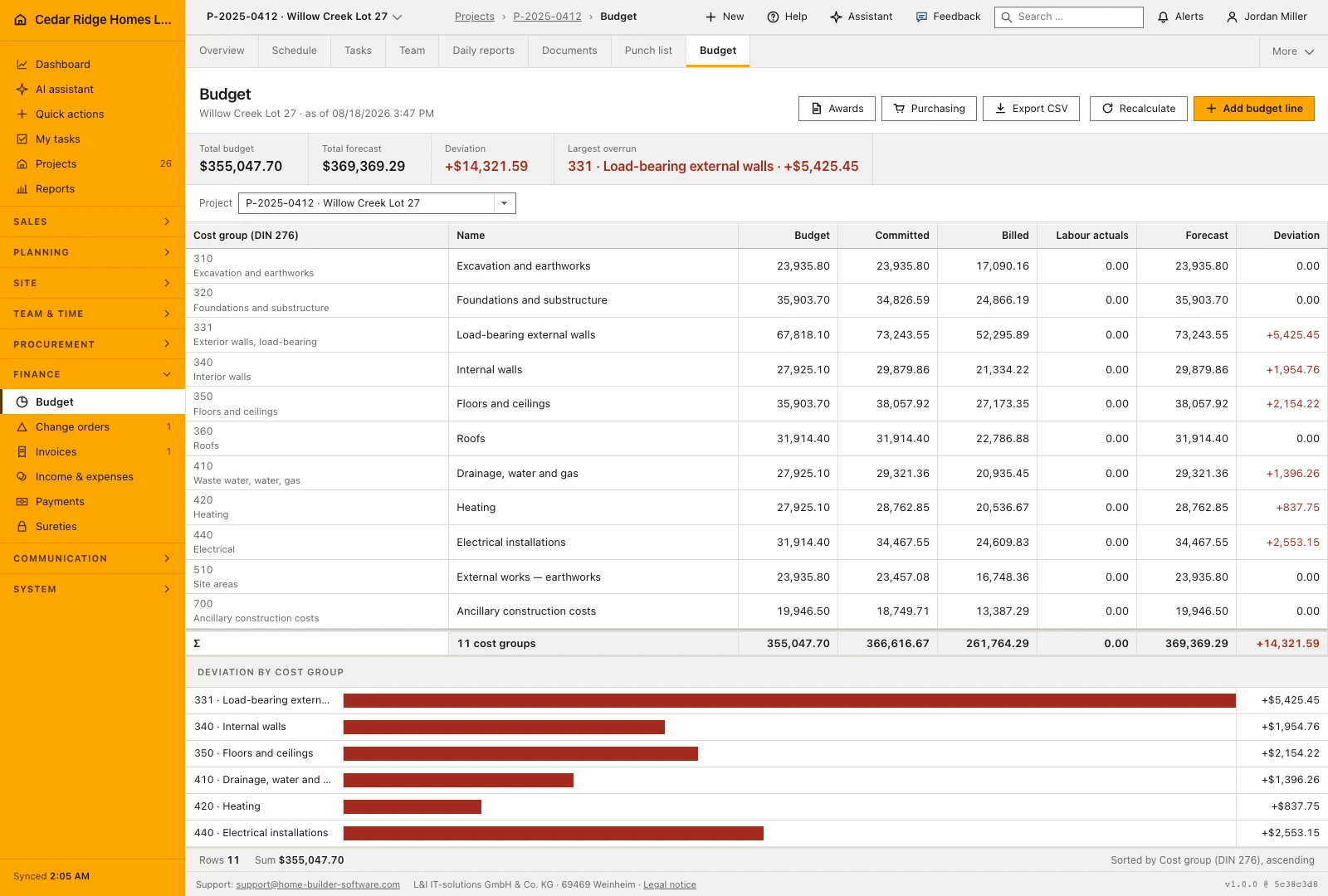
After every write the budget of the affected job is recalculated. Orders count as a commitment while they stand in sent, confirmed, part delivered or delivered. Where the money lands is decided by the cost groups on the positions; the head is only consulted when there are no lines at all. A cost group nobody planned gets a budget line of its own instead of staying invisible.
A recorded supplier invoice creates a finance entry of the purchase type, numbered EK, tied to the order, the due date and the cost group. Approval marks that entry booked, the payment run marks it reimbursed and writes a payment under a ZL number referencing the run and the supplier document. The award register upstream and the budget page downstream both link into this list.
 Open full-size screenshot
Construction purchase order software in the daily routine
An order is usually raised straight from an awarded bid, with project, supplier, cost group and amount prefilled, or entered by hand for material. The buyer adds line items, approves and sends it. Site staff book the goods receipt against the delivery note when the truck arrives. Accounting posts the supplier invoice, reads the match result, clears exceptions with the buyer and releases what is clean. The payment run then settles everything due as of the chosen date.
Read the documentationConstruction purchase order software: what it covers
Filter orders by project and purchasing status
Track supplier, amount and delivery date with overdue highlighting
See open-order value and deliveries due in the current week
Construction purchase order software: questions and answers
Which stages does a purchase order follow?
Orders move through draft, approval, sending, acknowledgement or confirmation, partial delivery, delivery and completion. Cancellation is also recorded.
How are late deliveries shown?
A passed delivery date remains red and marked overdue until the order is delivered.
What does construction purchase order software track?
It tracks the project, supplier, order lines, quantities, unit prices, cost groups, delivery date and purchasing status. Home Builder Software also records partial goods receipts and connects committed orders to the project budget.
Can I record partial construction deliveries?
Yes. Record a goods receipt with its date, delivery note and quantities for each line. Quantities above the outstanding amount are refused, and the order moves to partially delivered or delivered according to what has arrived.
When does a purchase order count as committed job cost?
Orders in sent, confirmed, partially delivered or delivered status contribute to committed cost. Cost groups on the line items determine the budget allocation; an order without lines uses its header cost group.
Use Construction purchase order software on your own projects
Request a trial period for the workflow around this module. We agree the roles, permissions and useful scope with you before preparing access.