Software for small home builders

In a small home-building business, the person pricing the next job may also answer the homeowner and chase yesterday’s delivery. Home Builder Software keeps the project, estimate, schedule, tasks and invoices connected so those responsibilities can be shared without passing around a different spreadsheet for every question.

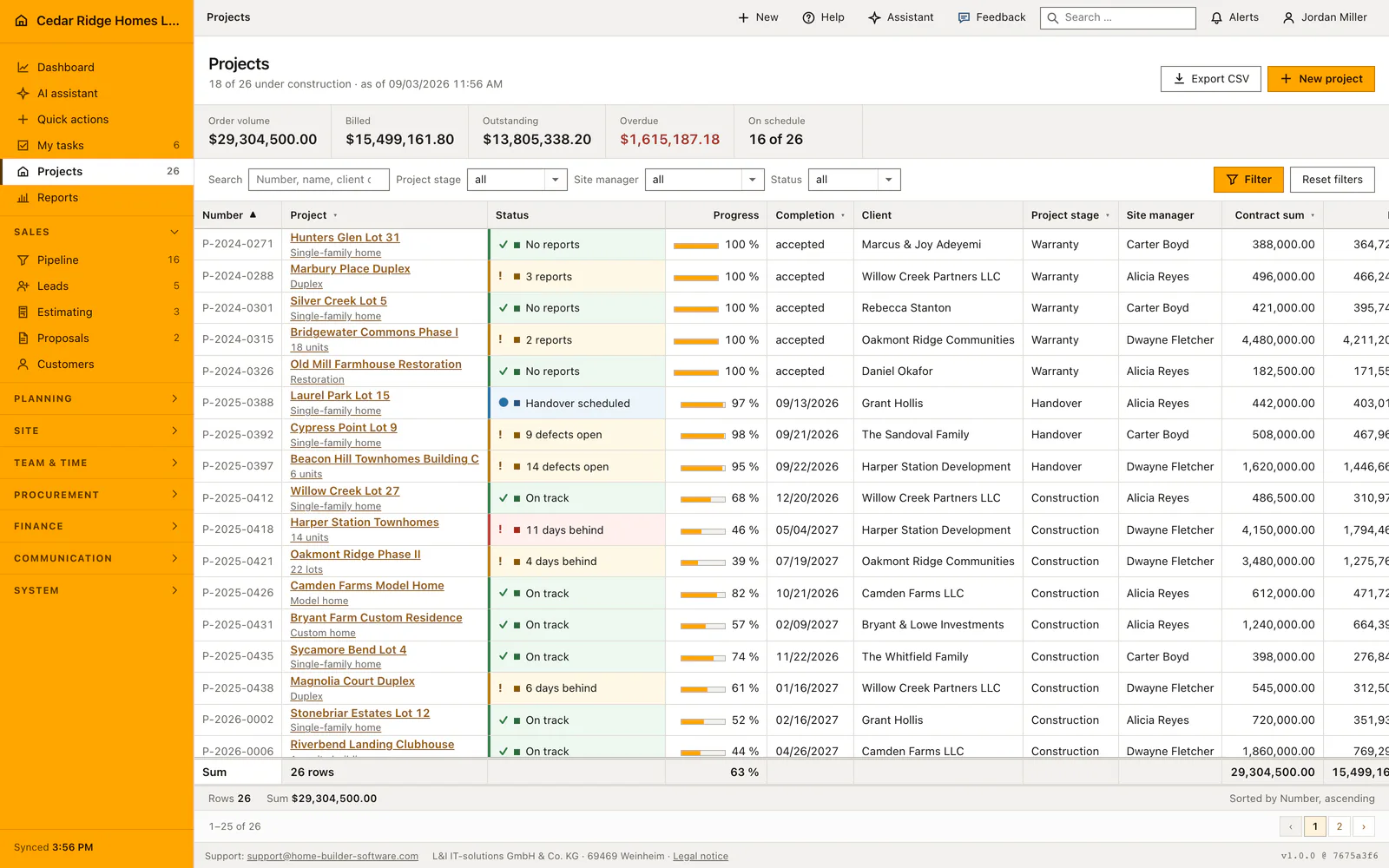
Construction project register with customer, stage, site manager and progress
Each house keeps its project identity, customer, stage and responsible site manager in the register.

Choose a manageable first project workflow

Start with the records your team will maintain every day. A project needs a customer and a responsible person; upcoming work needs dates and ownership; invoices need a status the office can follow. Add the wider purchasing, selections and service workflows when the people responsible for them are ready to use them.

Pick one active house and agree who maintains its project record, schedule and tasks. Give the field team the permissions required for their work and keep commercial controls with the appropriate office role. The same project can then support a site conversation and the office’s next invoice without exposing every company record to everyone.

The managed cloud includes all modules and unlimited projects. Its final quote depends on users and storage, so a small starting team should describe both rather than extrapolate the advertised starting price into a per-user formula. A self-hosted license is available separately for businesses that want to operate their own installation.

  • Start with one active house

    Use a real project whose dates, tasks and customer details can be checked by the people responsible for it.

  • Give each record an owner

    Agree who updates the schedule, follows open tasks and maintains invoices. Shared access does not remove that responsibility.

  • Test office and field permissions

    Check the access of a regular team member as well as the administrator before adding live business information.

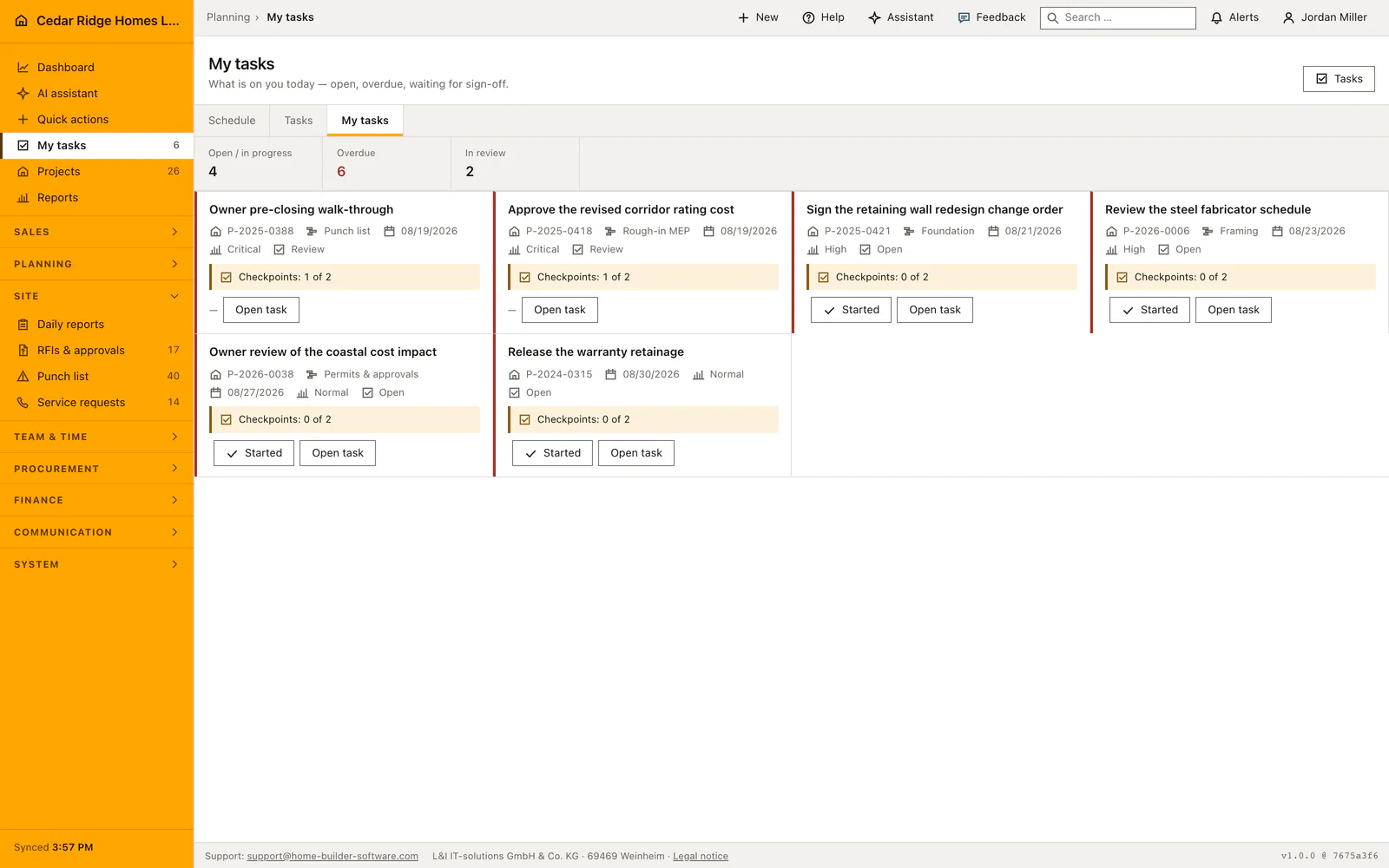
Personal construction task list with assignments and due dates
The personal task view brings together assigned work with due dates, priorities and progress.

A personal task list makes the next action visible

The personal task view collects work assigned to the signed-in colleague. It gives a small team a place to start without reading every project from top to bottom. Inspect how project links, due dates and task states fit the way you divide office work and site follow-up.

See personal construction tasks

Replace spreadsheet handovers in a controlled order

Keep the first rollout concrete: confirm project details, put upcoming work in the schedule and assign the open actions. Compare what the site team sees with what the office expects. Once those records are reliable, review the estimate-to-budget and purchasing processes with the people who will own them.

Existing spreadsheets may contain customer history, balances or documents that should remain available. Decide which records must move and which can stay in a reference archive. This is a suggested adoption sequence, not a promise of an automatic spreadsheet importer or a fixed setup time.

Check the fit for your country and operating model

The interface is available in English, German and French. The managed cloud is operated in the European Union. A browser-based product still needs a reliable connection, and local accounting, invoice requirements and cost-code mapping should be checked on one of your own jobs.

A self-hosted deployment changes who operates the infrastructure, backups and recovery. Agree those responsibilities before choosing it. For a small office that wants the provider to run the application, compare the managed-cloud quote with the time and support needed for self-hosting.

Home Builder Software pricing and trial access

Managed cloud starts at $70 per month before tax, with all modules and unlimited projects. Your written quote specifies users and storage. A self-hosted license is quoted separately.

The free 14-day trial opens all product modules, with up to 100 MB of uploads and a limited monthly AI allowance. A secure registration link arrives by email; no payment details or automatic subscription are required.

Questions from small home-building businesses

Do I have to use every module from the start?

The paid managed cloud includes the modules, but your team can introduce workflows in an agreed order. Start with the project records and responsibilities you can maintain consistently.

Is the starting price a fixed price for any team size?

No. The final monthly amount is quoted according to users and storage. Projects are unlimited in the managed cloud; there is no published per-user pricing formula.

What can we evaluate in the free trial?

The 14-day trial opens all product modules, with up to 100 MB of uploads and a limited monthly AI allowance. No payment details or automatic subscription are required.

Can we move our existing data automatically?

Do not assume a universal importer. Prepare representative source files and agree the records, relationships and totals that must survive a migration before planning the switch.

Choose the first workflow your team will actually use

Describe your current projects, team responsibilities and the spreadsheet handover that causes the most rework. We can use those facts to scope a useful evaluation.