
Construction invoicing software: setup and daily use
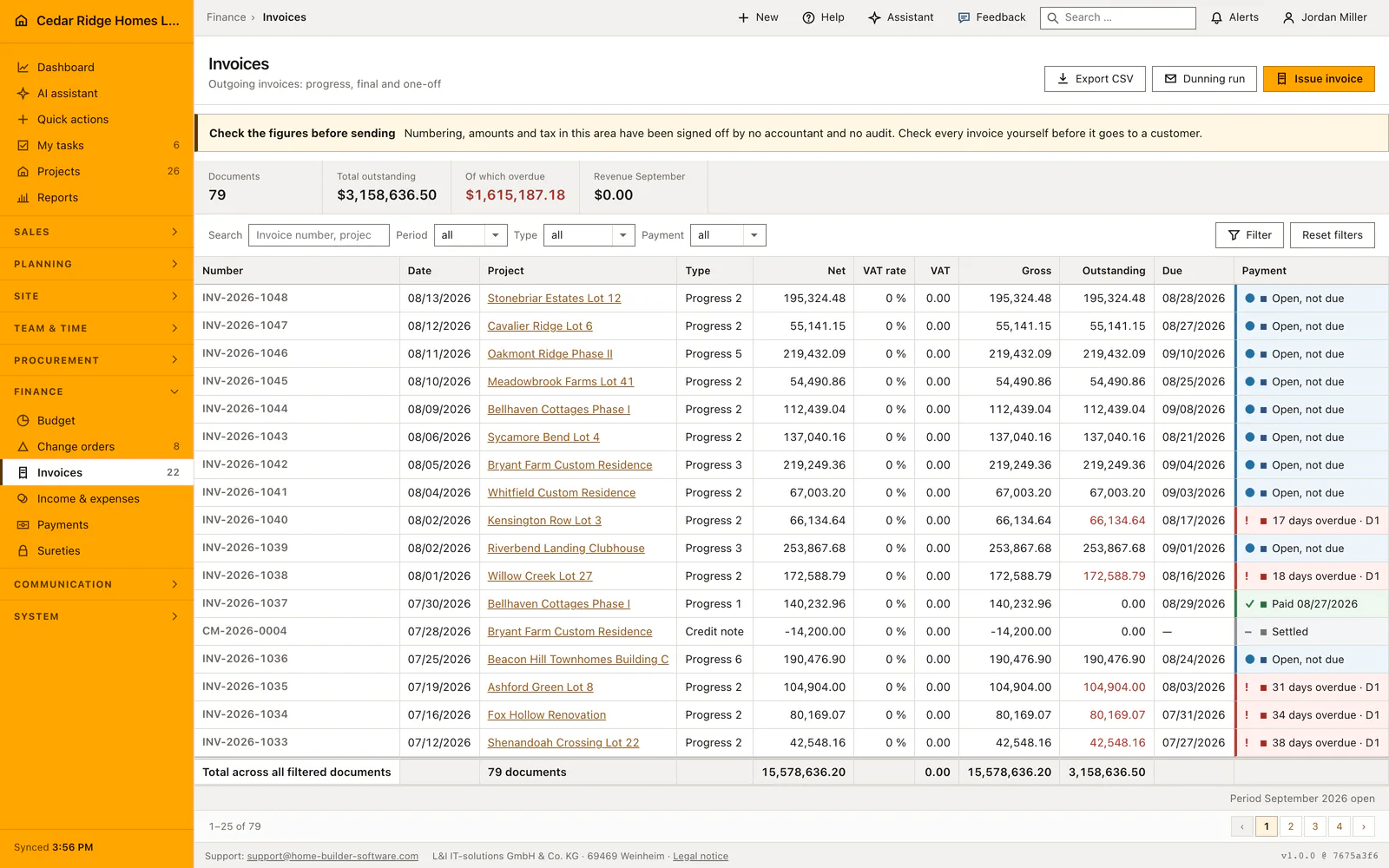
Invoices holds every outgoing document of the company: progress invoices, final invoices, ordinary invoices and credits, with net, tax rate, gross, the amount still open and a payment column written in plain words. From /invoices you issue a document, run the reminders, open the print sheet, download an XRechnung file and export the filtered list. Reading asks for finance.view, writing for finance.manage.
Payment terms, cash retention and tax rates to prepare first
Three fields on the job decide how an invoice looks before anyone types an amount. The contract sum sets the billing basis, the payment terms field holds up to 180 characters of free text that gets printed as the payment sentence and travels into the XRechnung note, and the retention percentage decides how much of the gross is held back at first. All three live on the job rather than on the document, so correcting them there benefits every later invoice. The due date is a separate matter: the create form proposes fourteen days of its own accord and never reads a number out of that sentence, so a job agreed at thirty days wants the figure changed by hand on each document.
The rates offered in the form are derived from the country of the company and can be overridden in the finance settings, so an Austrian firm is not made to bill nineteen percent because Berlin does. Every screen of this module carries a standing notice asking you to recheck numbering, amounts and tax before a document leaves for the customer; it belongs to the process rather than to the decoration.
Issuing a progress, final or standard invoice
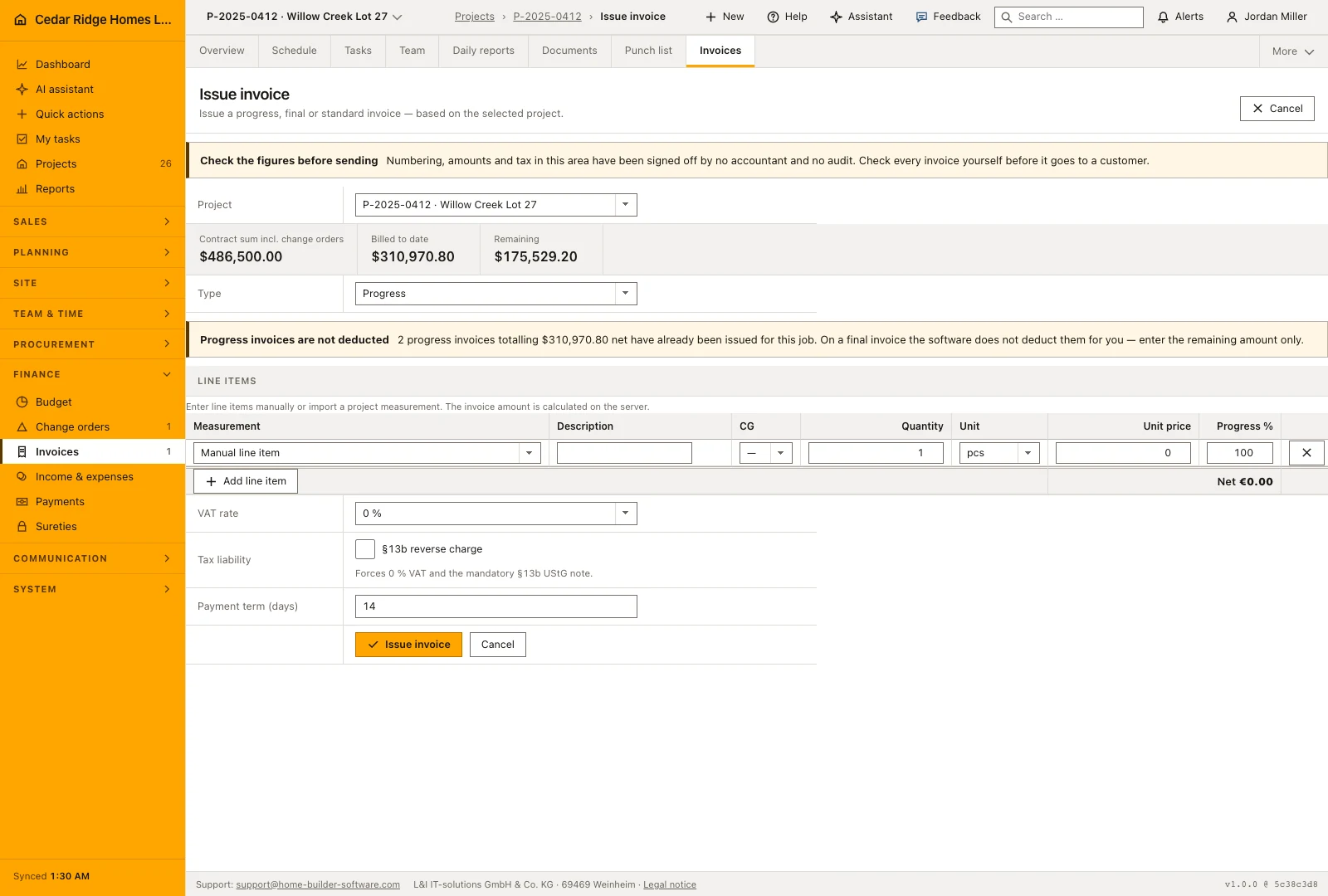
The screen opens with the job selector, and under it the billing basis: contract sum including posted change orders, billed to date, and what remains. Switching the job reloads the page and the basis with it. Below come the document type and up to a hundred line items with description, cost group, quantity, unit, unit price and a degree of completion, or a project measurement taken over into a line.
The server calculates each net position as quantity times unit price times completion, and the document total from those positions. Ticking the reverse charge option sets rate and tax to zero and adds the mandatory note. The payment term is proposed at fourteen days. Issuing reserves the next number, RE for an invoice and GS for a credit, numbers progress invoices per job and raises the job's billed sum in the same transaction.
A final invoice does not deduct the progress invoices already issued. The screen says so as soon as any exist, because the word suggests a closing statement, and describing the whole scope again bills it a second time. Enter the remaining claim only; the cumulative presentation with its deduction lines belongs to the print sheet.
Filtering open items, matching receipts and sending reminders
Four filters narrow the ledger: period as month, quarter or year, document type, payment state, and a search field over invoice number, job and customer. The metric band and the total row both cover the filtered set, so the figures on screen belong together. The payment column writes the state out, from eight days overdue with its reminder level through paid with discount to settled, or open and not yet due.
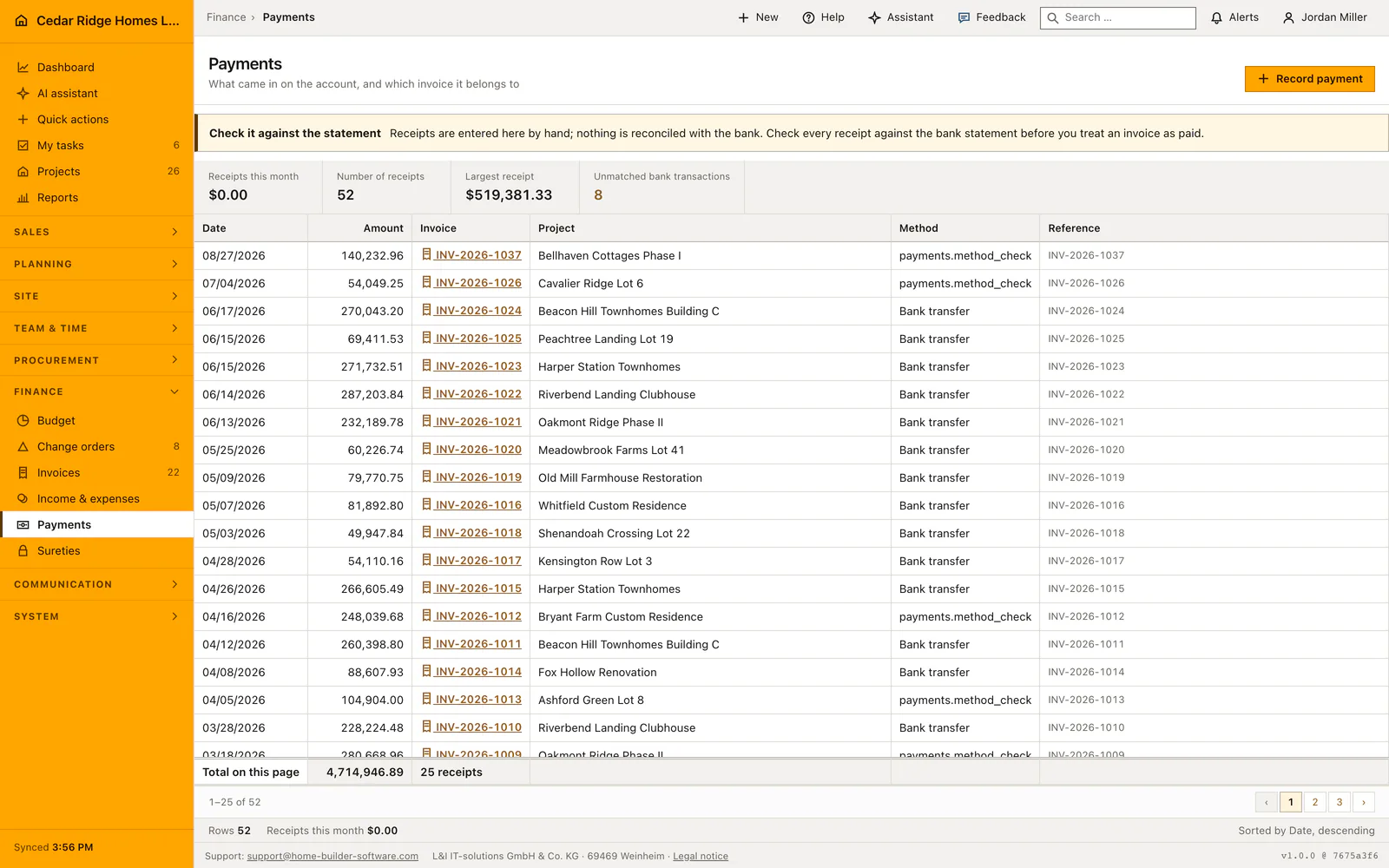
A document turns overdue through the daily deadline run, not the moment the date passes on screen. The single action then records the next reminder level on an overdue document, and the dunning run raises every overdue invoice below the third level by one step while skipping anything already reminded the same day. Receipts are entered in the payments module, each one lowering the open amount of the invoice it names.
Fixed fields, releasing the retention and the audit log
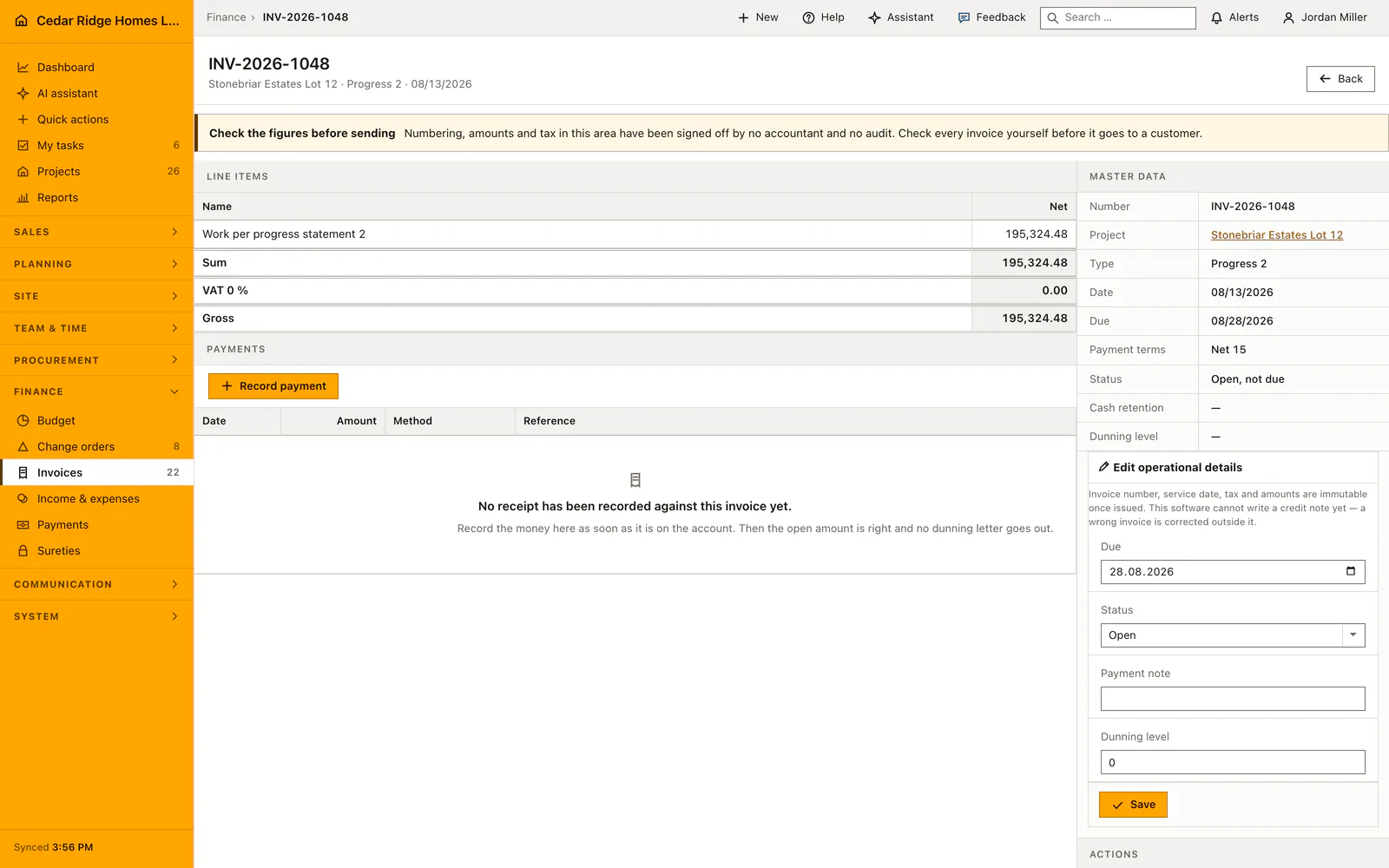
After issue four things stay editable: the due date, the operational status, the payment note and the reminder level. Number, date, rate, net, tax and gross are fixed, and the status choice depends on what the document already is, so a paid invoice does not go back to open. A financial correction takes the shape of a credit.
The amount withheld at issue lowers the payable figure while the gross stays untouched, and the detail page keeps a small retention ledger showing the withholding, the release, the date and the person. The release acts exactly once and opens the balance again. Issuing, dunning, the dunning run, the release and every change to the operational fields all reach the audit log.
Print sheet, XRechnung and the accounting export
Generating the PDF opens a standalone letter with the company head, the recipient from the job, the itemized works and the total block. On a final invoice it shows the cumulative works and below them every earlier progress invoice of the job as a deduction line. The reverse charge note appears where it applies, and the payment sentence pairs the due date of the document with the terms text stored on the job. The PDF comes out of the browser print dialog.
The XRechnung export downloads a UBL document carrying the XRechnung 3 customization id, supplier and customer, the tax category including the reverse charge case, payment data and the invoice line, as a public authority asks for it. The list export writes semicolon-separated CSV with a byte order mark, and the accounting variant adds account, contra account and posting key as a demonstration mapping.
Example of a final invoice with retention and payment receipt
Hunters Glen Lot 31 is ready for its closing document. The issue screen shows the basis: $388,000 of contract sum including change orders, $364,720 billed through two progress invoices of $182,360 each, and $23,280 remaining. The office picks the type final invoice, heeds the notice that earlier progress invoices are not deducted automatically, and enters one line over exactly the remaining claim: quantity one, unit price $23,280, completion one hundred percent. With a zero tax rate the gross equals the net, the proposed fourteen days turn 08/20/2026 into a due date of 09/03/2026, and issuing reserves the number INV-2026-1049 while raising the job's billed sum in the same transaction.
The job carries a five percent retention, so the software withholds $1,164 and puts the payable amount at $22,116 while the gross stays $23,280. The print sheet lays out the cumulative works of $388,000 and deducts both progress invoices, leaving exactly the $23,280 of this document. On 09/01/2026 the customer transfers $22,116; the receipt is recorded in payments, and the open amount drops to the withheld $1,164. Months later the release control frees the retention exactly once, the balance opens again, and the final transfer closes the document as paid, with every step from issue to release standing in the audit log.
Construction invoicing software: checks before saving
The invoice number is unique per company; a clash in the sequence is retried up to three times rather than answering a completed form with an error.
Only an overdue document can be dunned, the level stops at the third, and the run skips anything already reminded on the same day.
The reverse charge option forces rate and tax amount to zero and stores the note that gets printed on the document.
Document and updated billed sum of the job arise in one transaction, so a failed write leaves neither of them behind.
Detail, print and export routes check that the document belongs to your company and answer not found otherwise.
Construction invoicing software: common mistakes
Without the daily background run no invoice turns overdue by itself. The filter, the aging figure and the dunning run then stay empty beside documents that are visibly past their date.
The open amount of a fresh invoice is the gross less the retention. Booking the full gross as a receipt leaves the difference sitting there until the retention is released on purpose.
A final invoice does not subtract earlier progress invoices inside its own amount. Enter the remaining claim and let the print sheet produce the cumulative statement.
The product page describes the same module from the business side, with the decisions it supports and the modules it connects to.
See the product pageFrequently asked questions
Can issued invoice amounts be changed?
No. Number, issue date and amounts remain immutable; corrections are issued as credits.
Does invoicing support reverse charge?
Yes. Eligible construction services can use the §13b option with zero VAT and the required invoice notice.
Configuring this part for your own company?
Describe the sequence you follow today and the result you need at the end of it. We can walk through the settings that produce it.