
Construction software settings, API and webhooks: setup and daily use
Company configuration lives under Settings, whose tabs are grouped into Company, People and permissions, Master data and lists, System and My account. Most tabs need settings.manage, while Finance needs finance.manage, AI needs ai.manage and Users needs users.manage. Storage and the AI provider are set up by L&I IT-solutions against the company license and become active only after a live connection test; the company reads their state here and asks support for changes. Every change writes an audit entry.
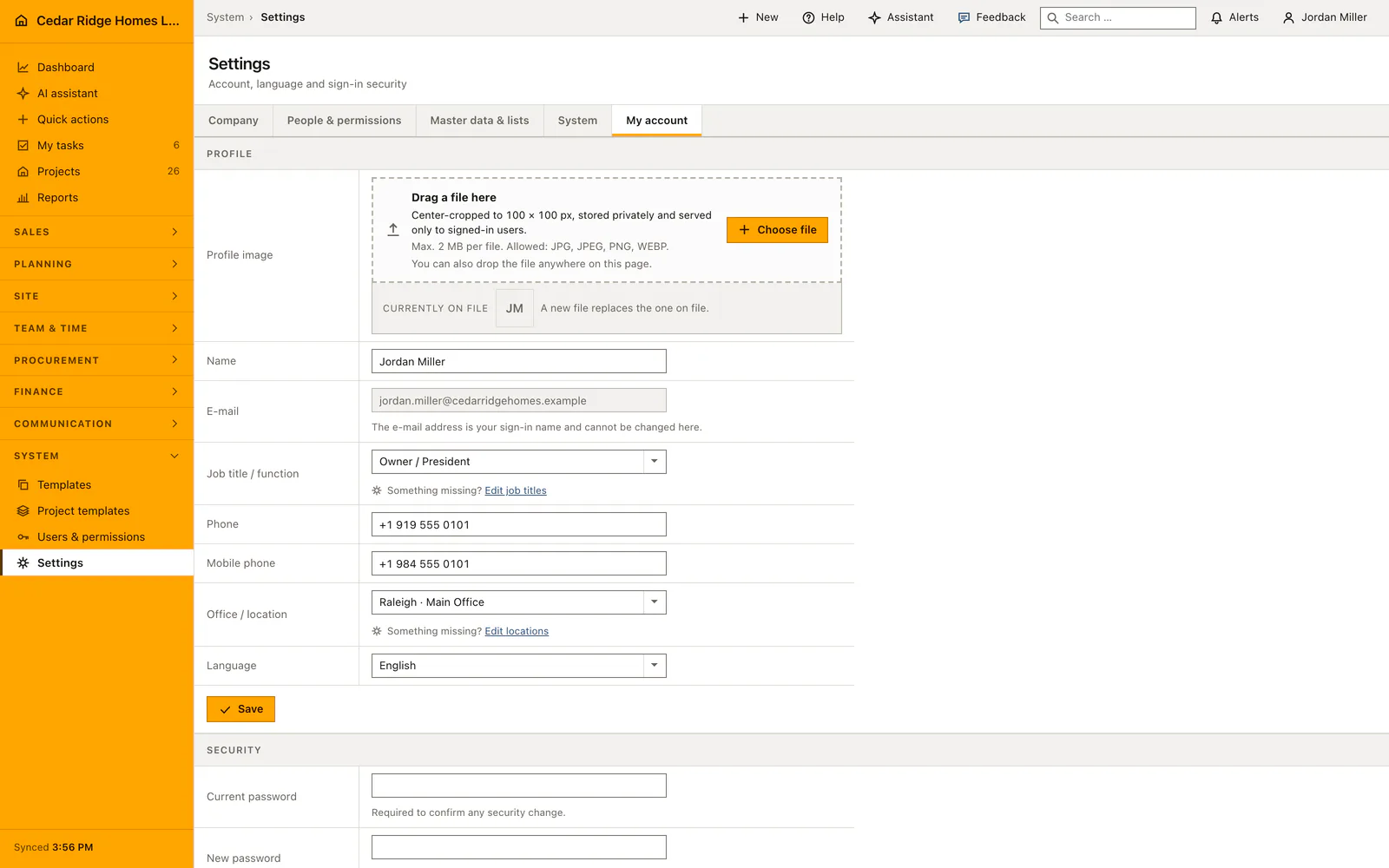
How the settings area is grouped and who may open each tab
The navigation is two rows rather than one long strip: the upper row names the kind of setting, the lower one the pages of that kind. Company holds the legal identity and documents, the process wizard, the setup checklist, finance numbering, the customer portal and the privacy choices. Master data and lists holds the company pick lists, the next-step labels, the document folders, the pipeline stages and custom data. System holds license, storage, AI and integrations.
A group whose entries are all out of reach is not shown at all, so the area a bookkeeper sees is genuinely smaller than the one an administrator sees. The license page is open to every signed-in colleague; the finance tab answers to finance.manage; the AI tab answers to ai.manage; the users tab answers to users.manage; everything else answers to settings.manage.
Company identity, document layout and finance number ranges
Company and documents is asked once and read by every printed record afterwards. It takes the country, the legal name, street, postcode and city, e-mail, phone and website, the legal form, register court and register number, VAT identification and tax number, the representatives and the bank details. The layout half sets the accent color, whether bank and register lines are printed, the payment terms, a footer note and the default introduction and terms, with a live preview of the footer.
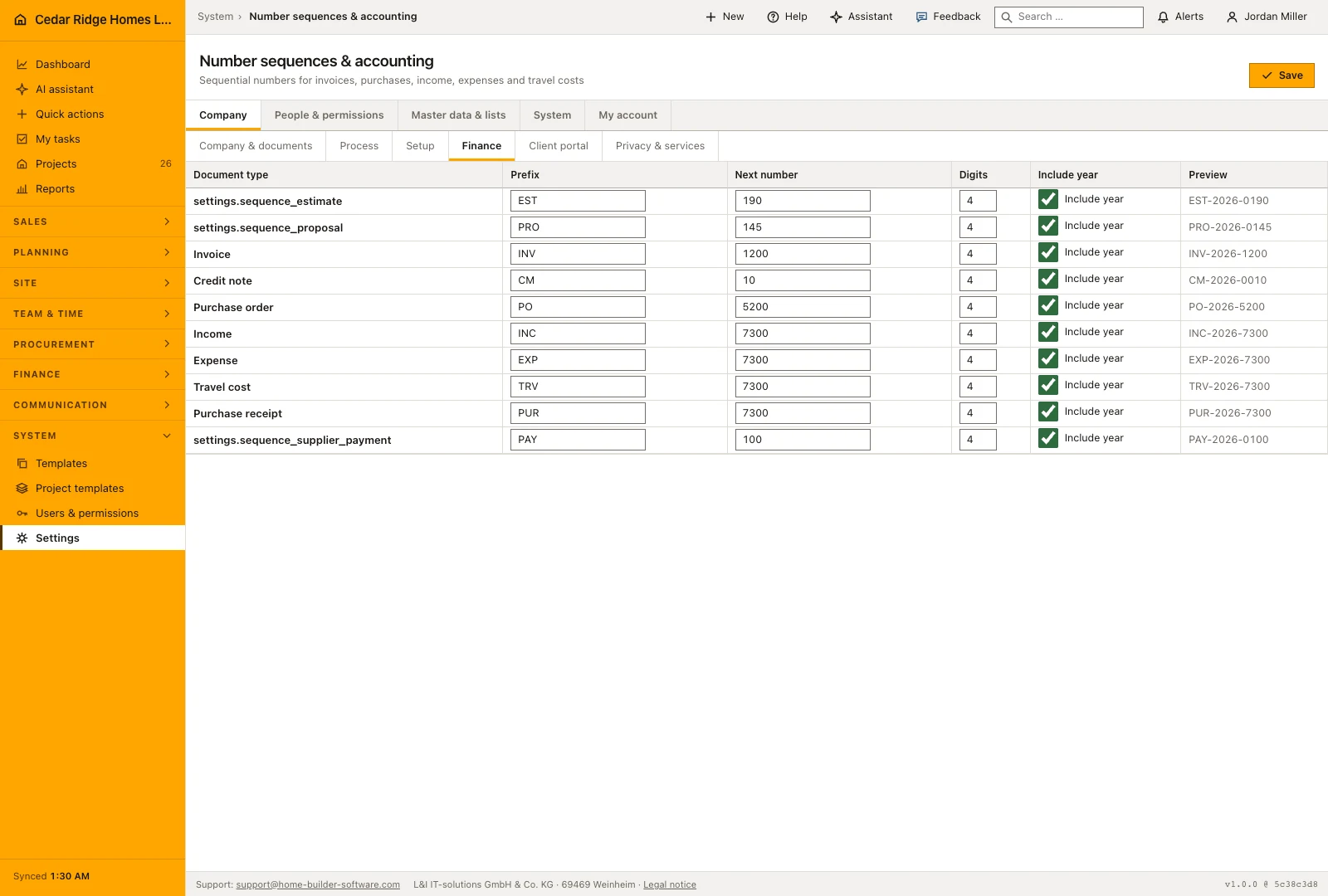
Finance numbering defines a sequence per document kind. Each carries a prefix of letters, digits and hyphens up to twelve characters, the next number to be issued, a padding between two and eight digits and a switch for including the year. Changing a prefix does not rewrite documents that already exist, so the change is visible from the next issued number onwards. The tab needs finance.manage, which keeps numbering with the people who answer for the books.
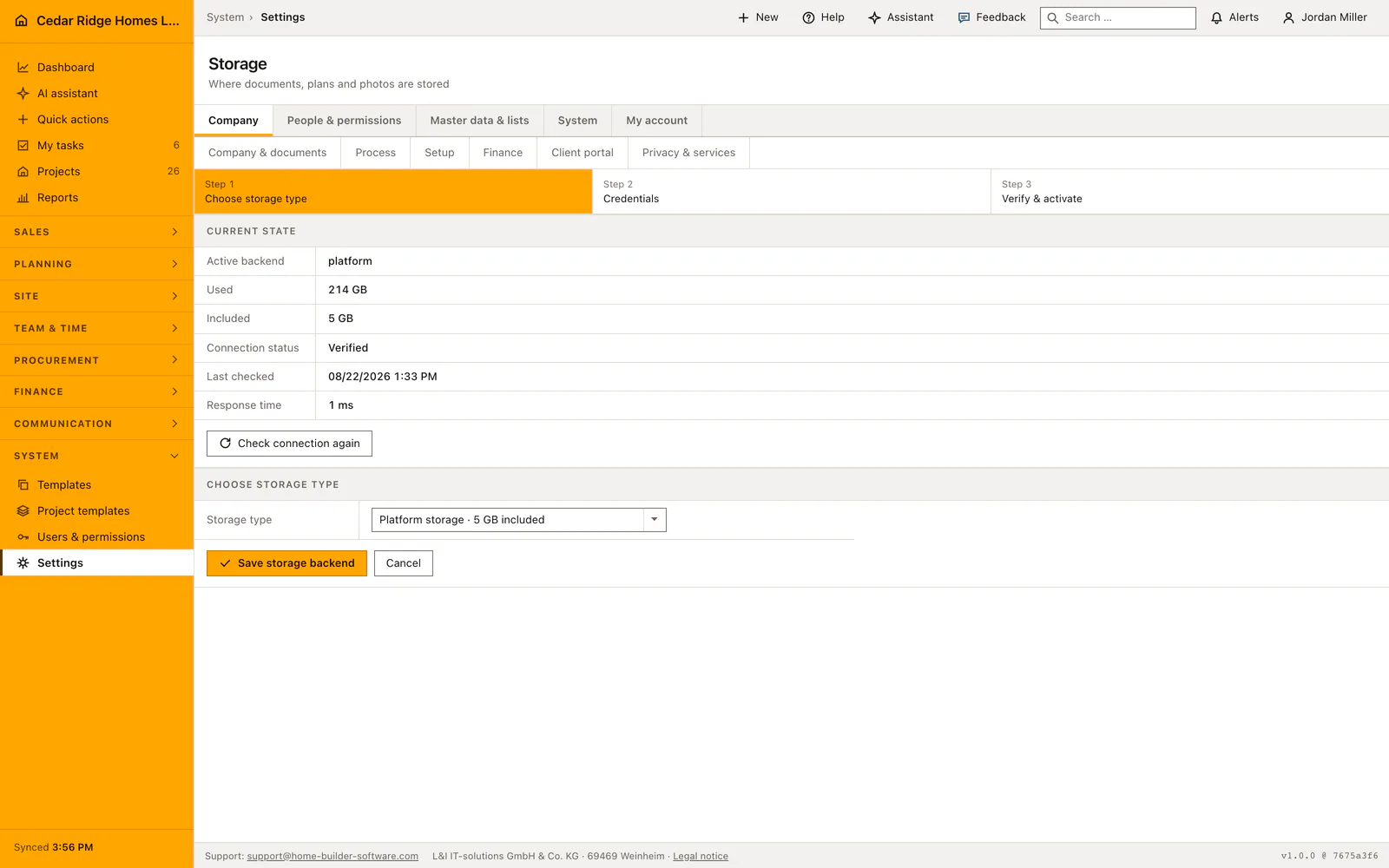
Storage backends, AI providers and their health checks
Storage runs on the platform, on an S3 bucket or over SFTP; which one, and with which endpoint, bucket, region, key or host, is set up by L&I IT-solutions through its admin menu against the license assigned to the company. Nothing is activated on trust: a write, read and delete probe runs first, a failing probe leaves the previous backend in place, and the successful one stamps the status, the latency in milliseconds and the time of the check, which is exactly what the company sees on the Storage tab.
The AI tab shows which provider L&I IT-solutions connected: the platform, Anthropic, OpenAI, Azure OpenAI, Gemini or Ollama Cloud, with the exact model or Azure deployment name. The check counts as passed only when the provider returns a genuinely non-empty answer, and with Ollama Cloud it also queries what the selected model can do, so vision or tool use is never claimed on its behalf. A company that wants a different provider or model asks support rather than editing anything here. The monthly budget in euros belongs to the platform mode alone: that connection refuses to save without it, while a provider connected for the company stores no budget at all, so there is no monthly target to maintain on that path.
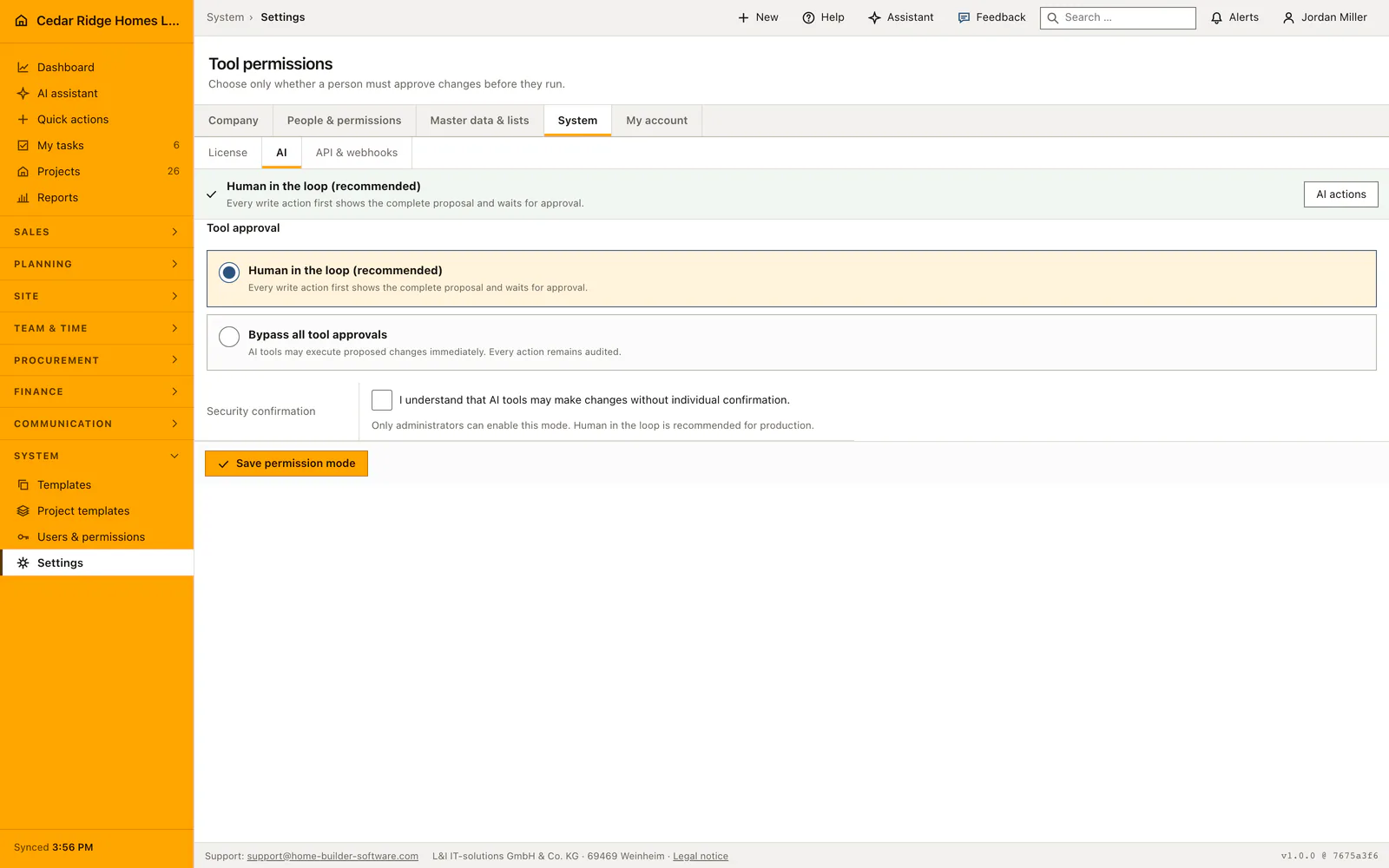
Portal sections, external services and AI tool permissions
The portal tab decides which sections a customer link shows, carries a welcome text of up to 2000 characters and switches on whether a signature is required. Privacy and services lists every external integration separately, with an explicit acknowledgement that has to be accepted before the selection saves. Map tiles, the weather host, the local document viewer, external 3D embeds and browser speech are each their own decision.
AI tool permissions sit on the AI tab and decide how far the assistant acts alone. Human-in-the-Loop is the default and holds every writing suggestion for release. The middle mode lets creating and changing happen at once while deletion still waits for a person. The bypass cannot be saved without ticking its safety acknowledgement and needs ai.manage. Each of these changes is recorded, alongside storage activation, portal configuration, privacy selection, company identity and finance numbering.
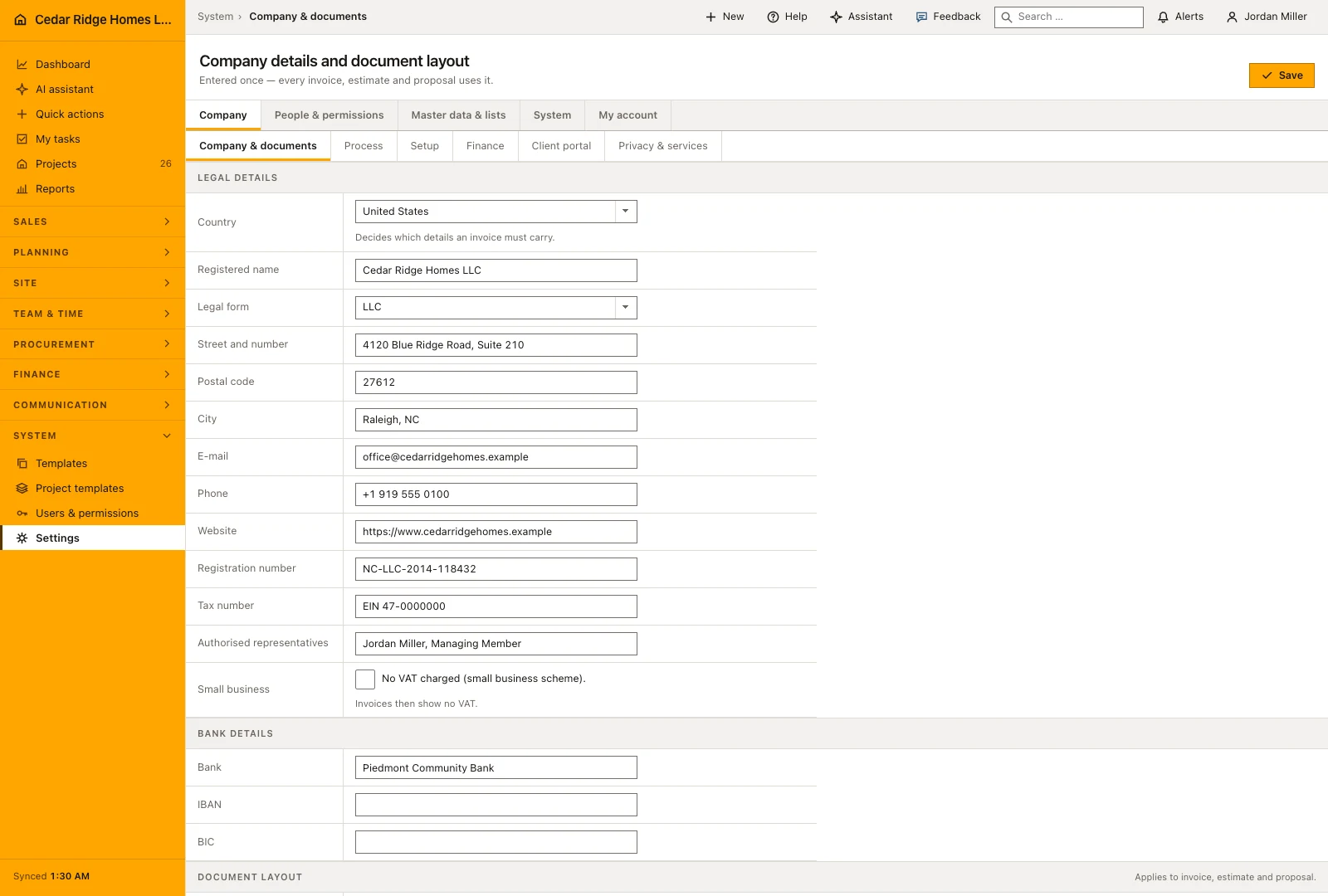
Where a saved setting shows up in the rest of Home Builder Software
Documents, site photos and portal uploads land in the storage L&I IT-solutions set up for the tenant, and the assistant answers through the provider connected there. The company identity prints on invoices, estimates and proposals; the number ranges issue their numbers there. Next-step labels color whole rows in the lead and pipeline lists through their semantic tone, and the pipeline stages define the columns of the board, so both are worth naming the way the office already speaks.
The company pick lists reach further than they look: trades appear on subcontractors and bid packages, equipment kinds on equipment, job title and office on every user record, project types on projects. Document folders structure the documents module. Under Integrations, API tokens and webhook endpoints connect the JSON API and forward the audit events, and the delivery list on that tab is where a failing endpoint becomes visible before anybody misses the data.
Example: Cedar Ridge Homes asks for an S3 bucket and reads the AI budget
Cedar Ridge Homes carries 214 GB of plans, photos and signed documents against the 5 GB included in platform storage, so Jordan Miller opens the storage tab, reads the active backend platform with its verified status, and sends support the request for the company’s own bucket cedar-ridge-project-files in the region us-east-1. L&I IT-solutions connects it through its admin menu against the Cedar Ridge license, with an endpoint, an access key and a secret that never pass through Jordan’s hands. The probe writes, reads and deletes a test file in the bucket first, then stamps the status Verified together with the check time and the measured latency. Jordan sees that stamp on the same tab, and from that moment every new upload lands in the company’s own bucket.
One tab further he reads the AI connection the company already runs: platform mode, model platform-standard and a monthly guide value of $60.00, of which $23.00 is recorded by the middle of August, leaving $37.00 of headroom for the rest of the month. The figure steers attention rather than switching anything off, which is exactly why it belongs in this settings round. The tool permissions stay on Human-in-the-Loop, so every writing suggestion of the assistant keeps waiting for a person; the mode that creates and changes on its own, and the bypass with its extra acknowledgement, remain options for later. The storage activation and his permission setting each leave an audit entry.
Construction software settings, API and webhooks: checks before saving
A storage backend is activated only after a write, read and delete probe succeeds; a failing probe changes nothing, and the previous backend stays in place.
S3 and SFTP secrets are entered by L&I IT-solutions, encrypted before storage and never rendered back into the company settings, not even to an administrator.
An AI provider counts as healthy only when its test request comes back with a non-empty answer text.
The bypass mode for AI tools cannot be saved without accepting its safety acknowledgement, and the tab itself needs ai.manage.
Finance number prefixes accept letters, digits and hyphens only, with a padding of between two and eight digits per sequence.
Construction software settings, API and webhooks: common mistakes
Asking support for a model name the provider does not serve: the health check fails and the connection stays inactive. Name the exact model or Azure deployment as the provider portal writes it when you request the change.
Treating the monthly AI budget as a hard limit. It is a displayed guide value next to the spend, not an enforced cap, so a busy month needs watching rather than trusting.
Switching off a portal section to hide one document from one customer: the switch is company-wide and applies to every customer link at once. Remove the single document instead.
The product page describes the same module from the business side, with the decisions it supports and the modules it connects to.
See the product pageFrequently asked questions
Which records does the JSON API expose?
Read endpoints cover projects, pipeline, defects, invoices, schedules, daily reports, documents, RFIs, change orders, payments and purchasing; selected operational records also have write endpoints.
Do integrations bypass roles or project access?
No. Token scope can narrow access, while the issuing user’s role, project access and tenant boundary still apply.
Configuring this part for your own company?
Describe the sequence you follow today and the result you need at the end of it. We can walk through the settings that produce it.