
Construction equipment tracking: setup and daily use
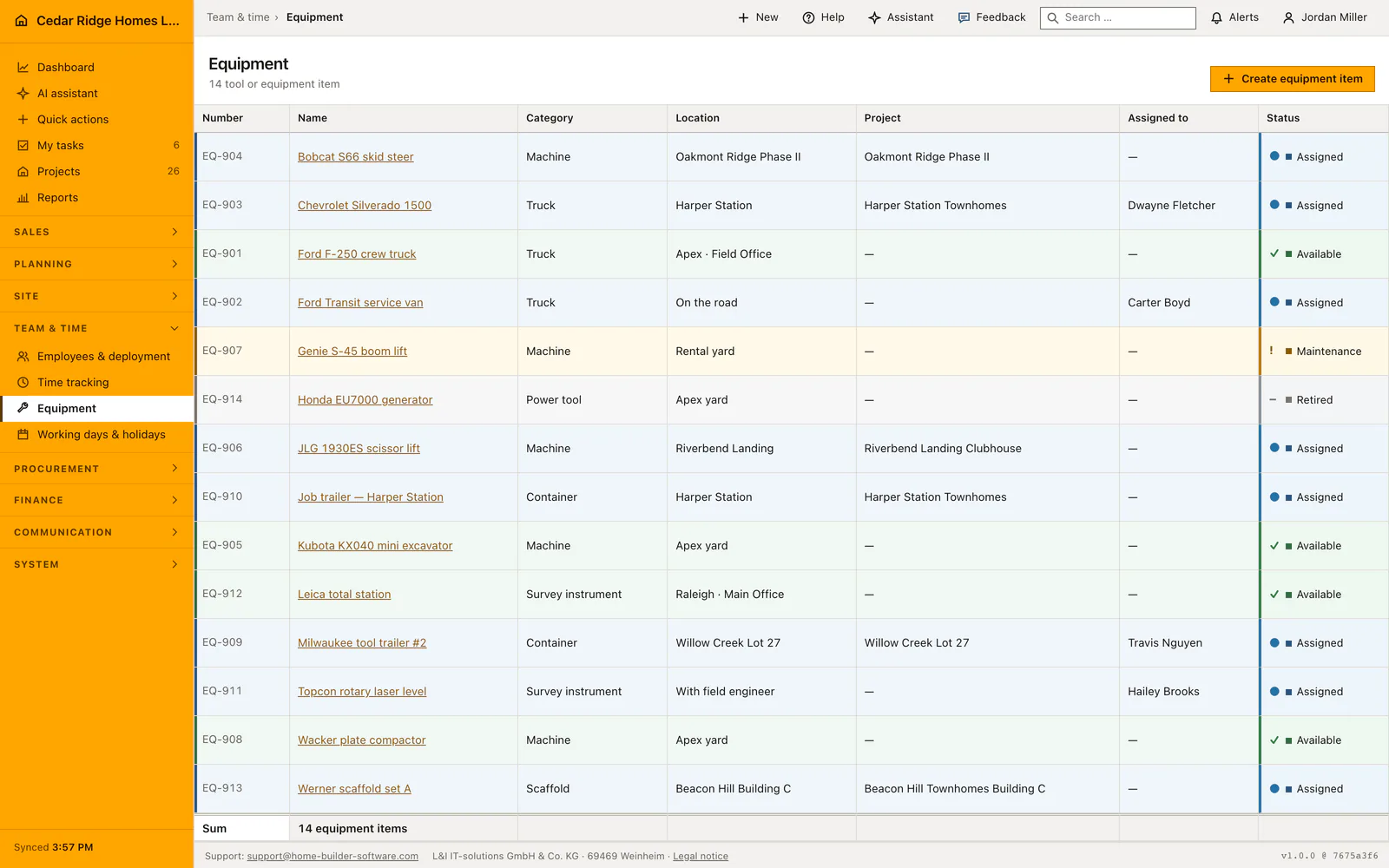
Equipment lives at /equipment under Team and time: one record per tool, machine or plant item, opened by name from a list that shows number, name, category, location, project, holder and status side by side. Registering an item needs the right to edit master data, while reading the list needs project access. Home Builder Software assigns the inventory number itself, in the BM series, and keeps every item findable after it has left the yard.
Equipment kinds, pick lists and the rights behind them
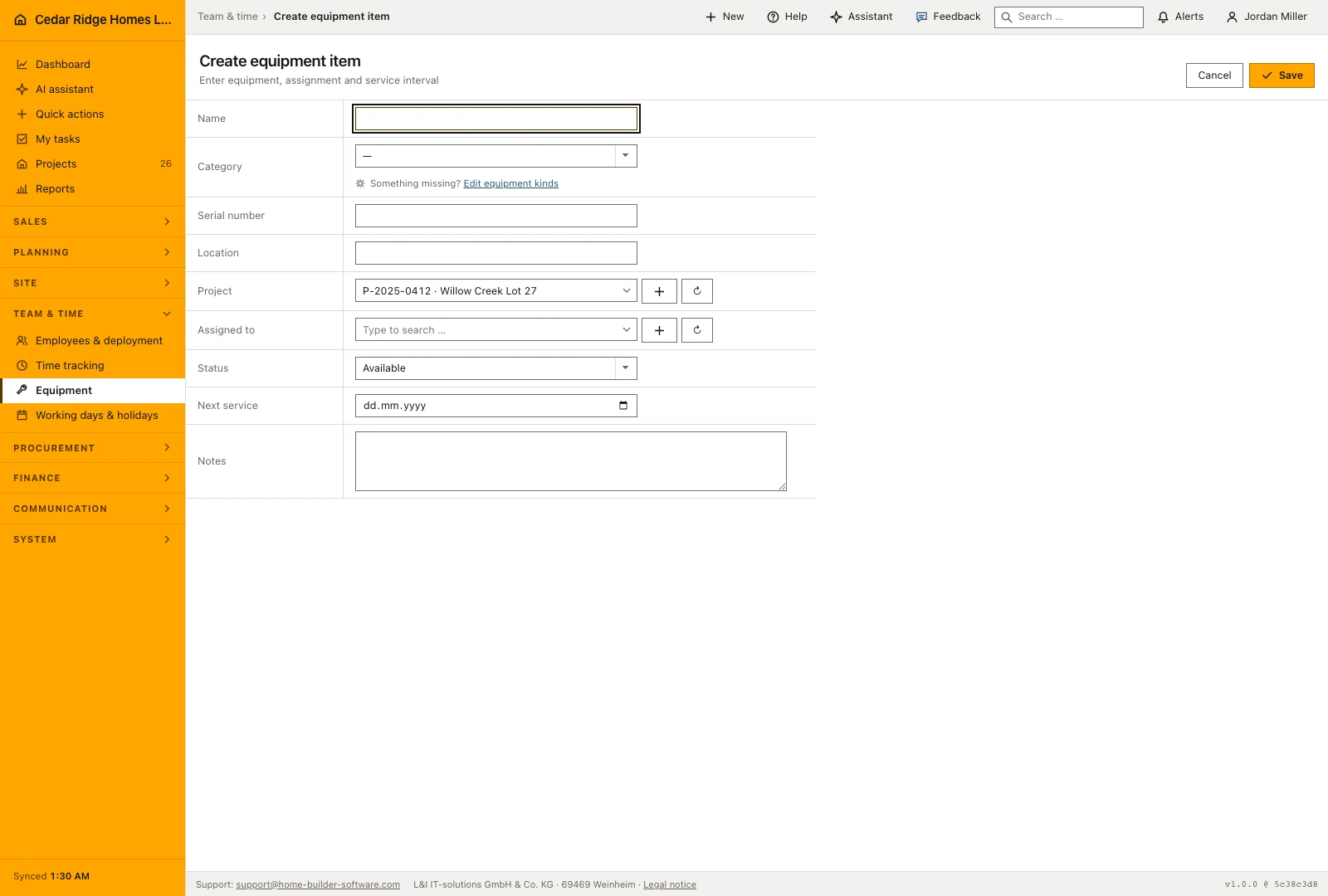
The Category field is not free text. It reads the company pick list for equipment kinds, kept under Settings, Master data and lists, Pick lists, and only somebody who may manage company settings can extend it. The field carries a quiet line naming that page, shown only to people allowed to open it. A value already stored on a record stays selectable after it leaves the list, so tidying the vocabulary never blanks an older entry.
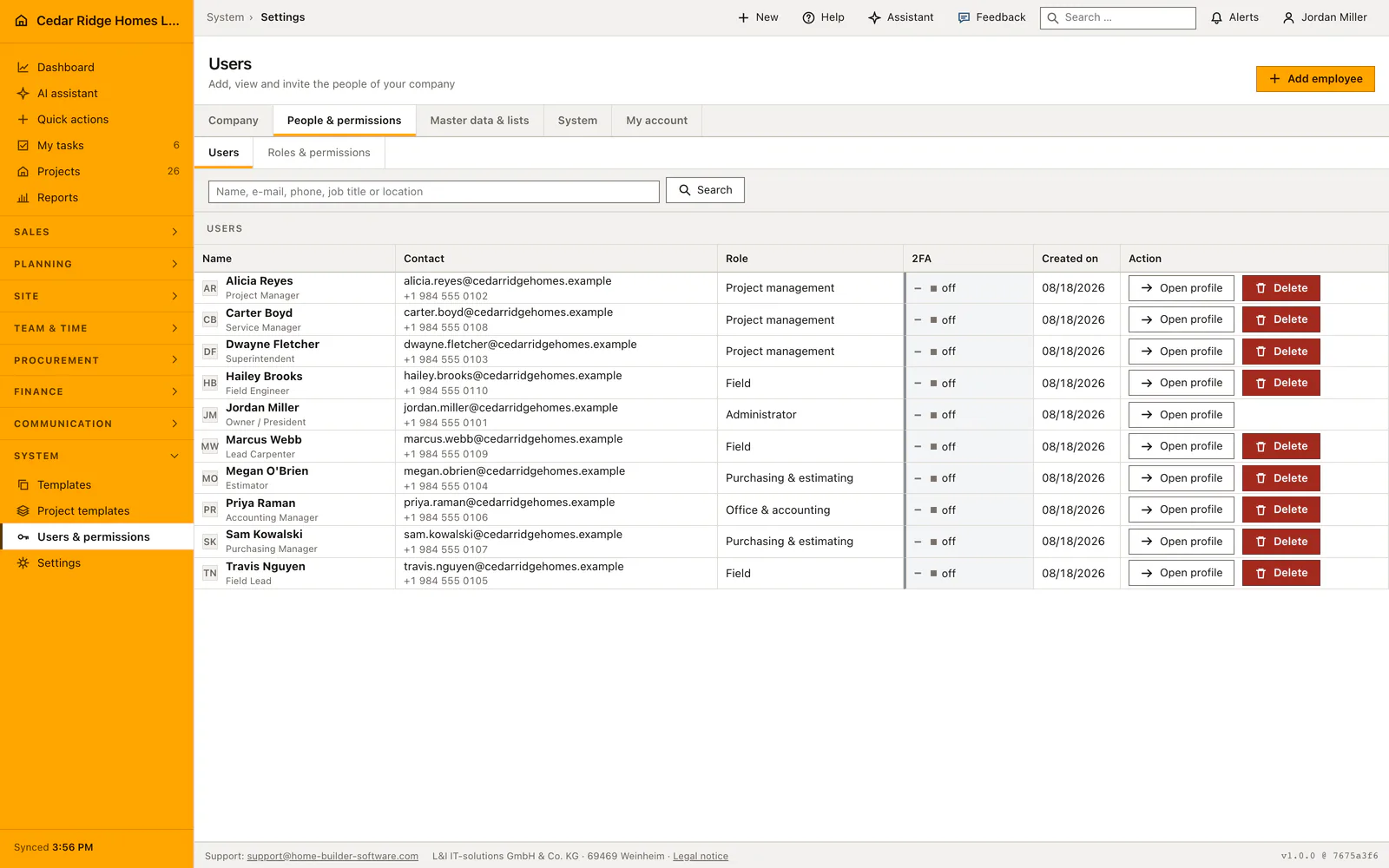
Two permissions divide the page. Opening the list and any single item needs the right to view projects, the same right that opens the project pages. Creating an item and saving a change needs the right to edit master data, which is what the create button is hidden behind. Holders come from the account list under Settings, Users, and only accounts flagged active are offered, so a colleague who has left cannot be recorded as holding a saw.
Registering a machine with inventory number, serial number and next service
Create equipment opens as a dialog over the list. The name is the only required entry, up to 180 characters. Category, a serial number of up to 120 characters, a free location line, project, holder, status and the next service date follow, and a notes box takes up to 5000 characters. The inventory number is not on the form: the application reads the highest existing number, adds one and writes BM-00001 upward, unique inside the company.
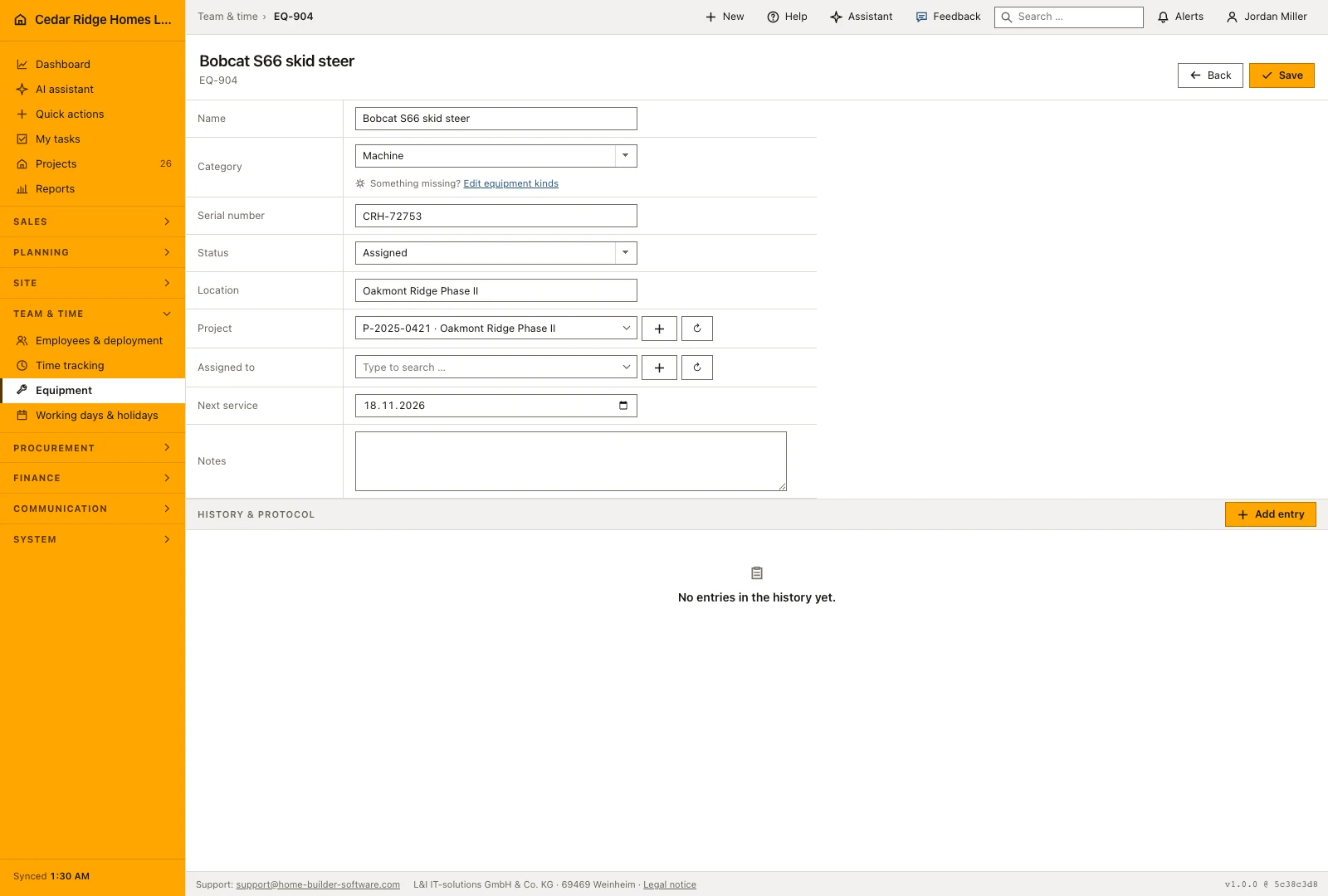
Saving lands you on the item's own page, where the same fields stay editable. Opening the create form from inside a site pre-selects that project, so a machine bought for one job starts attached to it. The project and holder pickers offer a way straight to project creation or to user administration when the entry you need does not exist yet. A project or an account belonging to another company is refused before anything is written.
Issuing a tool to a site and stepping it through maintenance
Four values carry the item through its life: available, assigned, maintenance and retired. The row color follows, green for available, blue for assigned, amber for maintenance and gray once it is retired, so a yard reads its whole stock without opening anything. When a crew takes a machine out, set project, holder and the assigned status in the same save; the row then names both the job and the person answering for the item.
Next service is a plain date, and location is a free text line rather than a picked place, which is what makes an entry such as "container, Neckarblick site" possible at all. Before an inspection falls due, put the item on maintenance so nobody plans with it, and set it back afterwards. Damage reports, inspection findings and photos belong in the history at the foot of the page, because only the history keeps who wrote what and when.
Who may change an equipment record, and what the log keeps
Every write passes two gates. The middleware maps every route of this module to the right to edit master data before the controller starts, and the controller checks the same right again together with the company the item belongs to. A record from another tenant answers 404 rather than 403, so a guessed address does not even reveal that a record exists. Without the right, the create and save buttons are absent rather than refused on click.
Registering an item writes equipment.created to the audit log and saving writes equipment.updated, each with the record id, the acting account, the time and the IP address. The same events are handed to any webhook the company has configured, which is how an external maintenance planner learns that a machine changed hands. Since nothing here deletes, the chain stays complete for the whole life of the item.
Equipment beside projects, accounts, custom fields and the history
The project reference is the link into the rest of the software: from the item you reach the project file, and the list shows the project number together with its name. The holder reference points at a user account instead of a typed name, so a change under Settings, Users takes effect everywhere at once. Both fields may stay empty, the normal state of a machine standing in the yard.
Below the form sit two shared blocks. Company-specific additional fields appear here as soon as an administrator defines them for equipment, and they are stored with the record. History and protocol takes notes, comments, meetings, minutes, photos and emails, the same block that projects, defects and subcontractors carry. A repair thread therefore stays attached to the machine and can still be read years later.
Equipment tracking walkthrough: a compact loader goes to Willow Creek
On August 18, 2026 Cedar Ridge Homes takes delivery of a Toro Dingo TX 1000, and Sam Kowalski, who holds the master-data right, registers it straight from the invoice. He types the name Toro Dingo TX 1000 compact loader, picks Machine from the category list, enters the serial number TX1-48213, writes Apex yard into the location line, sets the next service for November 6, 2026 and leaves the purchase in the notes: bought for $28,350 from the dealer in Garner. The number he cannot type anywhere: the imported rows keep their EQ marks; on save Home Builder Software issues BM-00001, the first of its own series, and the loader stands as a green, available row in the yard.
The following Monday the crew on Willow Creek Lot 27 collects the machine. Sam opens BM-00001 and changes project, holder and status in one save: Willow Creek Lot 27, Travis Nguyen, assigned. The row turns blue, and the list now answers where the loader works and who is responsible for it. On November 4, two days before the stored date, the status moves to maintenance so nobody plans with the machine; the dealer's service invoice over $412 goes into the history as a photo, the next service is reset to May 6, 2027, and the status returns to available. The audit log keeps the whole journey: equipment.created once, then a chain of equipment.updated entries.
Construction equipment tracking: checks before saving
The name is required and capped at 180 characters; the inventory number is never typed but generated as BM plus a five-digit sequence, unique inside the company.
Only projects and user accounts belonging to the same company are accepted; anything else is refused with a 422 before the record is written.
The status field accepts available, assigned, maintenance and retired and nothing else, and the row color is derived from it rather than chosen.
Only accounts marked active appear in the holder list, so a departed colleague can no longer be entered as holding a machine.
Registering and saving write equipment.created and equipment.updated to the audit log, each with account, timestamp and IP address.
Construction equipment tracking: common mistakes
Setting the project without switching the status to assigned leaves the row green, and the yard keeps planning with a machine that is already on site. Change both fields in the same save.
There is no delete here. Editing an old record into a different machine to save a line destroys both histories; retire the old item instead and register the new one beside it.
The category list cannot be extended from the equipment form. If a kind is missing, add it under Settings, Pick lists first, otherwise everything is filed under whatever value happens to be closest.
The product page describes the same module from the business side, with the decisions it supports and the modules it connects to.
See the product pageFrequently asked questions
Can equipment be assigned to both a project and a person?
Yes. The record supports a project and an assigned employee.
Which equipment statuses are available?
Items can be available, assigned, in maintenance or retired.
Configuring this part for your own company?
Describe the sequence you follow today and the result you need at the end of it. We can walk through the settings that produce it.