
Construction software setup wizard: setup and daily use
After registration the setup wizard fills an empty tenant before the first project exists. The wizard remembers its place and can be walked in any order: company details, processes, dashboard figures, existing data, storage, AI and a closing review. Every control needs settings.manage, so colleagues without it meet a waiting screen naming the administrators. Finishing needs the tenant database, and anything left unanswered receives the platform defaults in writing.
Registration, the tenant database and who may run the wizard
Registration creates the company and its first administrator centrally, and the isolated database for that company is provisioned from the wizard itself. Until the setup is finished, every other page of the application redirects back to the checklist, which is why the order of the steps matters less than getting through them. Progress is kept on the company record, so closing the browser and returning the next morning resumes exactly where the work stopped.
Only settings.manage reaches the controls. A foreman who signs in during this period does not get a screen full of buttons that all answer with 403; instead the waiting page explains that the company is still being set up and lists the names and addresses of the active administrators. That page is deliberate, because a first-run screen that exposes the storage and AI infrastructure to everybody in the crew would be the wrong first impression of a new system.
Company address, country profile, currency and timezone
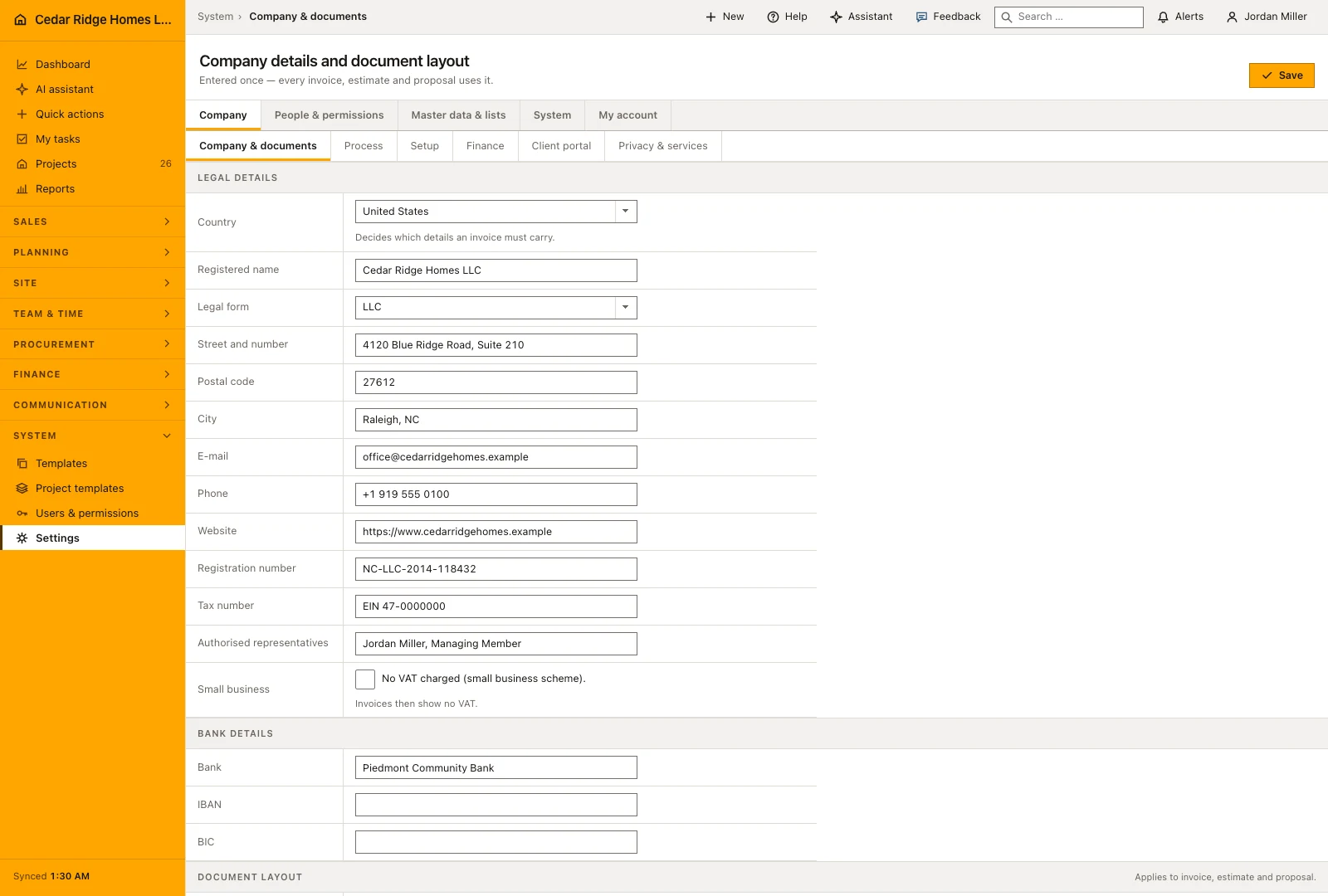
The company step asks the name, the employee count between one and a hundred thousand, street, postcode, city and the ISO country code. The country decides the rest, and the panel beside the form previews what it will apply: the profile, the currency, the timezone, the units and the tax logic with its rates. Anything derived can still be overridden by opening the panel.
The step strip is a row of links rather than a decoration, so any step can be reopened later. Correcting the postcode on the first screen weeks later does not rewind the wizard, because the recorded progress is only ever raised, never lowered. The same checklist stays reachable from the Company group of the settings area after completion, which matters because the company process and the dashboard figures are exactly the answers people postpone.
Process selection, extra fields and your own project phases
The process step is either the standard selection or an individual one across acquisition, estimating, projects, service, workforce, mail and portal. A free-text field records what is special about the way the company works, and three text areas take extra fields for leads, projects and customers, one per line, which are created immediately as editable company fields. The data step then imports existing contacts from CSV, TXT or XLSX with a preview and column mapping.
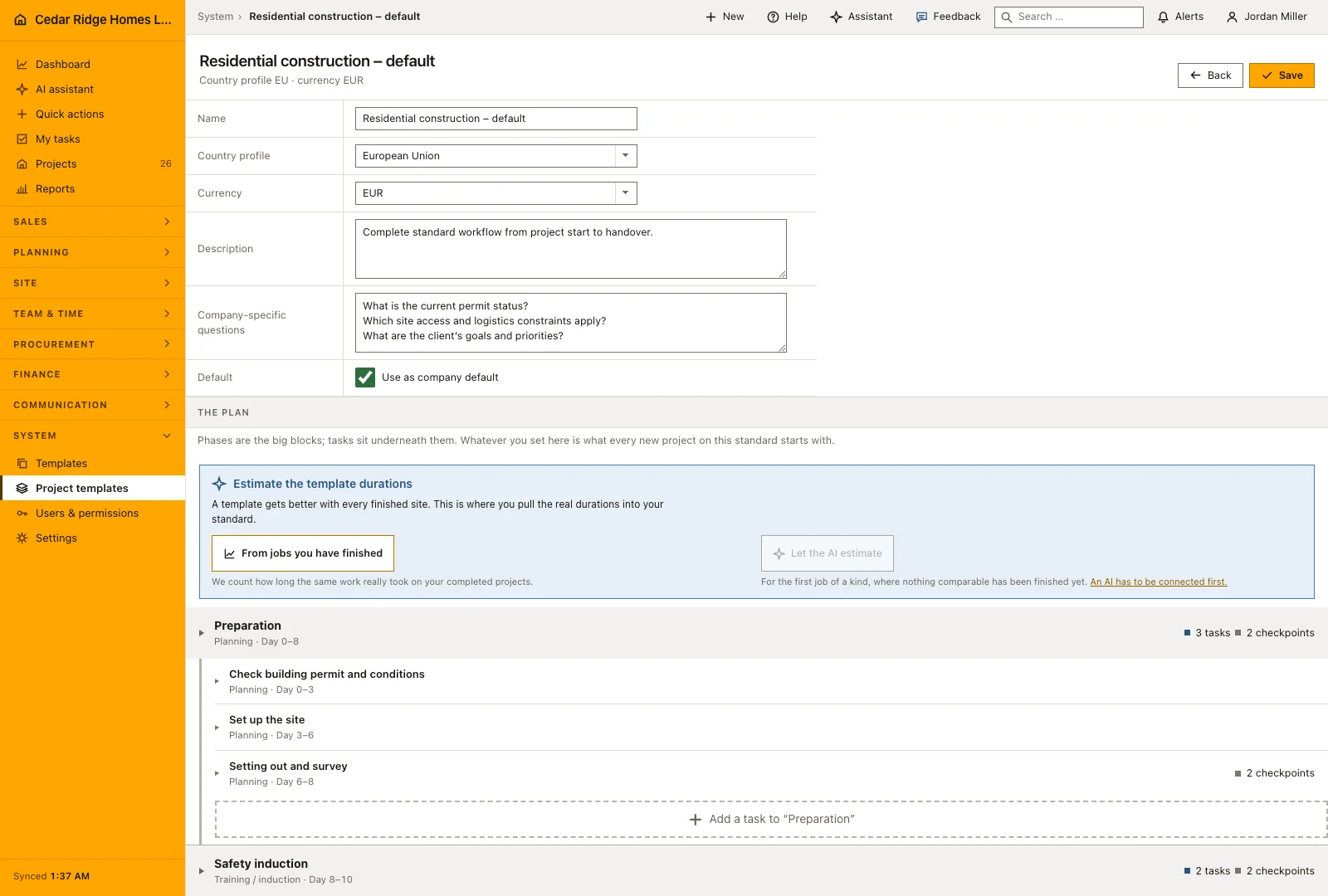
Alongside it sits a separate wizard for the company process, one question per screen. It asks which phases a normal project has, what work happens inside each phase, and three questions whose answers change later screens: who signs a task off, whether handover requires a photo, and how a normal project is billed. Nothing is written until the last button, and the result becomes the company default project template, editable in the plan editor forever afterwards.
Storage, the AI connection and finishing the checklist
Storage and AI are the two technical questions, and they sit near the end on purpose: neither is answered by the building firm itself. L&I IT-solutions sets up file storage and the AI connection for the company through its admin menu, against the license assigned to the company, and both are tested rather than believed. The wizard steps show what has been set up and whether the check passed; until L&I IT-solutions has connected anything else, the platform answer stands, and completion depends on the tenant database rather than on these two steps. Whatever remains on the platform answer is written as such.
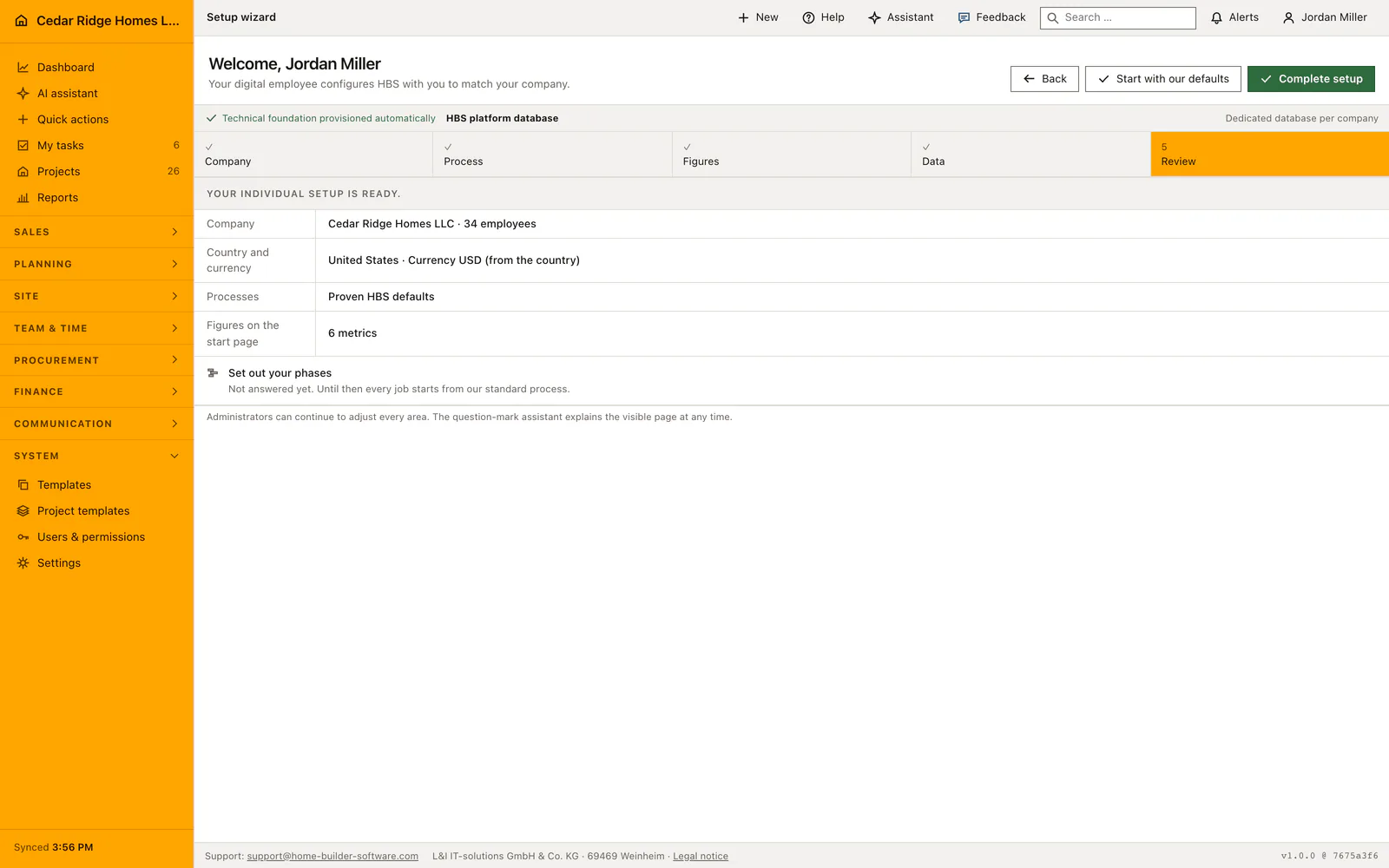
Start with our standards does the same in one move: platform services, the standard module selection, EU and EUR, the default dashboard figures, and a jump to the review screen. The review lists what is set and what is still open. Every step leaves an audit entry, from the organization and process updates through the applied defaults and the applied company process to the completion itself, so the first hour of a tenant is as traceable as the thousandth.
What the setup answers change in the dashboard, navigation and documents
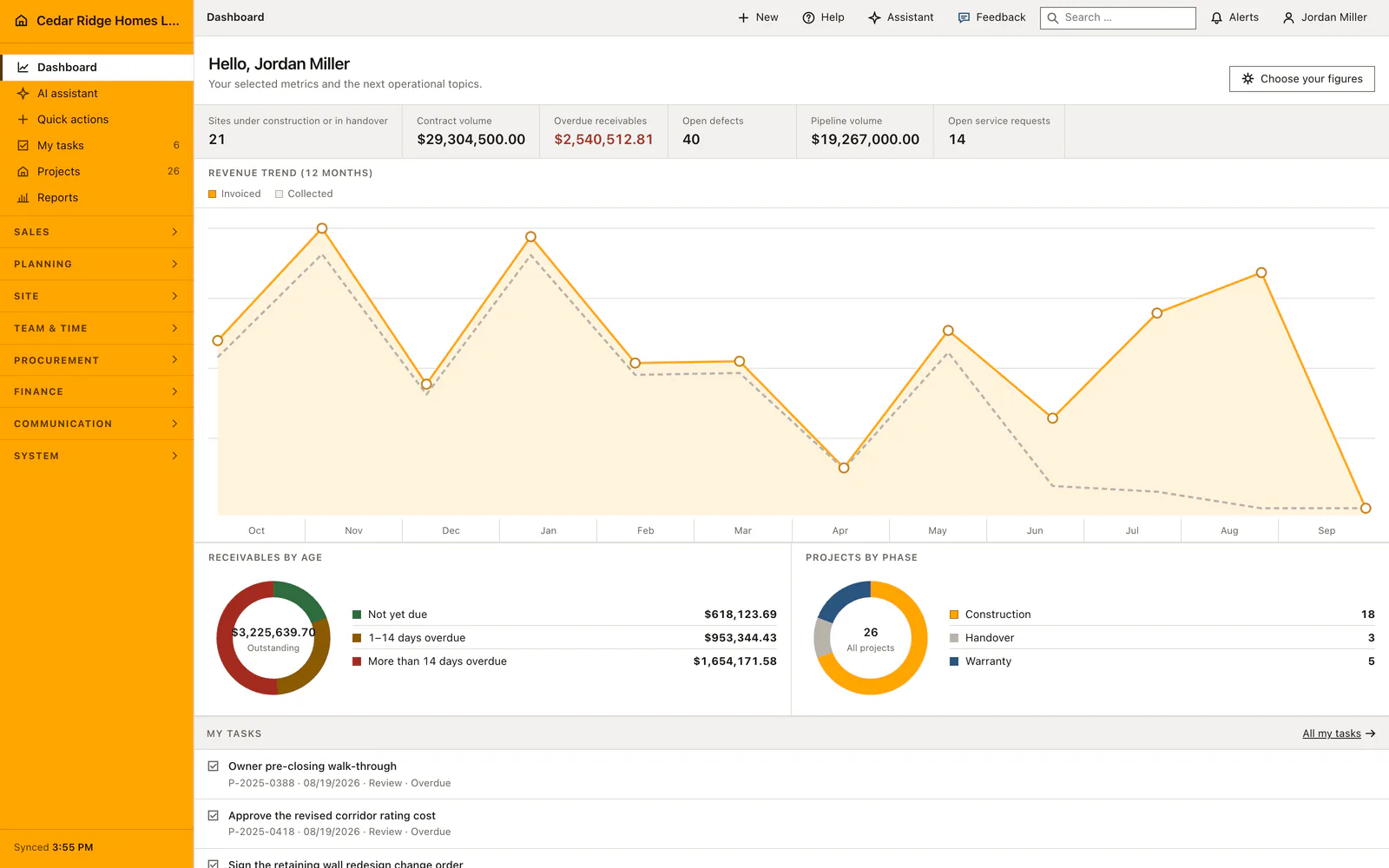
The dashboard step decides which figures the company start page opens with, and the same selection can be reopened from the dashboard later. The process selection decides which modules appear in the navigation, so a company that does not run a service desk is not asked to ignore one. The extra fields defined during setup appear in the detail files of leads, projects and customers, and imported contacts arrive as real customer records with their own customer number.
The country profile is the one with the longest reach. Currency, units, tax logic and rates travel from it into estimates, proposals and invoices, which is why the company step deserves care even when everything else is left standard. The company process becomes the template every new project starts from, and the schedule generated from it can still be changed phase by phase, including the durations that are later calculated from finished building sites.
Example: Cedar Ridge Homes walks the setup wizard on day one
Jordan Miller registers Cedar Ridge Homes LLC and lands in the wizard as its first administrator. The company step takes the name, the count of 34 employees, the address on Glenwood Avenue in Raleigh with the postcode 27603 and the country code US; the panel beside the form previews what the country brings, from the currency USD to the Eastern timezone and the matching tax logic. In the process step he keeps the proven defaults but adds Lot number and Plan option as extra project fields, one per line. The data step then reads a CSV of 15 contacts, shows the column mapping, and creates 15 customer records, each with its own customer number.
Storage and AI stay on the platform answers, because Cedar Ridge has asked L&I IT-solutions for nothing else yet, and the review lists them as platform storage with its included allowance and platform AI with budget. The dashboard step ticks the six figures the company wants to open with, and the phases question stays deliberately unanswered, so every job starts from the standard process until somebody sits down for it. Complete setup closes the checklist, writes the applied defaults into the audit trail, and the next sign-in leads straight to the start page with the chosen tiles instead of back to the wizard. Weeks later the same checklist is still reachable in the Company group, which is where the postponed phases finally get their answer.
Construction software setup wizard: checks before saving
Setup cannot be completed before the tenant database is provisioned; the finish action answers 422 until the database reports ready.
Every button of the wizard requires settings.manage, so a colleague without it sees the waiting screen with the administrators instead.
Storage and the AI provider are connected by L&I IT-solutions against the company license; the wizard shows their state and offers no field for credentials.
Recorded progress is only ever raised, so reopening an earlier step to correct an answer never rewinds the wizard.
Storage, the AI provider and the service selection are written with the platform defaults at completion wherever nothing else has been set up yet.
Construction software setup wizard: common mistakes
Importing contacts before the company step is answered: currency, units and tax rates come from the country profile, so anything calculated beforehand carries defaults nobody chose.
Taking the standard path and assuming the company process was captured too. It applies platform services, modules, EU and EUR, while projects still start from the shipped phase template until the process wizard is run.
Leaving the process wizard half finished and closing the tab: its draft lives in the session, so the phases typed there are gone unless the last button was pressed.
The product page describes the same module from the business side, with the decisions it supports and the modules it connects to.
See the product pageFrequently asked questions
Which country profiles are included?
Home Builder Software includes EU, US, Canada, Australia and New Zealand profiles with matching defaults.
Can setup apply sensible defaults?
Yes. The default path configures platform services, standard modules, EU/EUR and a practical dashboard after tenant activation.
Configuring this part for your own company?
Describe the sequence you follow today and the result you need at the end of it. We can walk through the settings that produce it.