
Custom construction sales pipeline: setup and daily use
Pipeline shows sales cases and running jobs in one funnel, as a grouped table or a Kanban board. Stages are company data rather than fixed code: an administrator holding settings.manage renames, reorders, colors and extends them under Settings. Moving a card writes the new stage and resets the day counter. The contract stage carries the only exit, a guarded conversion that creates the project and closes the case as won.
Configuring pipeline stages and next-step labels in settings
Stages live as label definitions with the domain pipeline_stage. The four system keys stay stable for lead, estimating, proposal and contract, but their name, color, semantic tone and sort order are editable, and any number of company stages can be added beside them. The key of a custom stage is generated rather than typed, which is why the stage column is wide enough to hold it. Only settings.manage opens this screen.
Two protections apply on delete. A system stage refuses deletion outright and says the four core stages may be renamed, colored and sorted instead. A custom stage that still carries an item refuses as well, naming the reason. Colors are validated as six-digit hexadecimal values on the server and emitted only as a style variable, so group headers, board columns and the tinted rows all draw from the same value.
Adding an opportunity and changing its stage
New cases enter through the lead form, which the pipeline offers in its own header. The chosen stage decides the number prefix and where the save lands, so an item entered directly at estimating receives a number beginning with K and returns to the estimating list. Every new item starts open, with today as the day it entered the stage and the person entering it as owner. The navigation counter is refreshed at once.
A stage change has two routes. On the board a card is dragged into another column, which sends the item and the target stage to the pipeline endpoint; the card identifies itself by its visible number. In the opportunity file the stage is a dropdown, and the date in stage can be corrected by hand when a case moved earlier than the record says. Both routes write the same two fields and nothing else.
Working the Kanban board and the grouped pipeline table
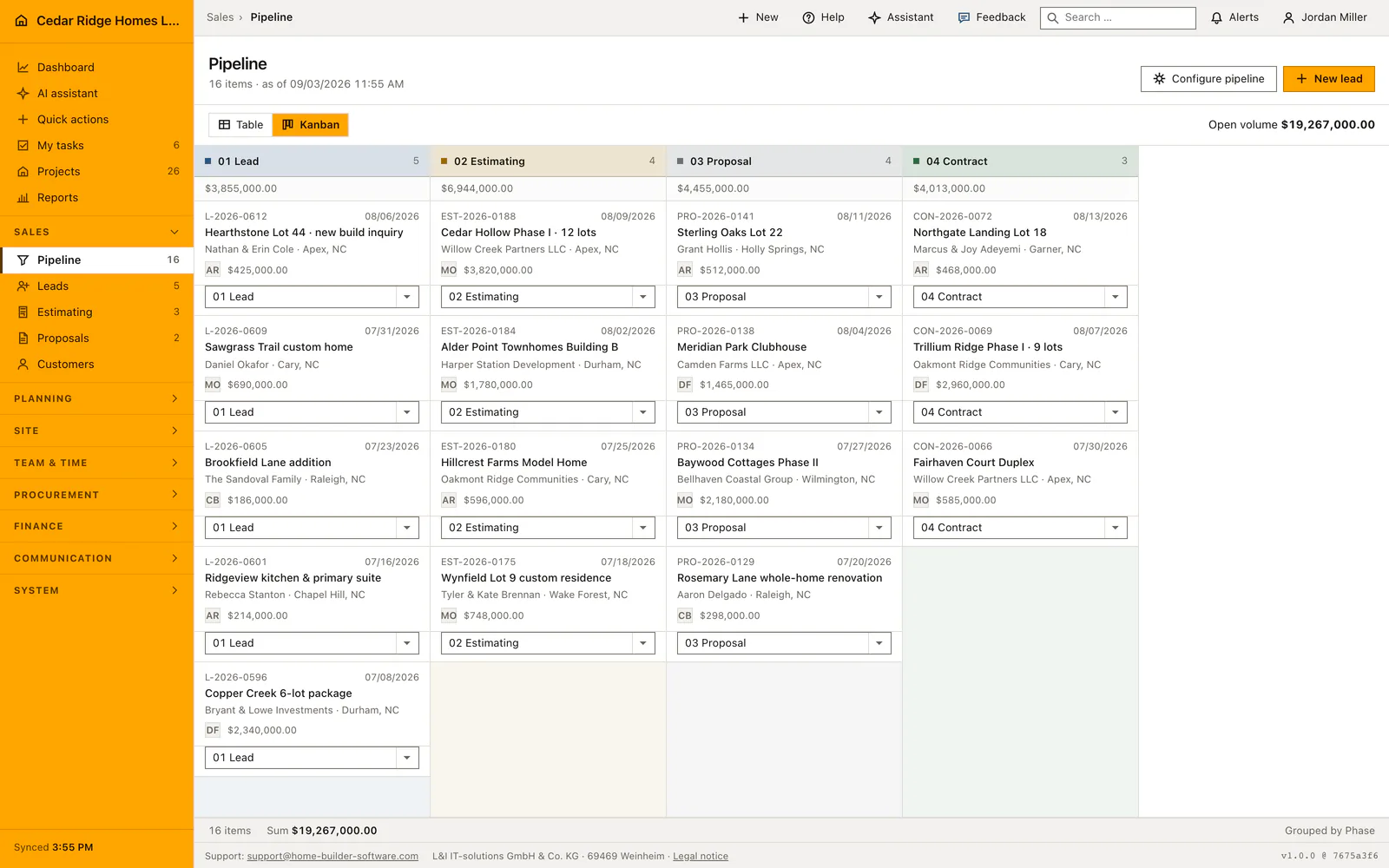
The table lists sales stages first and running construction, handover and warranty afterwards, so the whole book of work reads top to bottom. A group header states its stage, how many items it holds and their total volume, and an empty stage is left out rather than drawn as a blank block. Each row carries number, item, customer, site, volume, the date it entered the stage, days since then and the next step.
The board covers the sales stages only, since a running job is no longer being sold. Column headers repeat count and total; cards show the number, the date in stage, the title, customer and site, the owner initials and the volume. Row and card color follow the stage or the next-step label, and the wording and status symbol stay beside the color so nothing depends on color alone. Both views link into the same opportunity file.
Who may move a card and who may convert a contract
Reading the pipeline needs records.view. Every write on it, including the board move and the conversion, needs records.write, checked by the central write gate before any controller runs. Stage configuration is separate again and needs settings.manage, so a salesperson can move work through the stages without being able to change what the stages are. The read and move endpoints carry those two permissions individually.
The conversion is guarded by state, not only by permission. Only an open item in the contract stage qualifies; anything else is refused with a message naming the rule. Project creation and closing the case run in one transaction, so the two are never observed half done, and the customer record attached to the case is activated in the same step. The new project number continues the company sequence.
Handover into estimating, proposals, project and budget
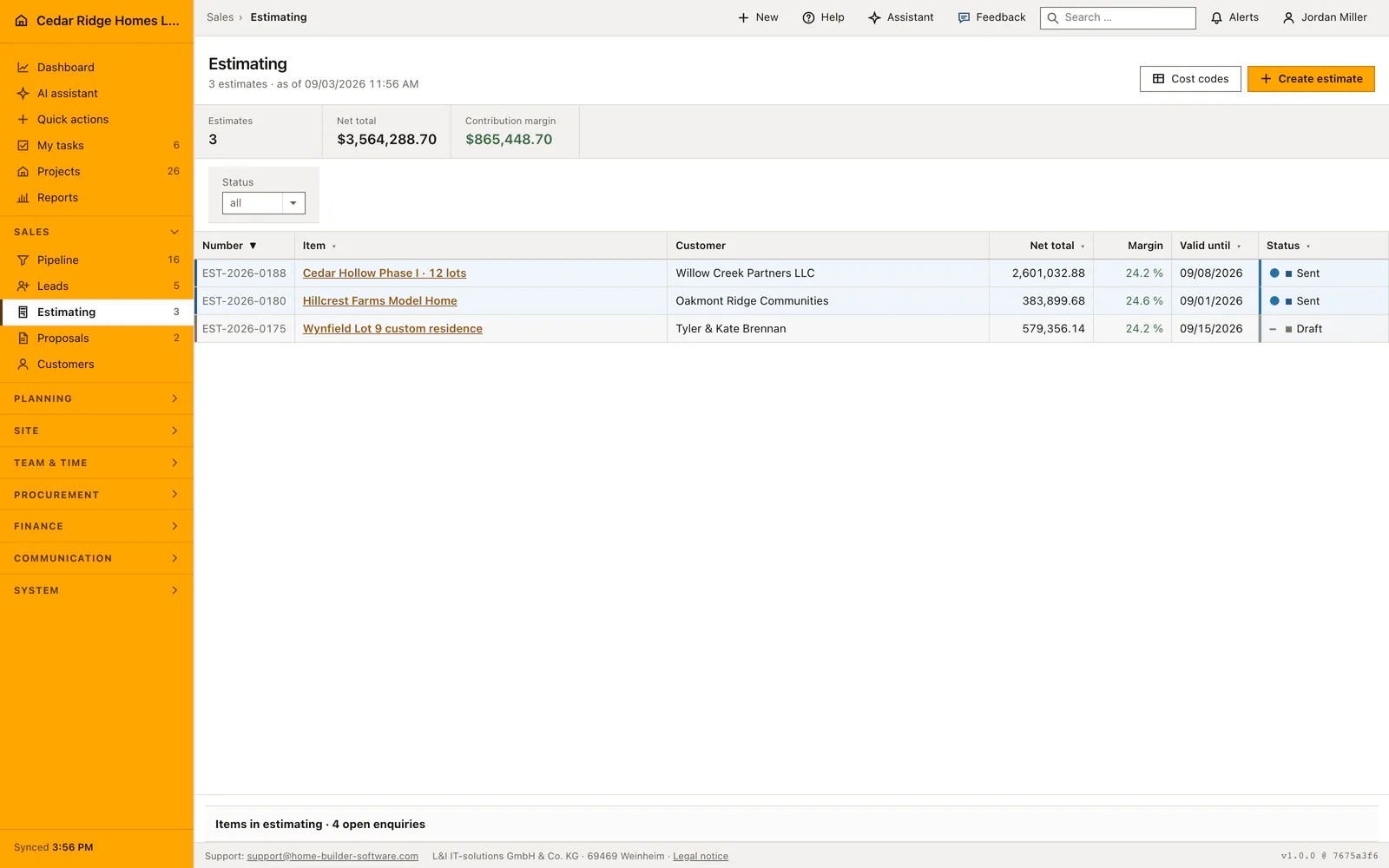
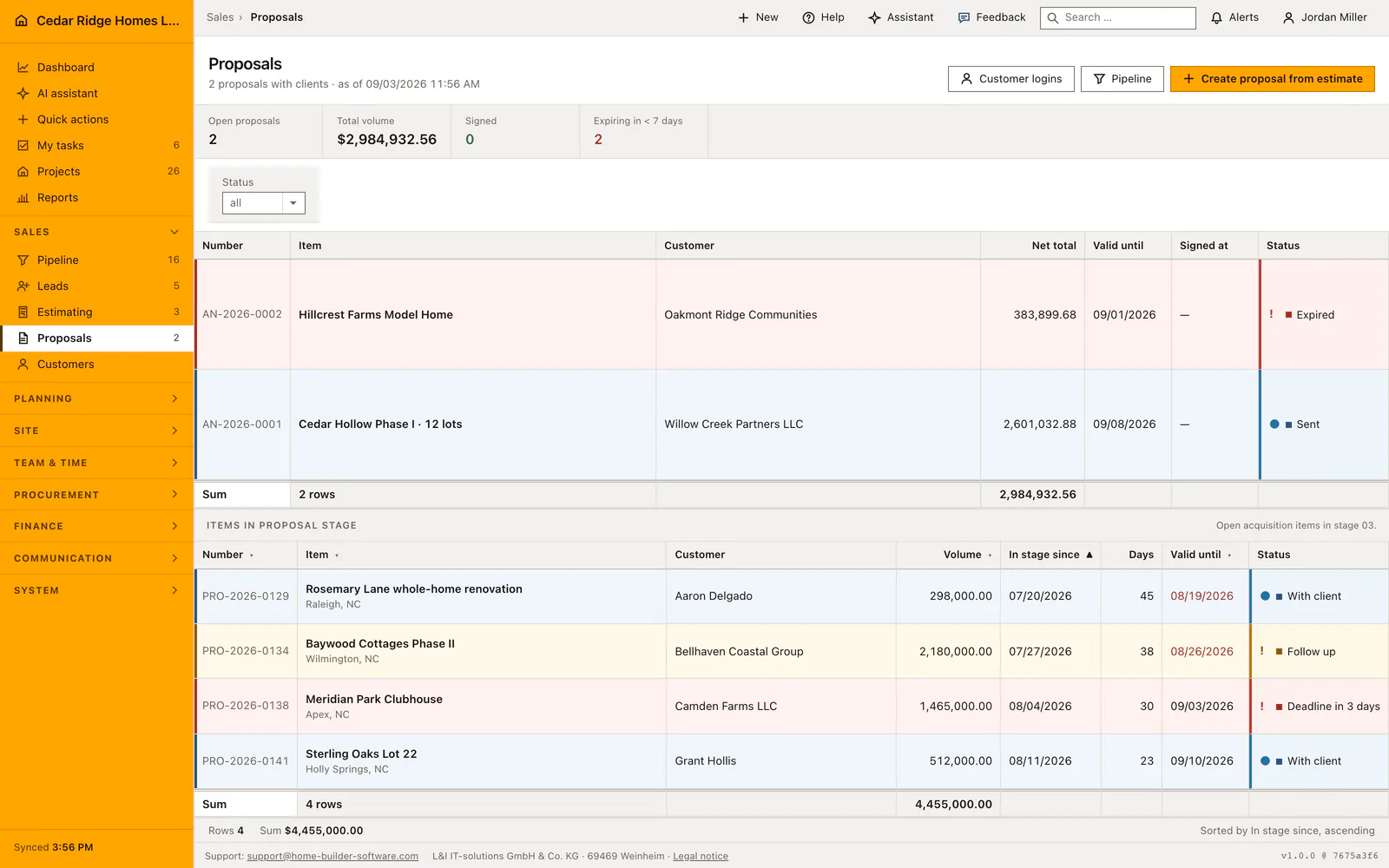
Conversion copies more than a name. The project takes the case title, its customer, its site, the volume as contract sum, the owner as site manager and today as the start date, and it opens in construction with progress at zero. The build type stays empty on purpose, because it describes what is being built and not where. The estimate and the signed proposal are attached to the project, so it stays traceable which documents the site grew out of.
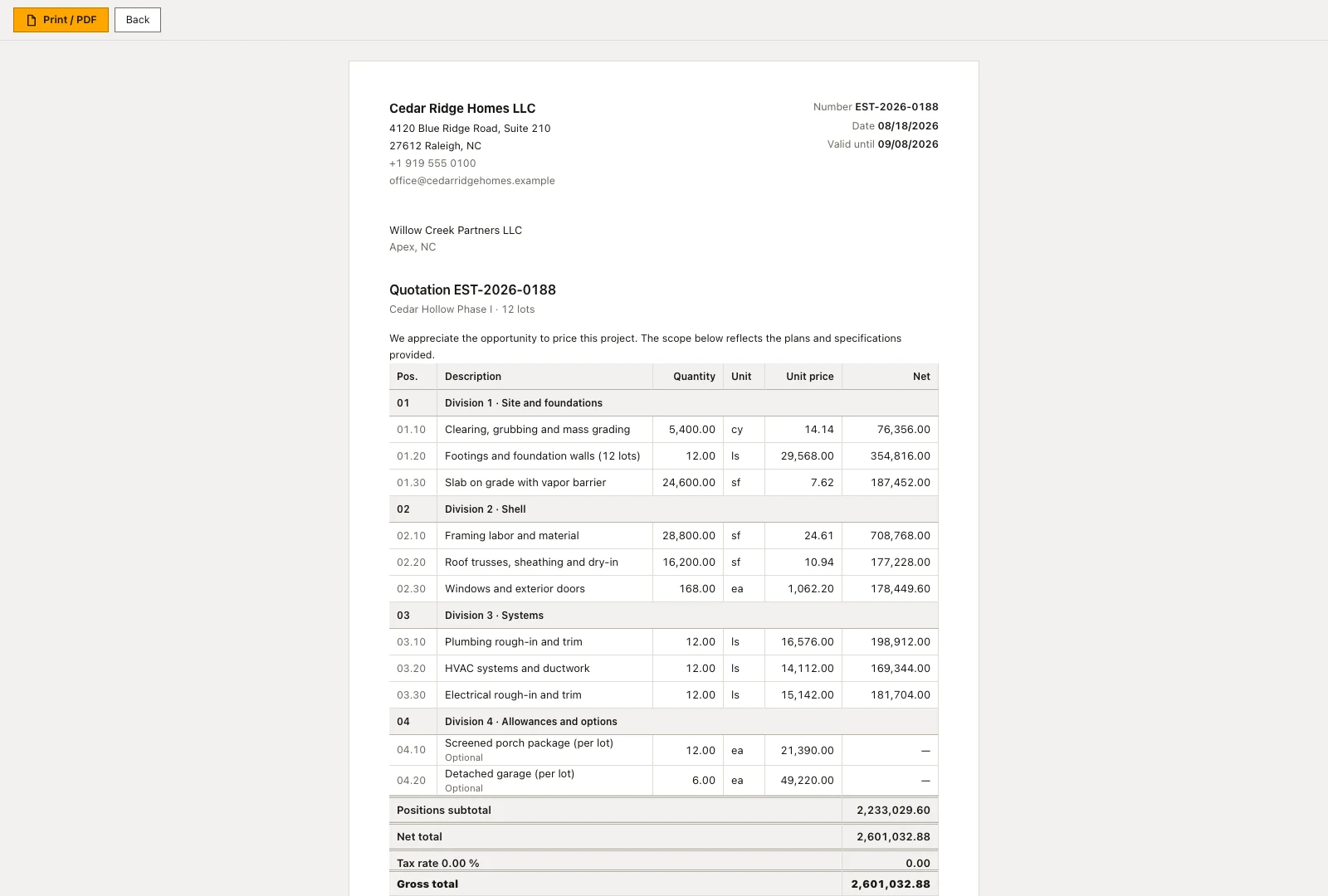
Where a costed estimate exists, its lines become the budget of the new project, grouped by cost group, and the confirmation names how many groups were written. Without priced lines no budget is created and the message names the project number only. From there the money side is worked in budget, invoices and purchasing, while rows and cards in both views lead back into the opportunity file.
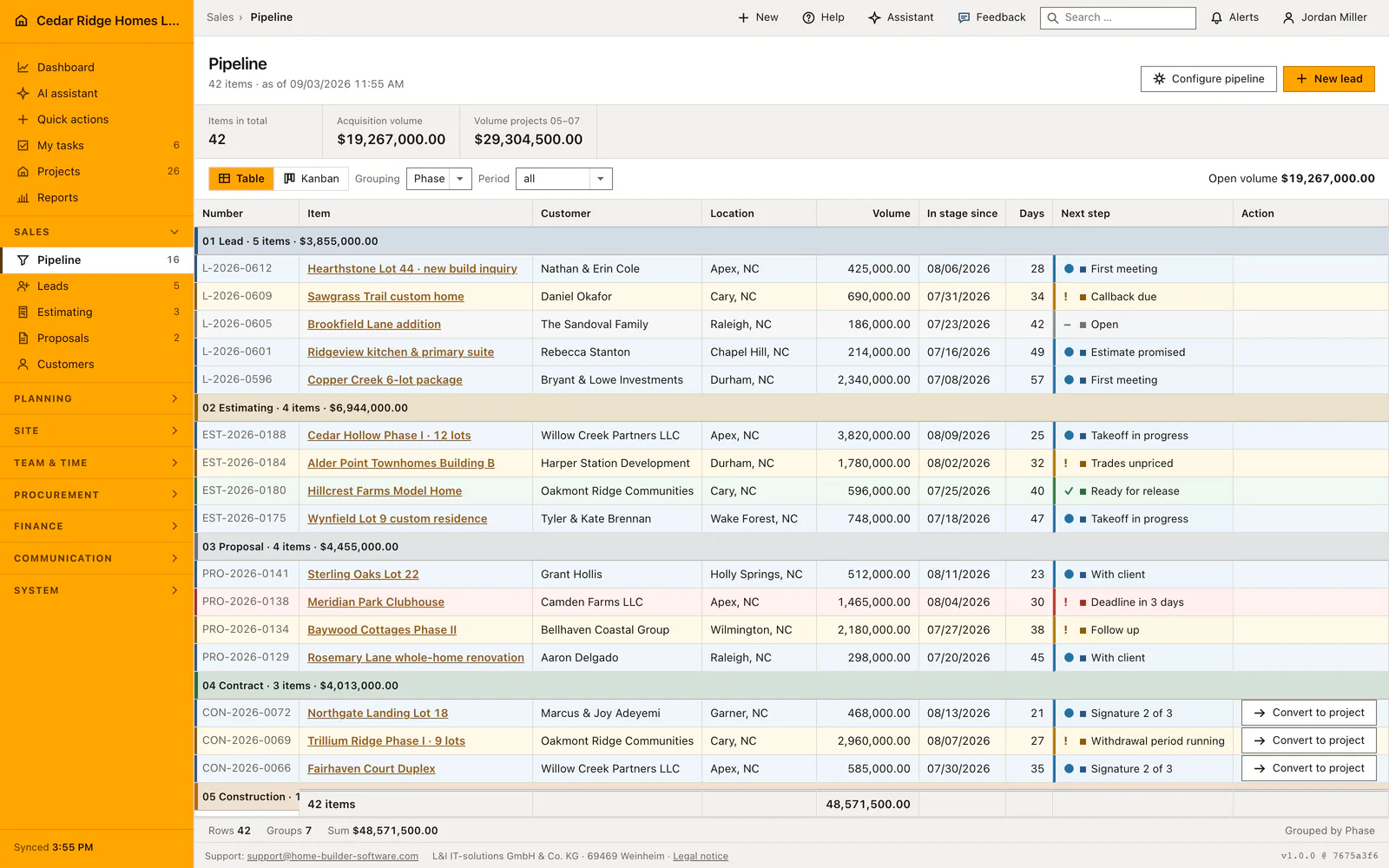
Worked example: converting the Northgate Landing contract
Northgate Landing Lot 18 enters the funnel in spring as an inquiry from Marcus & Joy Adeyemi in Garner and carries an expected volume of 468,000 dollars. On August 13, 2026 the salesperson drags the card from the proposal column into contract, which writes the new stage and restarts the day counter; by August 19 it reads six days, while the chip beside it reports the second of three signatures. The estimate traveling with the case prices the house at 391,240 dollars across eight cost groups, so 76,760 dollars of the volume remain as margin for Cedar Ridge Homes LLC.
The last signature arrives on August 21, and the conversion stands ready only because the case is open and sits in the contract stage. One click creates the job and closes the case as won inside a single transaction: title, the site in Garner, 468,000 dollars as contract sum and Jordan Miller as site manager move over, the start date becomes the day of the conversion, and the customer record of the Adeyemis switches from prospect to active. Because the estimate carries priced lines, the confirmation reports eight budget groups written, and the new file opens in construction with progress zero.
Custom construction sales pipeline: checks before saving
Only an open item in the contract stage converts; any other state is refused with a message that names the rule.
A system stage cannot be deleted, and a custom stage still carrying items refuses deletion and says why.
Stage colors are validated as six-digit hexadecimal values on the server and rendered only through a style variable.
Project creation and closing the won case run inside one transaction, so neither is ever visible without the other.
Moving a card writes today as the date in stage, so the day counter always measures the current stage.
Custom construction sales pipeline: common mistakes
Dragging a card by mistake resets the date in stage, and the previous value is not kept. Correct it in the opportunity file, where the date is an editable field, rather than dragging the card back.
A stage renamed in settings changes every view at once, including the board columns and the group headers. Agree the wording before renaming, because open items keep pointing at the same key under a new name.
Conversion fills the contract sum from the expected volume of the case. If the signed amount differs, correct it in the project file, where only finance.manage is allowed to change it.
The product page describes the same module from the business side, with the decisions it supports and the modules it connects to.
See the product pageFrequently asked questions
Can we add our own pipeline stages?
Yes. Administrators can add, reorder, rename and color custom stages; stages in use are protected from deletion.
What happens when an opportunity is won?
The controlled conversion creates the project with its contract value and responsible person and closes the opportunity as won.
Configuring this part for your own company?
Describe the sequence you follow today and the result you need at the end of it. We can walk through the settings that produce it.