
Construction payment tracking and bank matching: setup and daily use
Payments is the ledger of money that arrived, each receipt booked against one outgoing invoice. Reading the list needs View finance; booking a receipt needs Edit and approve finance. A receipt carries a value date, an amount, the method used, a reference and the invoice it settles. Booking one reduces that invoice in the same transaction. This page covers recording a receipt, reading the ledger, and the bank statement route behind it.
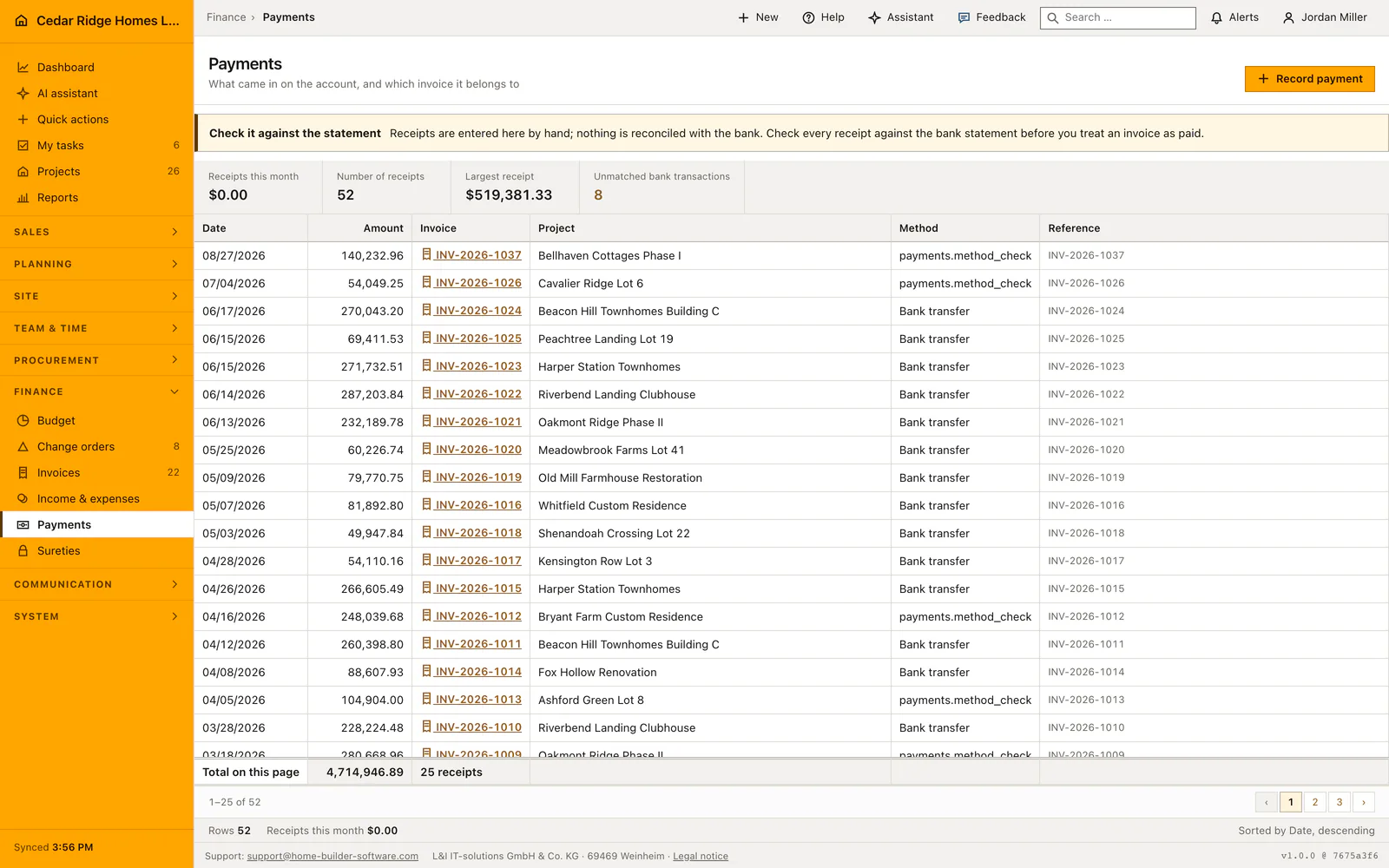
Open invoices as the precondition for booking a receipt
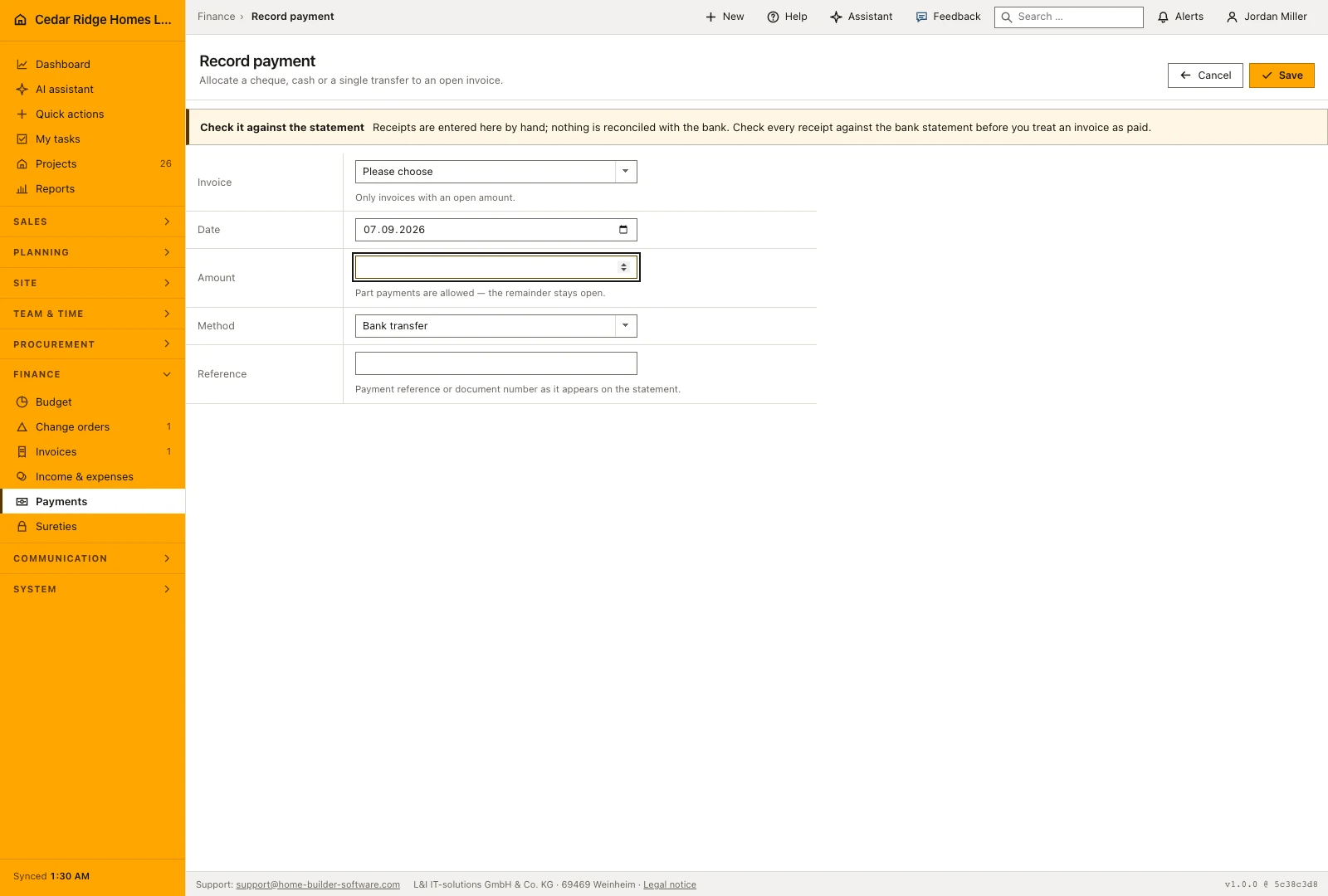
A receipt is always booked against an invoice, so the selection list on the recording screen holds only invoices that still show an open amount, ordered by due date and labeled with number, project and the sum still owed. When every invoice is settled the screen shows an empty state with a link into Invoices rather than a form with nothing to choose. Arriving from an invoice preselects that document, which is the usual path.
Three methods exist and no others: bank transfer, SEPA direct debit and card. The same three are offered to the assistant, which books through the identical right and lock rather than a second code path. Both screens of the module carry a standing notice saying that nothing here is reconciled with a bank and that every receipt belongs checked against the statement before an invoice is treated as settled.
Recording a check, cash or single transfer against an invoice
The form asks for the invoice, the value date, the amount, the method and a reference. Date defaults to today and method to bank transfer, so a straightforward transfer needs the amount and one click. A part payment is allowed and expected: enter what the statement shows, not what the invoice says. The reference field takes up to 180 characters and should repeat the payment reference or document number exactly as the bank printed it.
Leaving the reference empty is not an error. The stored row is then marked as recorded by hand together with the name of the person who booked it, and a booking made through the assistant says so in the same column, because that column is the only provenance visible in the ledger and in the export an accountant reads.
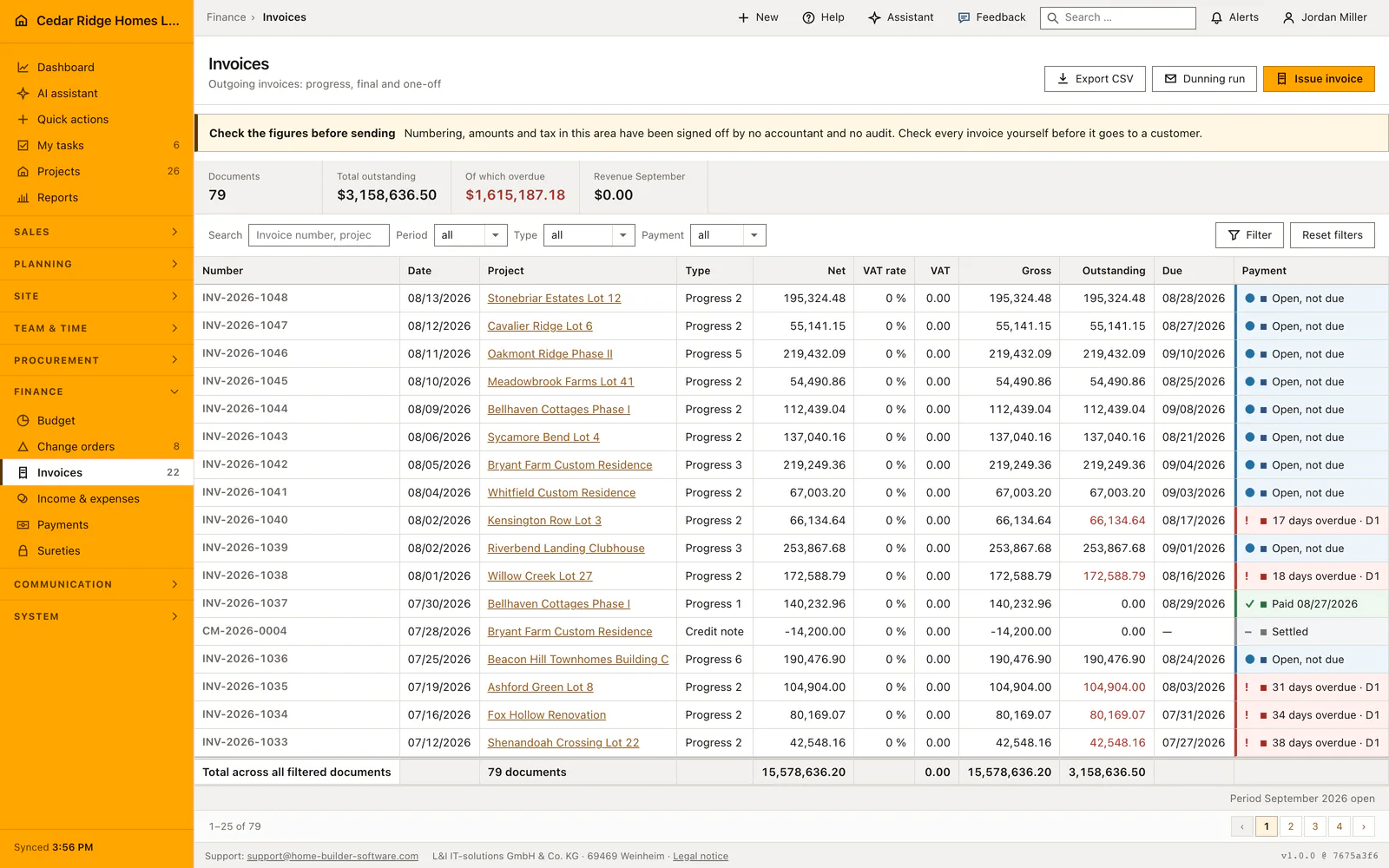
Reading the payment ledger and its monthly figures
Four figures sit above the table: receipts in the current month, the number of receipts, the largest single receipt, and the count of imported bank transactions still without a decision, which turns amber as soon as one is waiting. The rows below carry date, amount, invoice number, project, method and the bank reference in smaller type. Sorting is fixed on date descending and there is no user sort, which the status bar states in words.
The invoice number is the only link in a row, and it opens the invoice rather than the receipt, because a receipt has no page of its own. The foot line adds up the rows on the current page and says so; the month figure repeated in the status bar is a different number by design. The list pages at 25 rows.
Rights, the write gate and the payment audit entry
Viewing the ledger needs View finance, and every write in the module needs Edit and approve finance, checked once by the write gate and again in the controller. While a receipt is being stored the invoice row is locked, so two clerks booking the same check cannot both read the old balance and write back the same reduction. The open amount never falls below zero, which leaves a genuine overpayment visible as a receipt.
Each booking writes an audit record naming the invoice and the amount. A receipt booked through the assistant writes the same record, so the person reviewing the log sees the entries no human created. Booking also drops the cached navigation badge for open invoices, which is why the count in the sidebar moves at once instead of on the next login.
Bank statements, invoice status and the receivables report
The bank import route reads pasted statement lines or an uploaded CSV or text file up to one megabyte, in the column order date, amount, payer and purpose. Dates are accepted as 14.07.2026 or 2026-07-14 and amounts as 1234.56, 1234,56 or 1.234,56; a line that parses as neither, such as a header, is skipped and counted in the message. Imported lines are proposals only, never bookings.
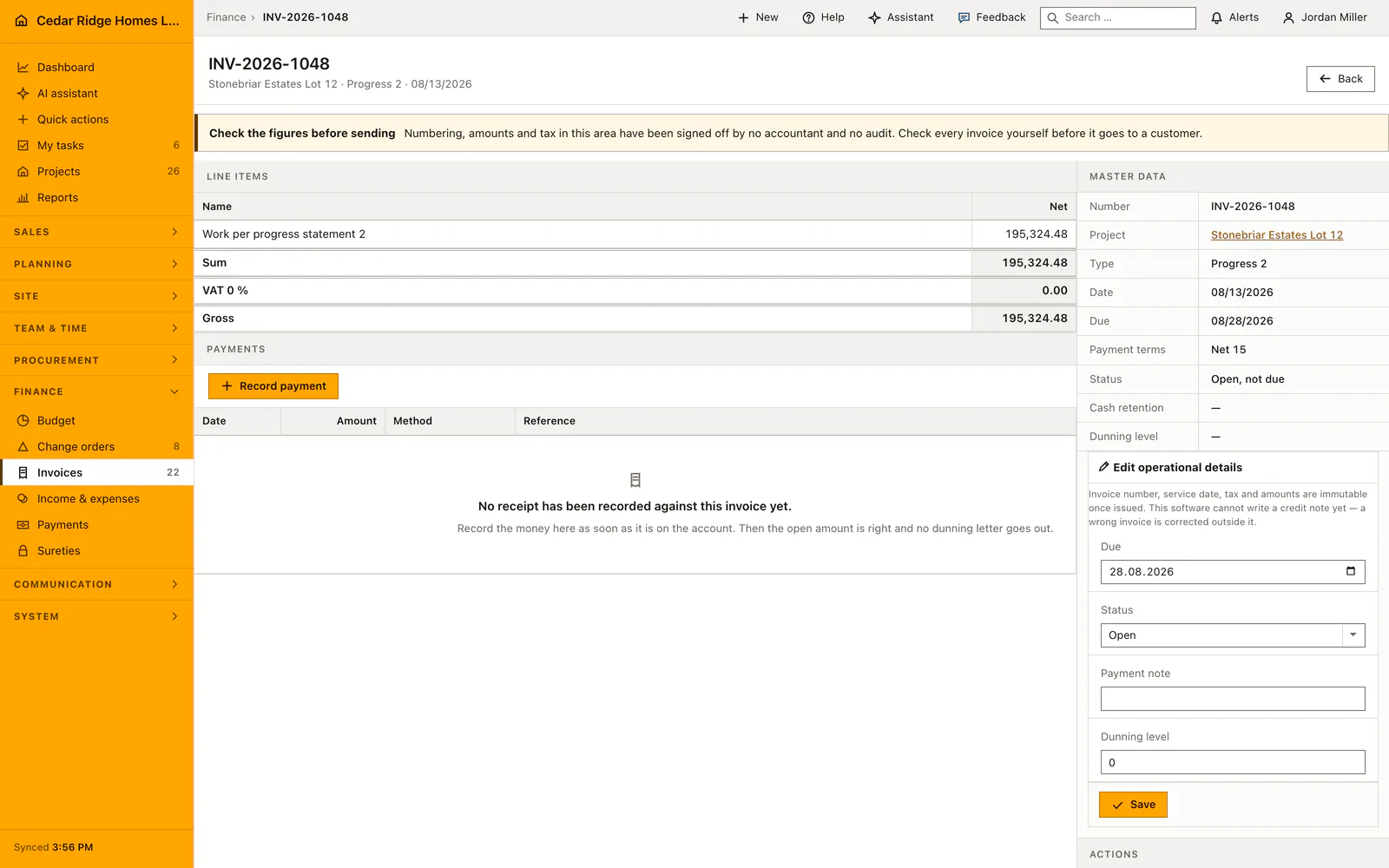
A match reduces the invoice: settled in full it turns to paid and takes the value date, a part payment leaves the rest open and the dunning run continues from there. The invoice file then lists every receipt against it with the discount note, the reporting screen shows what is still owed by age band, and a read endpoint under the API serves the same ledger to a connected system.
A part payment and the settling transfer in the payment ledger
Invoice INV-2026-1038 for Willow Creek Lot 27 stands at $172,588.79 gross with a due date of August sixteenth when the statement of August nineteenth shows $150,000.00 from Willow Creek Partners LLC. Priya Raman opens the invoice, jumps into the recording screen from there so the document is preselected, keeps the value date on the nineteenth, enters the figure from the statement rather than the invoice total, leaves bank transfer as the method and repeats the printed payment reference word for word. In the same transaction the open amount falls to $22,588.79, the invoice stays open, and the first reminder level keeps counting.
Nine days later the remainder arrives through the bank import. The pasted statement line carries the twenty-eighth of August, the amount 22588.79 and the purpose INV-2026-1038; because the figure matches the open balance exactly, the proposal column names the invoice and a single allocation books the receipt. The invoice turns to paid with the value date of the twenty-eighth, its file lists both receipts adding up to $172,588.79, the month figure above the ledger carries the two entries, and the dunning run lets go of the document without anyone touching it.
Construction payment tracking and bank matching: checks before saving
Only a positive amount can be allocated, and only to an invoice of the same company that still carries an open balance; anything else is refused.
The invoice is locked for the duration of the booking, so two people recording the same receipt cannot reduce the same balance twice.
An open amount is never written below zero, which keeps a real overpayment visible in the ledger instead of hiding it.
A bank line already allocated or ignored is refused a second decision and answers that it has been processed.
Construction payment tracking and bank matching: common mistakes
A part payment sets the invoice back to open and dunning continues from that point. Book the figure standing on the statement, not the invoice total, or the reminder level stops at the wrong stage.
Ignoring a bank line is meant for transactions with no invoice behind them, such as outgoing direct debits. It changes no invoice at all, so a receipt ignored by mistake has to be recorded by hand afterwards.
Nothing in this module is reconciled with a bank account. Read the statement before an invoice is treated as settled, because a receipt booked against the wrong document is noticed when the customer calls.
The product page describes the same module from the business side, with the decisions it supports and the modules it connects to.
See the product pageFrequently asked questions
Are bank transactions matched automatically?
No. The software proposes a match when possible, but a user confirms or ignores each transaction.
What happens after a full payment is matched?
The invoice becomes paid; after a partial payment its remaining balance stays open.
Configuring this part for your own company?
Describe the sequence you follow today and the result you need at the end of it. We can walk through the settings that produce it.