
Construction lead management: setup and daily use
Leads holds every inquiry that has not moved past the first stage. A lead is an opportunity in the lead stage with status open, so it shares its table, its numbering logic and its next-step labels with the pipeline and has no table of its own. Capture needs records.write and takes five fields; the record then appears in the list, on the board and in the navigation counter, with its author as owner.
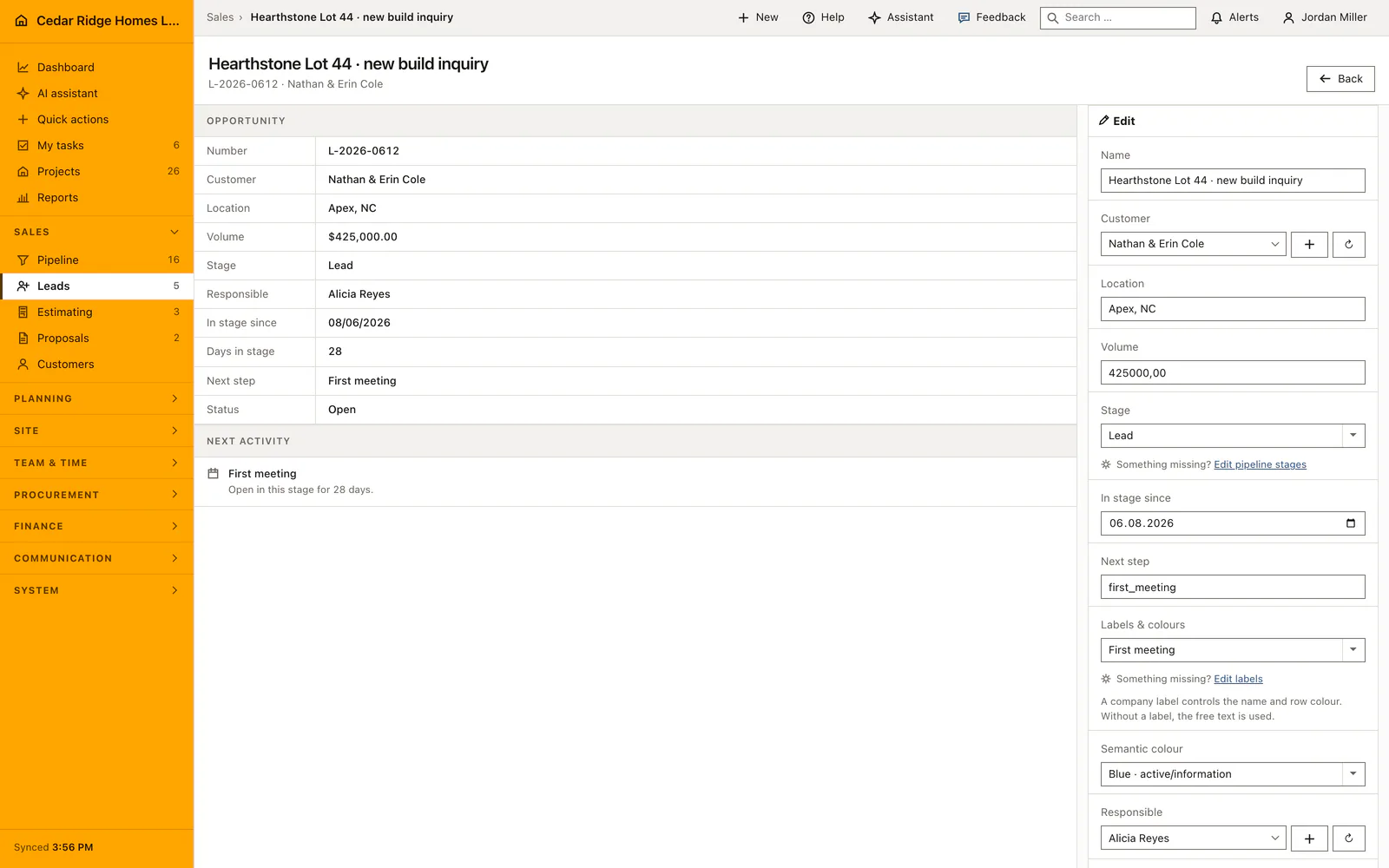
Customer records and next-step labels a lead needs
A lead points at a customer record, so the customer master has to hold the inquirer before or during capture. The picker accepts records of kind client in status active or prospect, and it carries a create link that opens the customer form already set to prospect. That keeps address and contact details in one place and lets the same record become an active customer later without being typed a second time.
The next step can be free text, but a company label is the better basis. Labels live under Settings and carry a name, a semantic tone and a color; choosing one sets the wording and the row color at the same time. Shipped next steps such as callback due or estimate promised are stable keys translated into the active language, while free text is shown exactly as it was typed. Both appear in the same column.
Filling the capture form and its automatic numbering
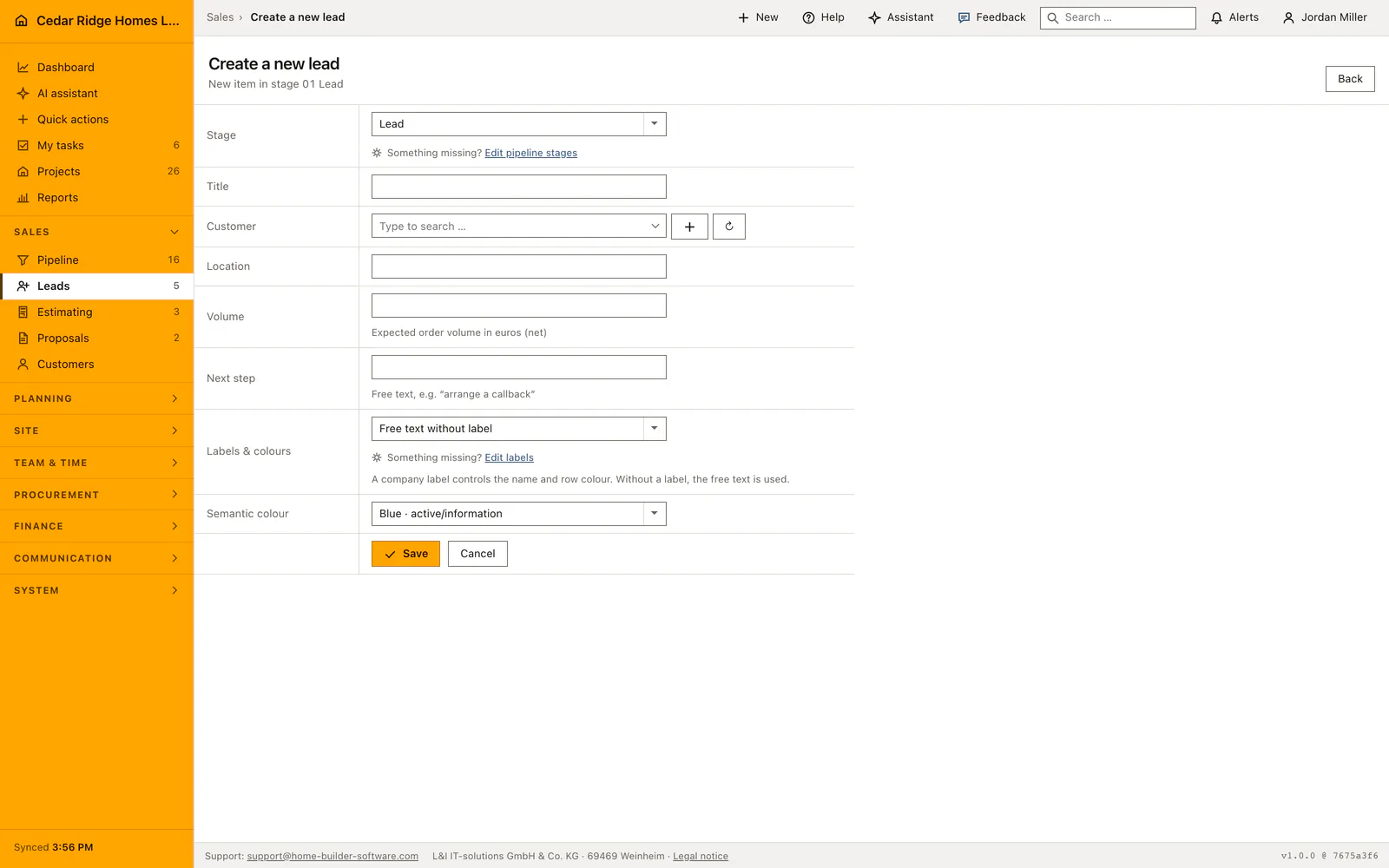
The form asks for a title of at most one hundred and fifty characters, the customer, the site, the expected net order volume in euros and the next step. Title and customer are required, the rest may stay empty. Volume is a number, not a range, and it feeds the total under the table as well as the pipeline figures, so an honest estimate is worth more here than a placeholder.
Saving issues the number itself. The prefix follows the stage the form was opened at, the year is the current one and the sequence is the highest number of that year for the company plus one, padded to four digits. Stage entry date is set to today, status to open and the current user to owner. The navigation badge is refreshed at once, so the new lead is counted without a reload.
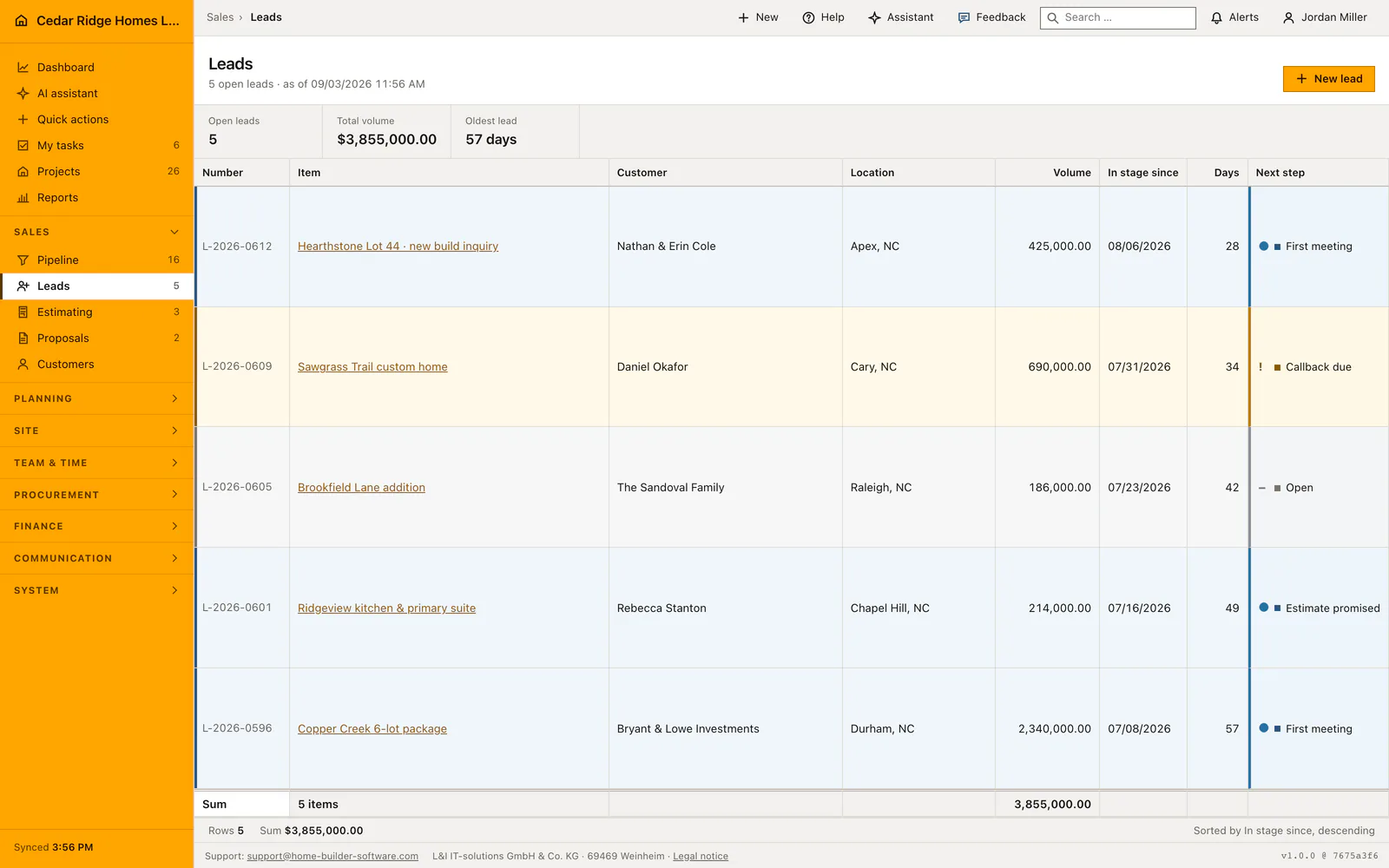
Watching the oldest lead and the next-step chips
The list sorts by the date an item entered the stage, newest first, and shows the three figures that matter for follow-up: how many leads are open, what they add up to and how old the oldest one is in days. A rising age figure is the signal that something has been left lying, and the days column names the case behind it. The totals row adds the volume of the visible rows.
Each row carries a next-step chip, which is the promise made to the caller. Working the list means clearing chips: a callback that was due becomes a first meeting, a first meeting becomes an estimate promised. The chip is edited in the opportunity file, either by picking another label or by typing over the free text, and the row color follows the choice immediately. Without a label the row keeps the neutral tone.
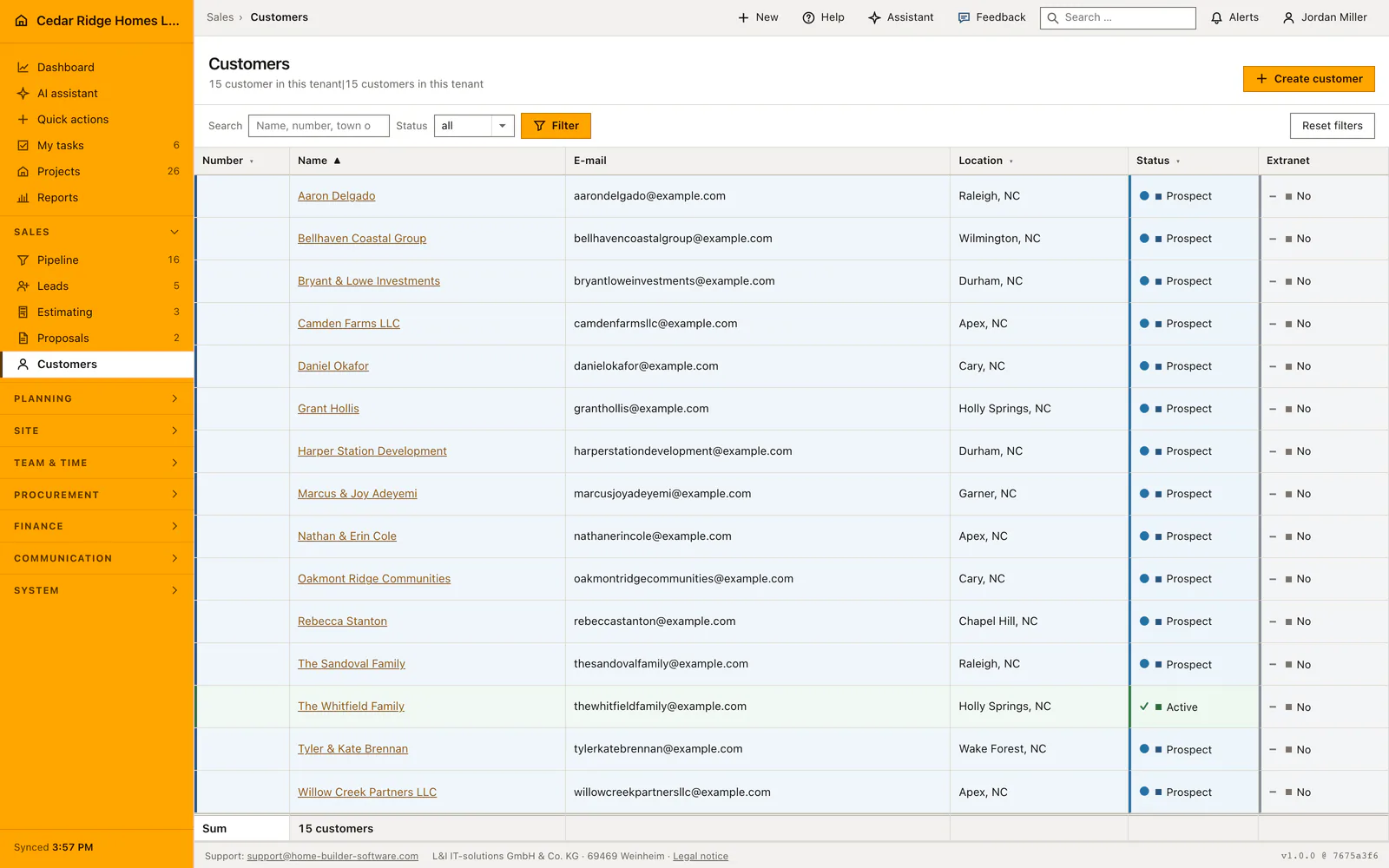
Ownership, records.write and the audit entry on every save
Reading leads needs records.view; creating and editing them needs records.write, which the central gate applies to every write route in the module. The owner is set from the account that created the record and can be changed in the file to any active user of the company; a user from another company is refused as invalid. The customer selection is validated against the company in the same way.
Editing writes an audit entry for the opportunity, and the same save may change stage, stage entry date, next step, owner, status and the validity date. Status accepts open, won or lost, so a case that came to nothing is closed rather than deleted and stays available for later reading. Restricting a user to named projects does not hide leads, because an opportunity carries no project yet.
From the lead file into estimate, proposal and pipeline
The opportunity file offers what the current state allows. With no estimate yet it offers to create one, with customer, case and title already filled in. With an estimate it opens that estimate and, while no proposal exists, offers to generate one. With a proposal it opens the proposal. In the contract stage the conversion into a project appears as well, and earlier stages say plainly that it is not available yet.
Beyond the file, the lead is the same record the pipeline draws. Moving it to estimating or proposal takes it out of this list, because the list holds the first stage only, and it reappears in the corresponding module list. The customer record follows the whole way: the prospect it points at becomes active at the moment the contract is converted, and the project stores that same customer identifier.
Worked example: from phone call to lead L-2026-0613
On the morning of August 19, 2026 Elena and Marcus Webb call Cedar Ridge Homes LLC about a custom home on Juniper Bend Lot 5 in Raleigh. The colleague on the phone opens the capture form, types the title, creates the Webbs as a prospect through the picker without leaving the form, sets Raleigh as location and enters 412,000 dollars as expected net volume. For the next step she picks the callback label. Saving issues L-2026-0613, one above the highest number of the year, stamps August 19 as stage entry and records her as owner of the case.
The list proves the arithmetic at once. Open leads climb from five to six, the total rises from 3,855,000 to 4,267,000 dollars, and the age figure keeps reading 42 days, because the oldest case is still the Copper Creek package from July 8. The navigation badge shows six without a reload. After the callback the chip in the file changes to first meeting and the row takes the color of that label; the day the Webbs move on to estimating, the record leaves this list, reappears there and keeps L-2026-0613 for its whole life.
Construction lead management: checks before saving
Title and customer are required; the customer must be a company record of kind client in status active or prospect.
The number is issued at save from the highest sequence of the year, padded to four digits, and cannot be typed.
An owner from another company is refused as invalid, as is a customer that does not belong to the company.
The list holds the first stage with status open only, so a moved or closed case leaves it immediately.
Every edit of the opportunity writes an audit entry naming the record that was changed.
Construction lead management: common mistakes
The next step is free text unless a label is chosen, and free text is shown raw in every language. A German phrase typed here stays German for a French colleague, so labels are the safer choice.
Volume is the expected net order value, not the price of a proposal. Leaving it at zero keeps the lead out of the total and out of the pipeline figures, which makes the funnel look thinner than it is.
Opening the capture form from another stage changes the number prefix and the page the save returns to. Start from the leads list when a genuine first-stage inquiry is being recorded.
The product page describes the same module from the business side, with the decisions it supports and the modules it connects to.
See the product pageFrequently asked questions
Does a lead use a customer record?
Yes. A lead links to a prospect record that becomes an active customer when the contract is won.
Is a new lead visible in the pipeline?
Yes. It receives a lead number and starts in the first pipeline stage.
Configuring this part for your own company?
Describe the sequence you follow today and the result you need at the end of it. We can walk through the settings that produce it.