
AI assistant for construction data: setup and daily use
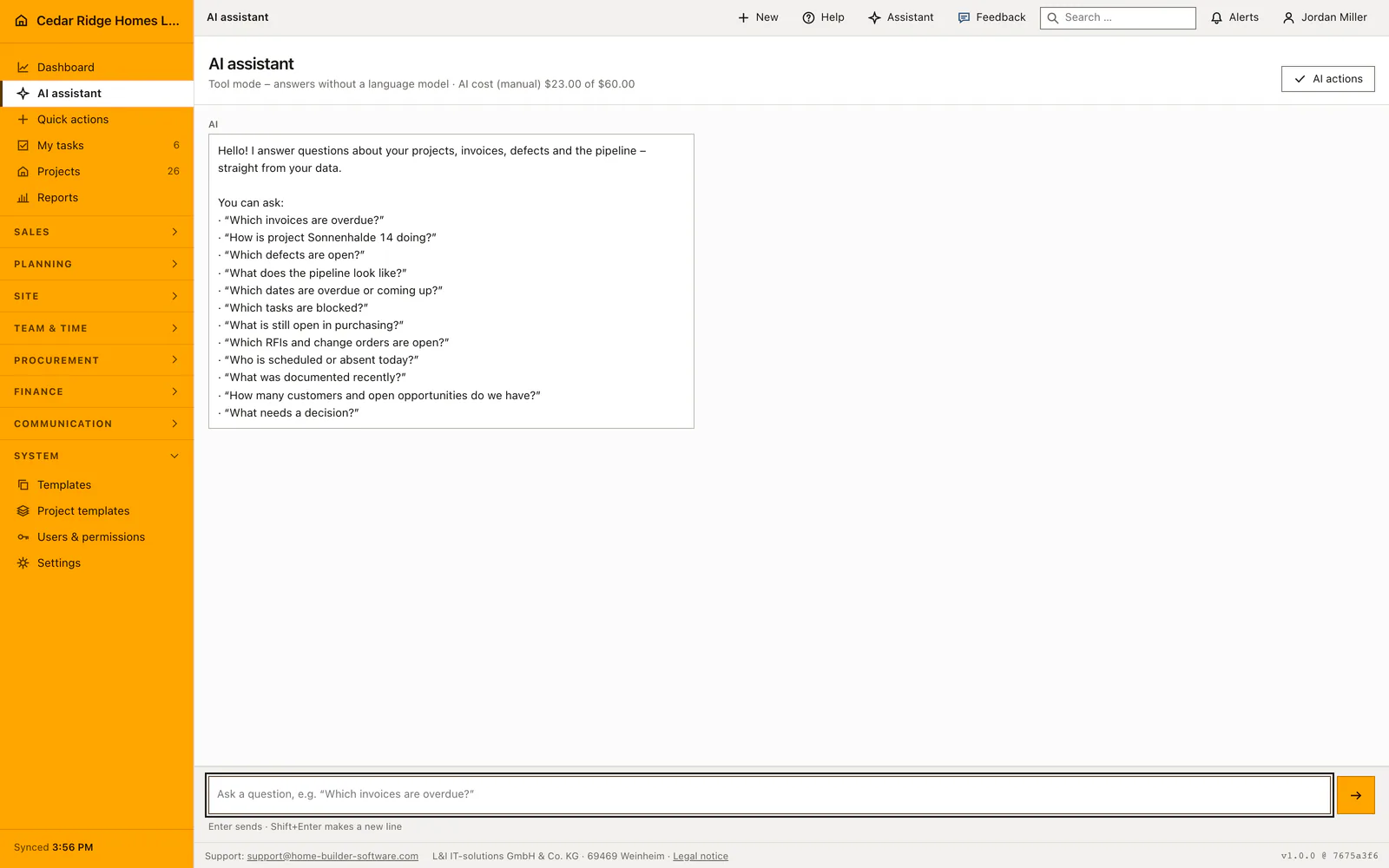
The assistant answers questions about data the signed-in user is already allowed to open, either as a full page under AI assistant or as a rail beside the current screen. Its header names the mode in use, a chip under every answer names the tool that produced it, and any change it proposes waits for a human decision unless an administrator has chosen otherwise.
The AI provider L&I IT-solutions connects under Settings and AI
Reaching the assistant at all needs ai.use, a permission every shipped role carries; the execution mode and the monthly figure need ai.manage. The AI tab opens with a step strip for mode, access and verification, followed by a state grid: mode, model, the monthly figure, the amount recorded this month, connection status, when it was last checked, the measured latency and the capabilities the check confirmed. The company reads that grid; it does not fill it in. Recheck connection repeats the test without touching the stored key.
Without a provider of its own, the platform path of Home Builder Software already answers, straight from the tenant database. Where a company wants Anthropic, OpenAI, Azure OpenAI, Gemini or Ollama Cloud behind the assistant, L&I IT-solutions connects that provider through its admin menu, against the license assigned to the company, and enters model, address and key there. No field on the company side asks for an endpoint or a key; the tab shows which provider is active, and a change is requested from support. The key field L&I IT-solutions fills is write-only, never prefilled, and stored encrypted on the tenant.
Asking a question that comes back with real figures
Type into the composer and press Enter; Shift and Enter together make a new line, and without JavaScript the send button posts the same question. Deterministic tools answer first from the company database, which is why the phrasing does not have to be clever. Overdue invoices, project status, open defects, pipeline, schedule dates, tasks, purchasing, RFIs and change orders, workforce, site records, customers and pending decisions each have a tool of their own.
Wording stays free. Common misspellings of project names are normalized, a follow-up such as and which of those inherits the last subject named explicitly, and the seven project phases are recognized in German, English and French. A bare what is open, asked without a subject, produces a question back rather than data from an unrelated module, and the answer is written in the language of the question rather than of the interface.
Reading the streamed answer, its tool chips and its source links
Answers appear while the provider is still writing them. Your own message stands on the right with your initials, the answer on the left labeled AI, and the speaker is written out because side and color never carry meaning alone. Only the log scrolls, so the composer and the newest message stay in view. Under each answer a chip names the tool behind it, for example the one for overdue invoices or for CRM search.
Below the chip sit links into the module that holds the record, which turns a figure into something checkable rather than something to believe. The session keeps the last twenty rounds and hands the most recent six to the agent as genuine dialogue turns; nothing survives the sign-out. An interrupted request stays in the input field, and its request id stops a retry from paying for the same provider call twice.
Execution modes review, write and bypass for AI write actions
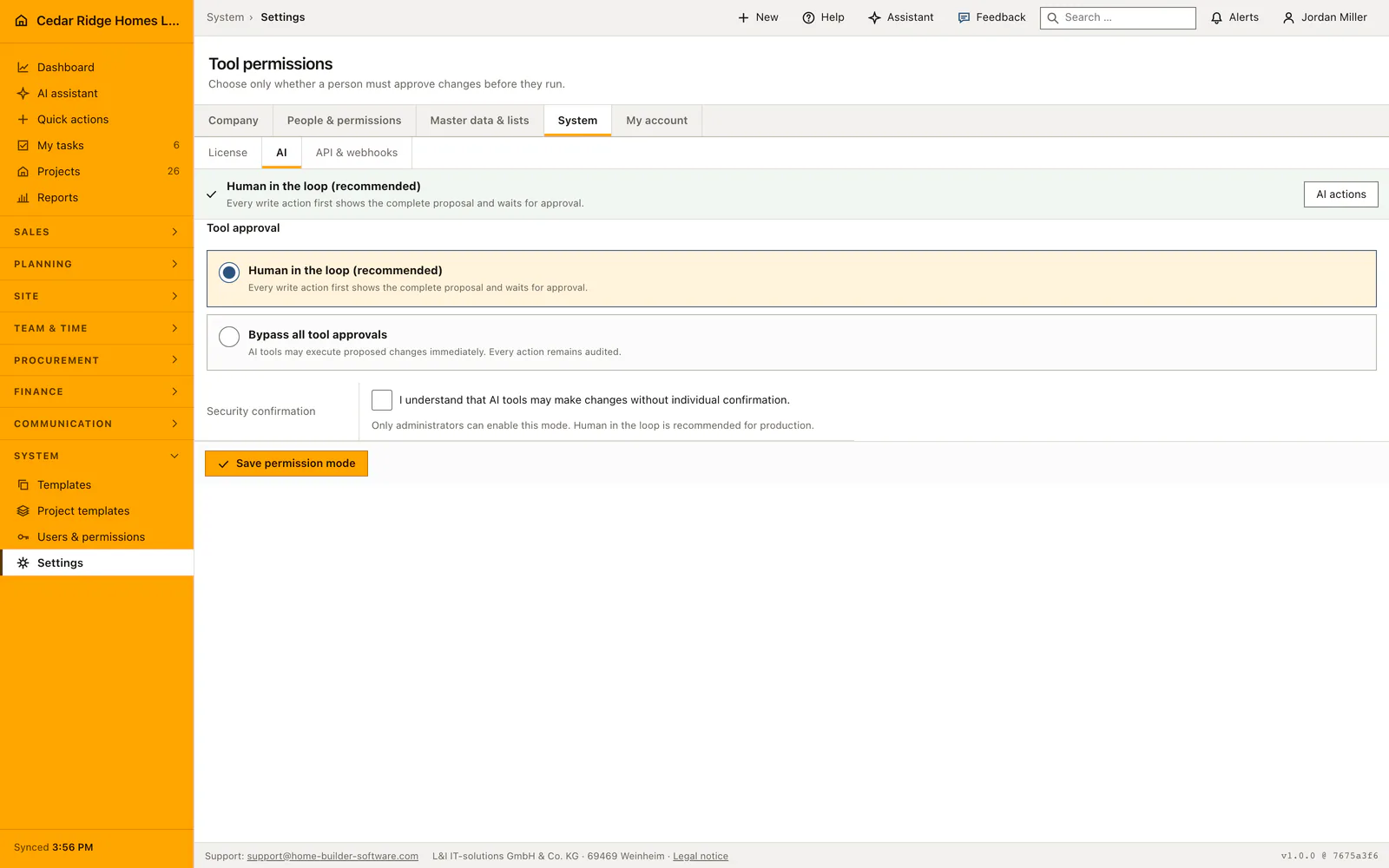
Any change the assistant wants to make passes one gate, always in the same order. First the permission the same change needs on screen, so asking the assistant never widens what a role may do. Then validation against the company's own data, which is where an invented project number fails. Then the company setting under Tool permissions, which has three positions: review proposes everything, write carries out creating and changing at once while deletions still wait, bypass carries out everything.
The proposal row is written before execution in every mode, carrying title, summary, payload, risk level, requested permissions, proposer and reviewer. Accept and run executes it under a lock, Reject closes it, and approving requires the permission the change itself would need. Moving to bypass needs ai.manage and an explicit security confirmation, and both the approval and the bypass leave an audit entry naming the action type and the decision.
The context rail on a project file, an invoice or a task
The rail opens from the spark button in the top bar and stays open from page to page until it is closed again, remembered for that person; the question mark beside it opens page help in the same panel, so the two take turns. It receives the visible page text, capped and marked as untrusted data, the documentation pages that match, document metadata and, inside a project file, a small number of stored project photos.
Document metadata and photos are handed over only with projects.view, and the tools offered follow the questioner's ordinary permissions, so a role without finance.view is never even shown the finance overview. Project releases apply to search and to detail retrieval in the same way. Files cannot be uploaded here: the images the assistant can look at are the ones already filed under Documents.
Asking the AI assistant which invoices are overdue at Cedar Ridge Homes
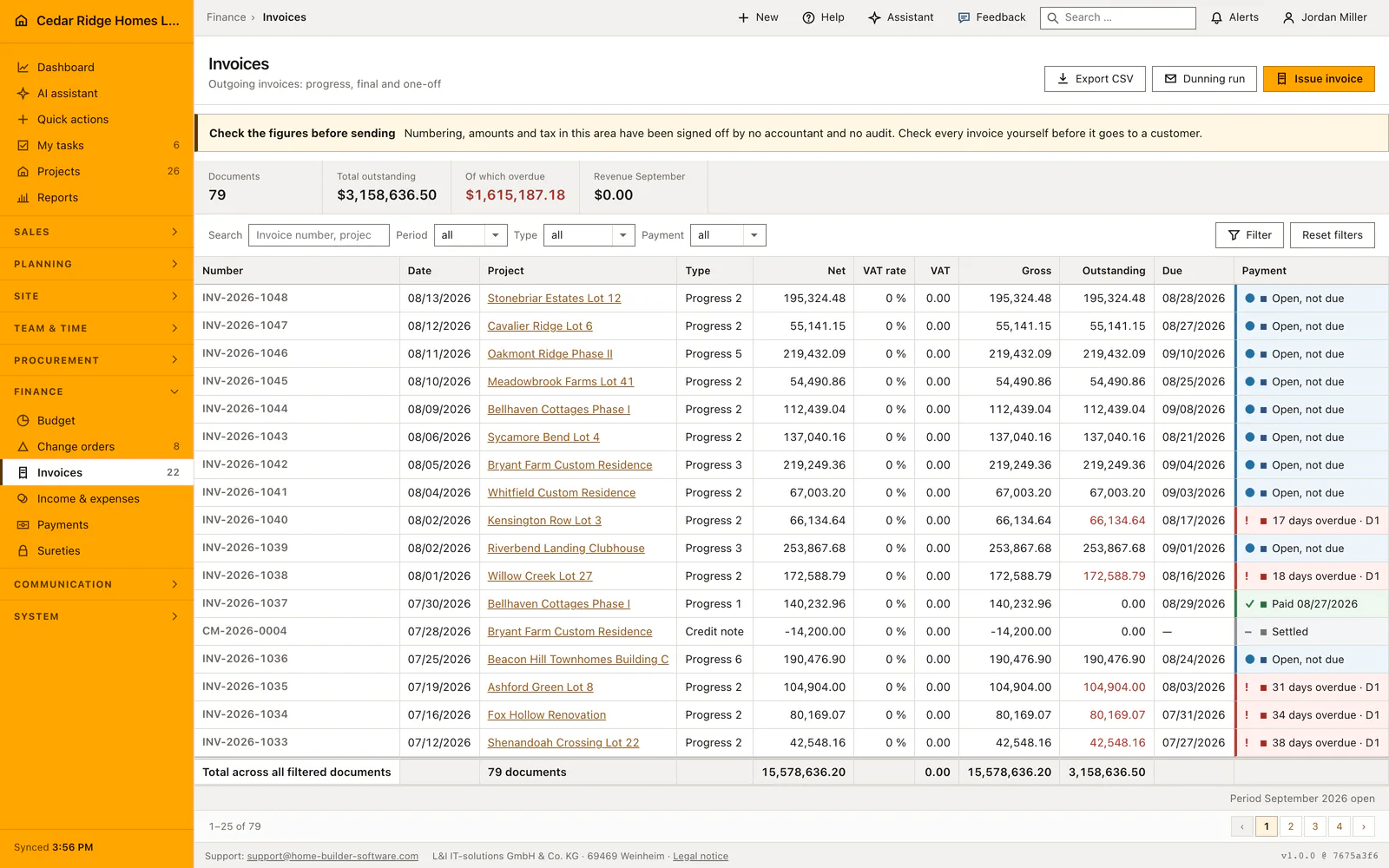
Jordan Miller types which invoices are overdue into the composer. The deterministic invoice tool reads the tenant database of Cedar Ridge Homes and streams back a list: Willow Creek Lot 27 with $172,588.79 open and past due since 08/16/2026, Kensington Row Lot 3 with $66,134.64, and the older documents behind them. A chip under the answer names the tool, and each line links into the invoice itself. The follow-up asking which of those have been waiting beyond a fortnight inherits the subject and narrows the list to Ashford Green Lot 8 at $104,904.00, Fox Hollow Renovation at $80,169.07 and Shenandoah Crossing Lot 22 at $42,548.16, together $227,621.23.
He then asks the assistant to create a task for Priya Raman: start the dunning run for the oldest documents, due on 08/21/2026. The company setting stands on review, so nothing is written yet; a proposal appears carrying title, summary, payload and risk level, while the header keeps naming the manually maintained monthly figure of $23.00 of $60.00, which blocks nothing. Because Jordan holds the planning permission the same change would need on screen, Accept and run executes the proposal under a lock, the task lands in Priya’s list, and the audit log keeps both the proposal and his decision.
AI assistant for construction data: checks before saving
Reaching the assistant needs ai.use, while the monthly figure and the execution mode are reserved for ai.manage; the provider itself is connected by L&I IT-solutions.
Every tool call re-checks permission, company and project release, so an answer cannot contain a record the questioner is unable to open.
The proposal is stored before execution in all three modes, which leaves an audit trail even where approvals are bypassed.
The provider behind the assistant is connected by L&I IT-solutions against the company license; the company settings offer no field for an endpoint, a key or a local address.
If the external service fails, the answer falls back to the database tools and says so instead of returning an error page.
AI assistant for construction data: common mistakes
The monthly AI amount in the header and the sidebar is a manually maintained guide value rather than a cap. It stops nothing, so the provider's own billing remains the figure that decides.
A follow-up inherits the last subject named explicitly, not the last answer shown. After changing topic, name the subject again or the tool selection quietly follows the older question.
Answers marked as coming without a language model are not a defect. They are the normal platform path, and they also appear when an external provider is unreachable, which is why the note matters.
The product page describes the same module from the business side, with the decisions it supports and the modules it connects to.
See the product pageFrequently asked questions
Can the assistant see every company record?
No. Its tools follow the signed-in user’s normal permissions and tenant access.
Does the assistant change data automatically?
Write actions are proposals by default and require acceptance. Only administrators can enable the audited bypass mode.
Configuring this part for your own company?
Describe the sequence you follow today and the result you need at the end of it. We can walk through the settings that produce it.